

Moving Google Drive Files and Chrome Bookmarks
In an earlier post I explained and demonstrated how to use Google Takeout to save all of the data from your Google account. If you only want or need a handful of files, there is an easier option than using Google Takeout. That option is to simply download the individual files in your Google Drive […]
Chrome Tip – Quickly Hide or Show Bookmarks
In a webinar I recently hosted I incidentally showed a quick way to show or hide the bookmarks bar in Chrome. The webinar was not about Chrome or anything Google-related so I was surprised when someone asked me to show the trick again. There is not a trick, just hit CTRL+Shift+B to show or hide […]
How to Remove Google Forms Add-ons
Last week my Android notified me that I had 22 apps that I hadn’t used in the last 30 days. I took that as a good reminder to do an audit of all the things connected to my Google account and disable or uninstall the apps, extensions, and add-ons that I no longer use. That […]
A Cool Tool for Uncluttering and Saving Online Articles

Unclutter is a free and open-source Chrome and Firefox browser extension that anyone can use to remove the clutter from a web page. That’s not all that Unclutter does. It also lets you save articles to read later, highlight and annotate articles that you save, and Unclutter lets you adjust the size and contrast of […]
Two Tips to Make Chrome Run a Little Faster
There was a time when Google Chrome was the new kid on the block and promised faster browsing and faster page load time. That hasn’t been the case for many years now. In fact, now when I hear colleagues, students, or others complain about their computers or Chromebooks running slowly the first thing I do […]
More Video Editing Features Coming to Chromebooks This Fall

Earlier this summer Google launched a new built-in screencasting tool for Chromebooks. This week Google announced that more video features will be added to Chromebooks in the fall. The new video editing features on Chromebooks will actually be found inside of Google Photos on Chromebooks (availability for other platforms seems to be coming later). These […]
Two More Tools That Can Help Students Stay Focused on Online Tasks

On Friday morning I shared a browser extension called BeTimeful that limits your access to social media sites during your working hours. As I wrote in that blog post, there are similar tools worth noting. Here’s a short overview of some tools that can help students remove distractions and stay focused while working online. StayFocusd […]
How to Move Bookmarks Between Chrome Profiles

I was recently contacted by a teacher who was leaving her current school district and wanted to know what would happen to all of the bookmarks she had stored in her Chrome profile. Her Chrome profile was tied to her school-issued Google account which was going to be closed when she left the school. The […]
Best of 2022 So Far – Chrome Settings You Need to Know
I’m taking the rest of the week off. While I’m gone I’ll be republishing some of the most popular posts of the year so far. Google Chrome is far and away the most popular web browser amongst readers of this blog (68% of you use Chrome, the next most popular choice is Safari at 20%). […]
Five Things I Like About the New Chromebook Screencast Recorder

Last week Google introduced a new way to record screencasts on your Chromebook. You can watch my tutorial about how to use it right here or as embedded at the end of this blog post. After a week of using it, here are five things that I like about it and I think will be […]
Five Great Chrome Extensions for Teachers

After seeing my browser in one of my tutorial videos or one of my presentations, people often ask me about the extensions that I have installed. Here are five Chrome extensions that teachers should try. 1. Nimbus screenshot – I use this to create annotated screenshots. It can also be used to make screencast videos, […]
Paper, Programming, and Games – The Week in Review

Good morning from Maine where it feels like spring this morning. The wind is blowing away the clouds of yesterday and it should be a sunny day to play outside. We’re going to put on our boots and go for a little hike this today. I hope that you do something fun outside today too. […]
More Easy Ways to Save Paper & Ink When Printing

Last week I published a blog post titled Stop Printing the Internet in which I shared some ways to limit the amount of ink and paper you use when printing and also encourage others to do the same. There are even more easy ways to limit the amount of paper and ink you use when […]
Try This New Google Chrome Feature

Those of you who subscribe to my YouTube channel might have seen me share this yesterday. There’s a handy new feature in Chrome that appears when update to the latest version. The new feature is a side panel reading list that could prove to be very helpful to those of us who tend to have […]
Five Chrome Settings You Need to Know

Google Chrome is far and away the most popular web browser amongst readers of this blog (68% of you use Chrome, the next most popular choice is Safari at 20%). If you’re using Chrome and or your students use Chrome, there are some helpful settings that you should know how to use. Knowing what these […]
How to Manage Browser Pop-ups – Not All of Them Are Bad
Yesterday morning I answered a question from a reader who was having a little trouble accessing the sharing function on a website. From the description she gave me, the solution was to enable to pop-ups for that particular website. I sent her a screenshot of how to enable pop-ups and then created this short demonstration […]
Forest – A Tool to Help You Focus on Important Tasks
When I need to focus and get a lot of writing done, I set a timer and tell myself that I can’t stop writing until the timer goes off. Forest is a Chrome extension that basically does the same thing plus it blocks me from websites that could distract me from getting things done. Forest […]
Best of 2021 – How to Make Chrome Run Faster

As I do every year, I’m taking this week as a break from publishing new blog posts and will be republishing some of the most popular posts of the year. Here’s one from September. There was a time when Google Chrome was the new kid on the block and promised faster browsing and faster page […]
An Easy Way to Quickly Add Voice Notes to Google Docs

Yesterday morning I published The Easiest Way to Add Narration to Google Slides. In that blog post I featured a Chrome extension called Mote. Mote, as I’ve mentioned in the past, can be used for adding audio to a bunch of Google Workspace tools including the comments on Google Documents. In this short video I […]
A Fun and Educational Use of Chrome’s Inspect Tool

In this week’s Practical Ed Tech Newsletter I shared some of my favorite “techy” tricks to impress your students and colleagues. One of those tricks is to use the inspect tool in Chrome to view the code behind any webpage and then modify it to change what appears on the page on your computer. The […]
Display a Timer With a Google Document

Earlier this week a reader of my weekly newsletter emailed me to ask for advice on how to display a document and countdown timer on the same screen. The idea being that the document is displayed on a large screen via an LCD projector or Chromecast and a small timer is also displayed. The document […]
How to Make Chrome Run a Little Faster

There was a time when Google Chrome was the new kid on the block and promised faster browsing and faster page load time. That hasn’t been the case for many years now. In fact, now when I hear colleagues, students, or others complain about their computers or Chromebooks running slowly the first thing I do […]
How to Generate Captions for Any Video

YouTube will automatically generate captions for almost any video that you find. Likewise, it will automatically generate captions for videos that you upload to your account. That’s great if you want to use YouTube. But if you have a video that isn’t on YouTube and you need to display captions with it, there is a […]
The Difference Between a Chrome Profile and a Google Account

This morning as I was starting to get caught up on a backlog of email I answered a question from a reader who wanted to know if I had a video about Chrome profiles that she could share with her staff. I do, here it is. In the video I demonstrate and explain the difference […]
How to Change Camera and Microphone Access Settings in Chrome

On a fairly regular basis I get questions from readers that go something like this, “I’m trying to use Flipgrid but my camera won’t work. What can I do?” A variation on that question asks for help with a microphone. When you’re trying to use a website like Flipgrid, Vocaroo, GoSynth, or any other site […]
Enable Audio and Video Captions on Any Page in Chrome

This week Google rolled-out the latest update to Chrome. In the latest version there is now support for automatic captioning of audio and video on any web page that you visit in the Chrome web browser. The captions will work whether or not the audio is played aloud. When enabled, captions will be displayed at […]
Add Voice Notes to Your Email With Mote

Last month I featured a new Chrome extension called Mote. Mote lets you add voice comments to Google Classroom, Slides, and Docs. As of yesterday it lets you add voice comments to Gmail messages. If you already have Mote installed in your Chrome web browser you should already have access to using Mote in your […]
My Favorite Chrome Extensions Right Now – And What They Do

It’s a fairly regular occurrence that people watch one of my screencast videos and then ask me what all of the extensions are that appear in my Chrome browser. My students often comment on all the extensions that I have installed. To be honest, sometimes I install an extension just to try it out and […]
The Difference Between Signing Into Chrome and Signing Into Your Google Account
As I do every year, I’m taking this week off from writing new blog posts. This week I’ll be re-running a few of the most popular posts in 2020. Last week my friend Beth Still asked me if I had a video that showed people how to sign into Chrome and switch between Chrome profiles. […]
Blurred Backgrounds and Custom Grids in Google Meet

Yesterday, I shared news about a new teacher control in Google Meet. Today, there are two more new Google Meet features to note. The latest announcements from Google about Meet carried the news that you’re now able to customize the grid view in your meetings and you can now blur your background in Meet. Both […]
How to Clear Your Chrome Browser History and Stored Passwords

On a fairly regular basis I get emails from teachers who are disappointed that a website I demonstrated in a video or wrote about in a blog post doesn’t work for them. Sometimes the trouble is with the website, but often the trouble is on your end. After you’ve tried the steps I outlined in […]
Chrome Media Hub – Manage Background Video and Audio

Like a lot of people, I have a habit of leaving a bunch of Chrome tabs open even if I’m not actively using them. It’s not the best habit because it does unnecessarily use resources. It can also contribute to the annoyance of having a video or audio file start playing in the background. Google […]
Signing Into Chrome vs. Signing Into Your Google Account
Last week my friend Beth Still asked me if I had a video that showed people how to sign into Chrome and switch between Chrome profiles. She mentioned it because she was helping some people who were confused about the difference between signing into Chrome versus signing into their Google accounts. The differences are small, […]
How to Make the Home Button Appear in Chrome
This morning I had a colleague come to me in a bit of a panic because the home icon in Google Chrome had “disappeared from her computer.” I was able to quickly relieve her panic by showing her the settings options in Chrome. If you find yourself in a position like mine or like my […]
A Quick Way to Transfer Pages from Your Phone to Desktop

A couple of weeks ago I showed you how you can quickly send a webpage from your desktop to your phone without using a bookmarking service. Today, I have directions for doing the reverse of that process. If you use Google Chrome on your phone as well as on your laptop or desktop you can […]
An Easy Way to Send Links From Your Computer to Your Phone or Tablet

If you’re like me, you probably have a smartphone and a laptop and perhaps a tablet that you use throughout the course of your day. And at least once a day browsing on my laptop when I realize that it’s time to go to the dentist or another appointment and I need want to take […]
How to Use the Google Dictionary Chrome Extension

The Google Dictionary Chrome extension is a handy little tool that lets you highlight a word on any webpage to quickly find a definition and hear a pronunciation of that word. Google Dictionary isn’t the only Chrome extension that has this capability, but it is the only one that Google itself offers. In the following […]
A Chrome Extension for Clutter-free Reading and Printing

Mercury Reader is a Chrome extension that removes sidebar content from articles that you view in your Chrome web browser. It will hide banner ads, suggested “related” articles, and anything else that is not a part of the primary article on the page you are viewing. When you use Mercury Reader to print an article, […]
These Chrome Extensions Show Vocabulary Words When You Open New Tabs

Opening a new Chrome tab so that you can check Facebook for “just a minute” is a dangerous game. If it’s not Facebook it could be any number of equally time-sucking sites like Pinterest, Twitter, or YouTube. In the past I’ve suggested using Recall Study Time to see a reminder whenever a new Chrome tab […]
Use This Chrome Setting to Save Your Laptop’s Battery
Even though it has improved in the last year, Google Chrome is still notorious for draining laptop batteries. This is particularly true when you have many extensions installed. You can preserve some of your battery’s life by opening the advanced settings menu in Chrome and choosing to disable the option to “continue running background apps […]
How to Manage Installed Chrome Extensions

During a workshop that I was leading this week someone asked me how she could remove some of the extension icons that were displayed in her Chrome browser. The simple solution is to right-click on the extension icon and then choose the option to either hide or remove the extension. Hiding it will just hide […]
How to Install and Manage Chrome Extensions

From time-to-time the icons in my Chrome browser prompt questions from viewers of my YouTube videos. Usually, the questions are about which extensions I’m using. Today, I was sent this question: Do you ever worry that by having so many extensions installed you have more risk for security breaches? My answer was that I do […]
5 FAQs About Whisper for Google Classroom

Whisper is a free Chrome extension that was featured in last week’s most popular post of the week. During the week I received a bunch of emails about the extension. Here’s a short run-down of the questions most frequently asked about Whisper. 1. What is Whisper? It is a free Chrome extension that lets you […]
Creating Folders and Subfolders to Organize Chrome Bookmark Bar
The Chrome bookmark bar can be an incredibly useful tool to help you get organized, but it can be your worst enemy if you don’t take steps to tame it. Just a couple of weeks ago, I shared some ideas for how to use favicons to reclaim space on your bookmark bar. The video below walks […]
G Suite Training App
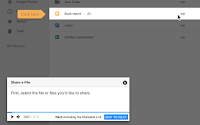
The GSuite Training is a Chrome extension that provides interactive tutorials on a variety of Google Apps including Gmail, Calendar, Docs, Sheets, Sites, Classroom, and Slides. The extension exists within each app and the tutorials change depending on which app is open. When you open the extension you will see a searchable list of tutorials. When […]
This Little Change Can Save Your Laptop’s Battery
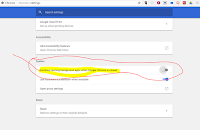
Earlier this morning in my post about customizing your Chrome settings I included the screenshot that you see in this post. That screenshot illustrates an advanced setting that you can use in Chrome if you are using a Windows or Linux computer. The setting stops Chrome apps/ extensions from running in the background when you […]
Customize Your Google Chrome Settings
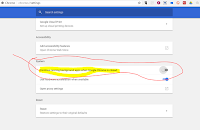
Google Chrome has many excellent features, provided you know where to find them. If your school has made you switch to a Chromebook, you may find yourself having to use Chrome exclusively now. I made the following video to help new Chrome users locate and customize their Chrome settings. Chrome, particularly when you have many […]
How to quickly show or hide your Chrome bookmarks bar
In a webinar last week I incidentally showed a quick way to show or hide the bookmarks bar in Chrome. The webinar was not about Chrome or anything Google-related so I was surprised when someone asked me to show the trick again. There is not a trick, just hit CTRL+Shift+B to show or hide the […]
Text to Speech in Chrome
Earlier today Charles on Twitter asked me for a recommendation for a Chrome extension that offer text to speech capabilities. The first thing that came to my mind was Announcify. With Announcify installed in your browser any time you’re viewing a webpage you can simply click on the Announcify icon in your browser and have […]
How to Add Accessibility Options to Google Chrome

I was setting up a new Chromebook today with a brand new Google Account. One of the things that I did on that Chromebook was enable some accessibility options (more on Chromebook accessibility in a future post). The Chrome web browser supports a handful of accessibility options. To enable accessibility options in the Chrome web […]
Mic Note – Create Time-stamped Multimedia Notes
Mic Note is a free Chrome app that allows you to create voice recordings, text notes, and image-based notes on one concise notebook page. The notes that you record with your voice can be time-stamped by clicking on your Mic Note note page while you’re recording. You can also take notes without recording any audio. […]