
A New Look for Presenting With Google Slides

On Monday Google announced a change to the presentation menu in Google Slides. Yesterday afternoon I got to try it for the first time. The new Google Slides presentation menu is a great improvement over the old one! Just like before you still need to click the “present” button in the Slides editor. You’ll notice […]
Quick Tip – Apply Custom Colors to Google Slides

Regular users of Google Slides are probably familiar with the process of adding images to the backgrounds of their slides and changing the background color. There is one little background color option that is easily overlooked. That option is applying a custom color that isn’t listed in the default color menu in Google Slides. In […]
Get Instant Feedback on Your Presentations With Presenter Coach
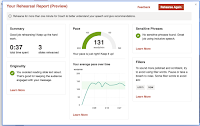
Presenter Coach is one of best features to be added to PowerPoint in a long time. Presenter Coach is found in the online version of PowerPoint that anyone can use with a free Microsoft account. Presenter Coach will give you feedback on the pacing of your presentations, your use of filler words, and your use […]
Coming Soon to PowerPoint – Real-time Captions and Translations

Earlier this year Google added automatic captioning to Google Slides. This week, via The Verge, I learned that Microsoft is adding automatic captioning and translation to PowerPoint starting in January. The automatic captioning will work when you are displaying your slides in presentation mode. You will have a choice of languages in which to display […]
Projeqt – Create Dynamic Presentations

Projeqt is a presentation tool in which you can mix content from the web with your own content to create visual stories about your favorite things. Using Projeqt you can create a visual story by linking together images, videos, and text. The content you link together can be material that you upload or material that you […]
Three Neat Features of Buncee – Create Multimedia Stories
Buncee is a great tool for creating multimedia stories. Earlier this week two of Buncee’s team members gave me a tour of all of the features available to teachers and students within the Buncee platform. Three features stood out to me during that tour. Those features are animations, integrated image search and citation, and hyperlinked […]