
What's New in Classwork: Back-to-School 2026
Discover the latest Classwork updates and enhancements, including Math & RLA Readiness Checks™, powerful new reports, district dashboards, AI-assisted workflows, and more—all designed to help educators save time and improve student learning.
Classwork Updates: New Features for Teachers & District Leaders
Education continues to evolve—and so does Classwork.
Over the past several months, we’ve listened carefully to feedback from teachers, instructional coaches, curriculum teams, campus administrators, and district leaders. The result is our biggest collection of Classwork updates yet.
Whether you’re creating classroom activities, monitoring student progress, or supporting instruction across an entire district, these new features are designed to help you work more efficiently while providing even greater insight into student learning.
From a refreshed user experience to powerful new reporting tools, AI-assisted workflows, and our new Math and RLA Readiness Checks™, Classwork continues to grow as a complete education enterprise platform that supports everyone—from curriculum teams to classroom teachers.
Let’s take a look at what’s new.
NEW! Math & RLA Readiness Checks™
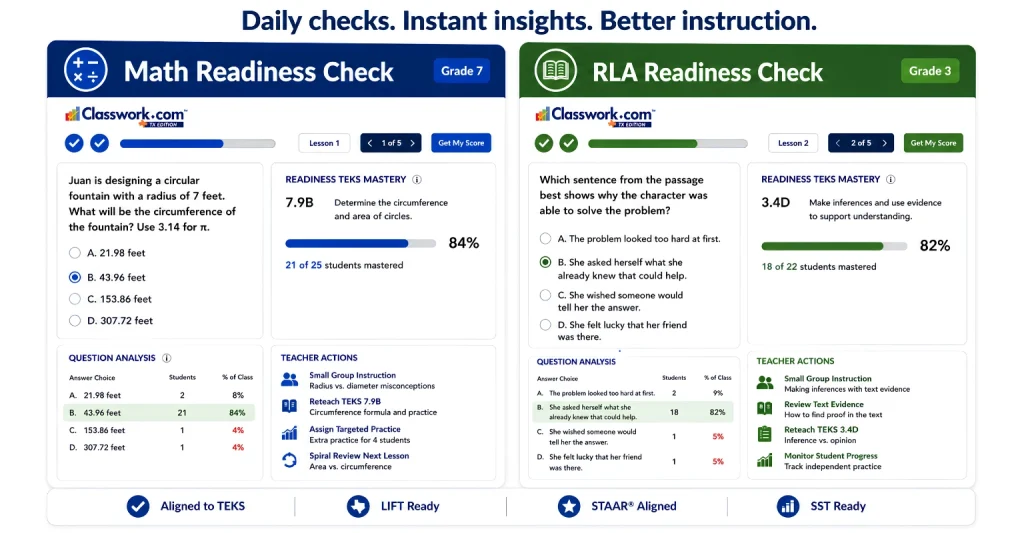
One of our most exciting additions this year is the introduction of Math and RLA Readiness Checks™.
These standards-aligned assessments are designed to provide frequent, meaningful progress monitoring without the need for lengthy benchmark testing. Instead of waiting weeks or months to identify learning gaps, educators receive immediate insight that can guide instruction while it still matters.
With Readiness Checks™, educators can:
- Monitor daily and weekly student understanding
- Identify misconceptions before they become larger learning gaps
- Measure standards mastery over time
- Better prepare students for state assessments
- Receive immediate instructional data that supports informed teaching decisions
Because Readiness Checks™ are built directly within Classwork, results automatically contribute to standards mastery reporting and instructional dashboards.
Our new Math and RLA Readiness Checks give Texas educators immediate visibility into student progress. Designed to align seamlessly with official Texas Essential Knowledge and Skills (TEKS), each quick assessment automatically generates targeted teacher actions. Whether you are tracking daily progress with our Texas OER & Bluebonnet Learning™ Solutions or preparing for end-of-year exams with STAAR® Aligned practice strategies, Classwork turns everyday evidence into real-time instructional growth.
Texas Districts Using Bluebonnet Learning™?
If you’re implementing Bluebonnet LearningIf you’re implementing Bluebonnet Learning™, be sure to explore our new Bluebonnet Learning™ + LIFT Hub.
This dedicated resource brings together implementation guidance, Readiness Checks™, Texas OER Companion information, reporting, lesson logs, coaching tools, and district leadership resources—all in one place.

A Fresh Look Designed Around Your Workflow
You’ll immediately notice a cleaner, more intuitive experience throughout Classwork.
Rather than changing how you teach, these updates simplify the tasks you perform every day.
Recent improvements include:
- Updated navigation
- Cleaner assignment workflow
- Faster content creation
- Activity thumbnails for quicker organization
- Improved Flex Editor experience
- Easier access to authoring tools
- Simplified classroom management
The goal is simple: fewer clicks, faster workflows, and more time focused on students.
Faster Content Creation Starts Here
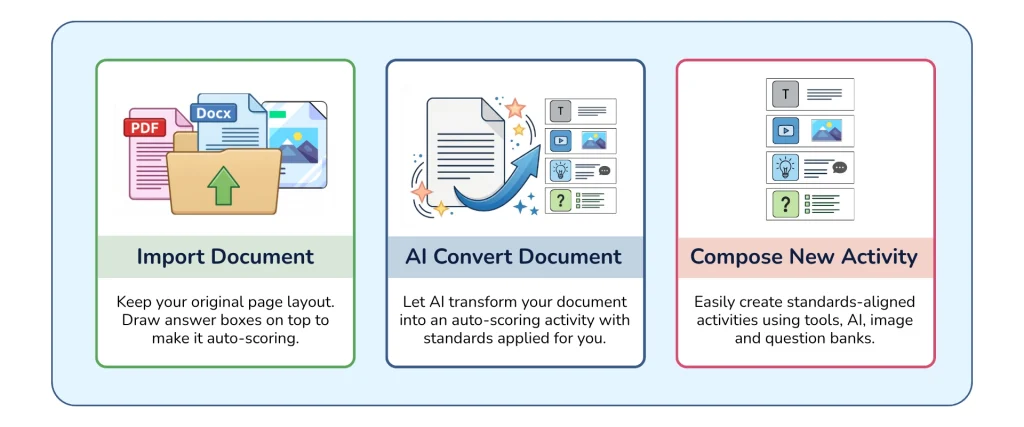
Creating classroom activities is now faster and more intuitive with the redesigned New File experience. Teachers can choose the workflow that best fits how they already work.
You can now:
- Import existing PDFs, Word documents, images, and presentations while preserving the original layout for quick conversion into auto-graded activities.
- Use AI Convert Document to automatically transform instructional materials into interactive activities with standards applied for you.
- Compose New Activity from scratch using AI, question banks, images, videos, text, and Classwork’s full suite of authoring tools.
- Access the redesigned Flex Editor with an improved toolbox and streamlined editing experience.
- Build engaging activities in fewer clicks with a cleaner, more organized workflow.
Smarter Assignment Settings
Assigning work is now easier than ever.
Instead of navigating multiple pop-up windows, assignment settings are now organized into a single streamlined experience that allows teachers to configure everything in one place.
Teachers can now:
- Schedule assignments by individual class period
- Customize release times
- Configure LMS-specific settings
- Manage student feedback options
- Control question attempts by item type
- Review all assignment settings from one convenient screen
These improvements help teachers spend less time configuring assignments and more time teaching.
Powerful New District Dashboards
Instructional leaders need more than end-of-year reports.
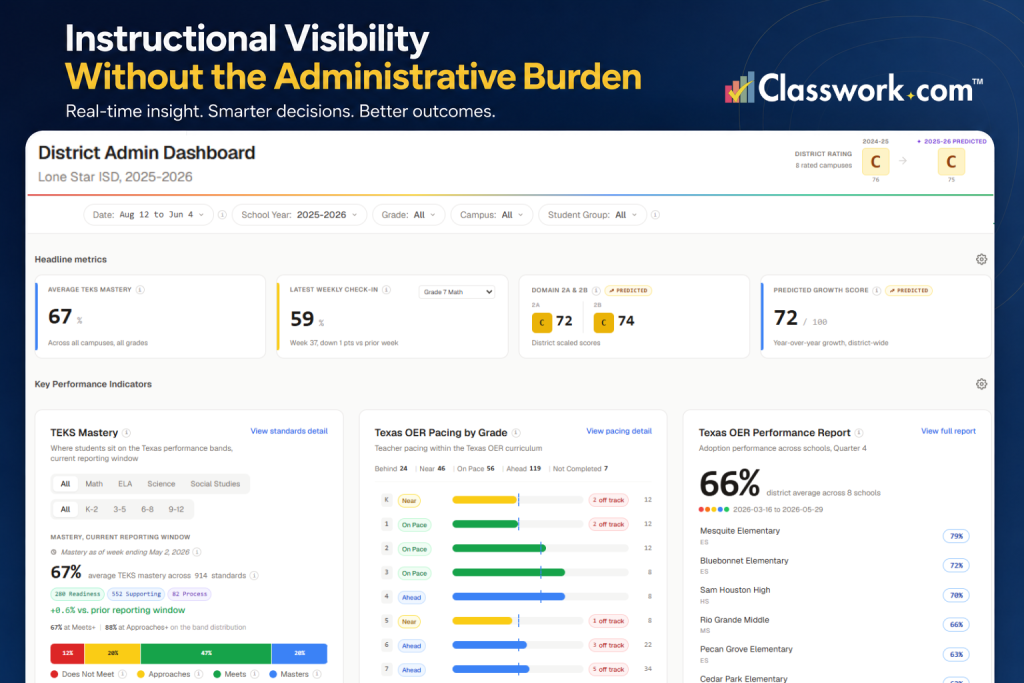
The new District Dashboard provides real-time visibility into student performance across schools, grade levels, teachers, classrooms, and student groups.
District and campus leaders can now quickly identify:
- Standards mastery trends
- Growth over time
- Grade-level performance
- Campus comparisons
- Teacher performance trends
- Student subgroup performance
- Longitudinal progress
- Assessment item analysis
These insights help leadership teams identify curriculum issues, instructional needs, and opportunities for intervention while there’s still time to make an impact.
New Instructionally Supportive Reports
Data only matters when it leads to action.
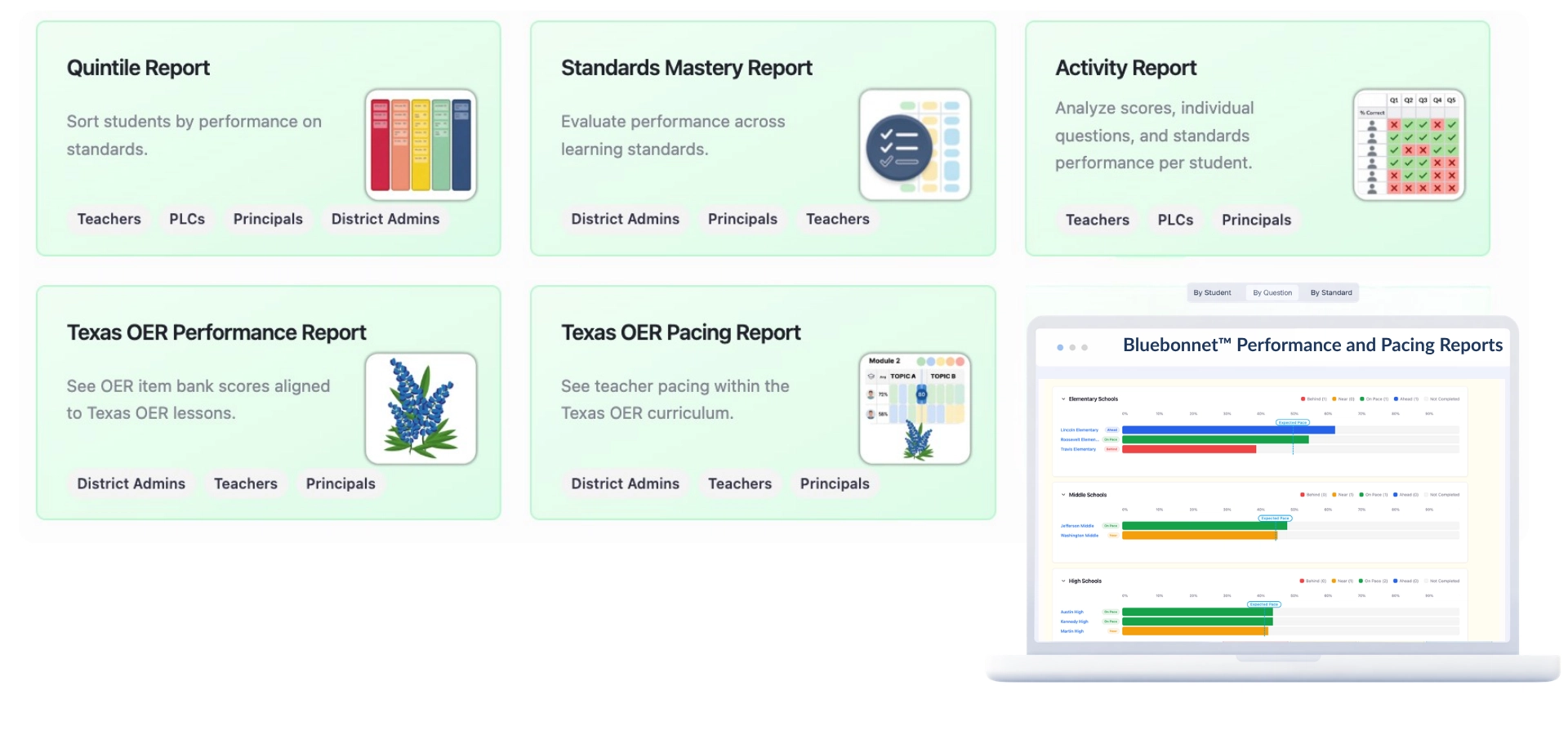
Our newest reporting tools help teachers and administrators quickly identify student strengths, learning gaps, and instructional next steps.
New reports include:
Activity Reports
Review student performance on individual assignments with standards, question-level analysis, and AI-supported instructional insights.
Quintile Reports
Group students by performance to identify trends across classrooms, grade levels, campuses, and districts.
Standards Mastery Reports
Track standards mastery throughout the school year and quickly identify areas needing additional support or enrichment.
AI-Powered Insights
Generate instructional recommendations and follow-up activities based on student performance.
For Texas districts using Bluebonnet Learning™, additional pacing and performance reports are also available.
Expanded Roles & Permissions
Managing district access is now easier.
New Roles & Permissions allow User Administrators to customize access based on each user’s responsibilities.
Administrators can now manage:
- Campus access
- Curriculum authoring
- Academic coaches
- PLC leaders
- Reporting permissions
- Administrative tools
This provides greater security while ensuring every educator has access to the tools they need.
Easier Class Management
Teachers now have more flexibility than ever before.
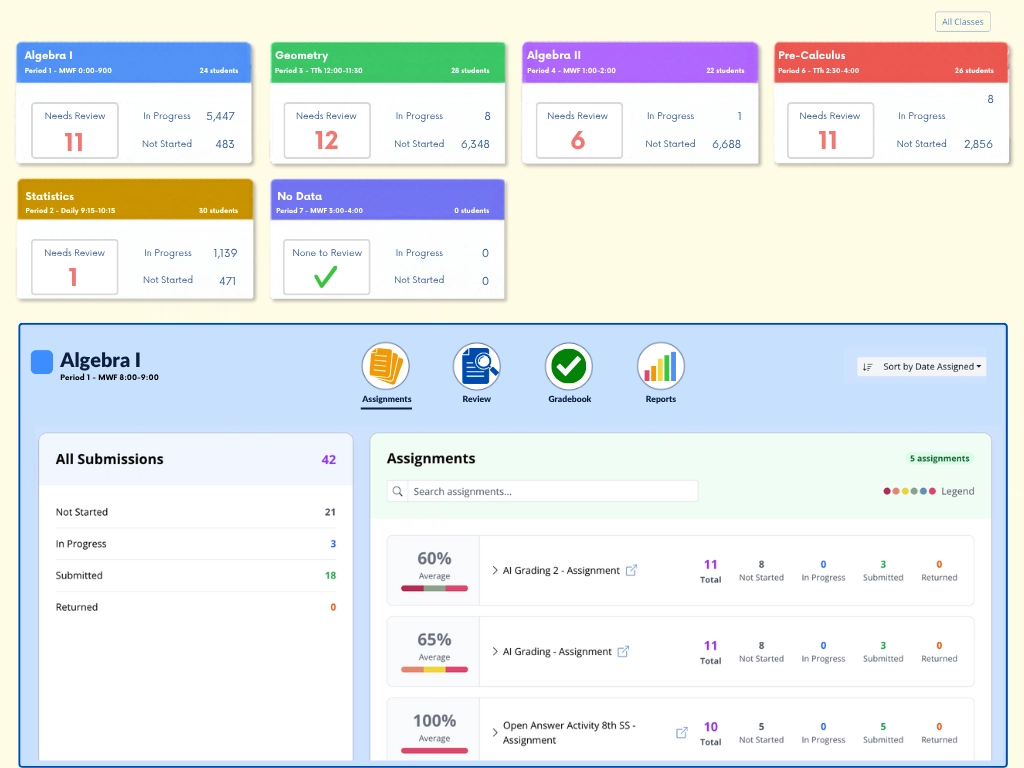
Within the new Classes experience, educators can:
- Import Google Classroom classes
- Sync with supported LMS and SIS platforms
- View assignments by class
- Access gradebooks
- Review student submissions
- View instructional reports directly within each class
Everything is organized to help teachers quickly find the information they need.
AI Convert/Auto-Magic
One feature we’re especially excited about is Auto-Magic.
Simply upload a PDF, highlight the areas you want students to interact with, and Classwork automatically creates many of the interactive, auto-graded question types for you.
Instead of manually recreating every question, educators will soon be able to transform existing instructional materials into interactive classroom activities in just minutes.
It’s another example of how AI continues to help educators save valuable planning time.
More Than a Classroom Tool
Today’s Classwork is much more than a digital worksheet platform.
It connects curriculum teams, district leaders, campus administrators, instructional coaches, teachers, and students through one comprehensive education platform.
From curriculum authoring and classroom instruction to district reporting and instructional decision-making, Classwork helps educators create meaningful learning experiences while providing the data needed to improve student outcomes.
As we continue building new features, our commitment remains the same:
Save educators time. Provide meaningful instructional insight. Help every student succeed.
What are Classwork Updates?
Classwork Updates highlight the newest features, enhancements, and improvements added to the Classwork platform. These updates are designed to improve classroom instruction, simplify workflows, and provide better instructional insights for teachers and district leaders.
What are Math & RLA Readiness Checks™?
Math and RLA Readiness Checks™ are standards-aligned assessments that help educators monitor student understanding throughout instruction. They provide immediate feedback and contribute to standards mastery reporting without requiring lengthy benchmark assessments.
Who can use the new Classwork features?
Many of the newest features are available to all Classwork users. Some administrator reports, district dashboards, and Bluebonnet Learning™ reporting tools require specific user roles or district licensing.
What are the new district dashboards?
The District Dashboard provides instructional leaders with real-time visibility into student performance across schools, grade levels, teachers, classrooms, and student groups, helping districts make informed instructional decisions.
What new reports are available?
Recent reporting enhancements include Activity Reports, Quintile Reports, Standards Mastery Reports, AI-powered instructional insights, and additional Bluebonnet Learning™ performance and pacing reports for eligible Texas districts.
Can teachers create activities faster?
Yes. New AI-assisted authoring tools, the improved Flex Editor, streamlined assignment settings, and the upcoming Auto-Magic™ feature significantly reduce the time required to create digital learning activities.
Will Classwork continue adding new features?
Absolutely. We continuously improve Classwork based on educator feedback and evolving instructional needs. Check back regularly for the latest Classwork Updates as new features become available.