
If You Have a YouTube Channel, Watch Out for This Email Scam
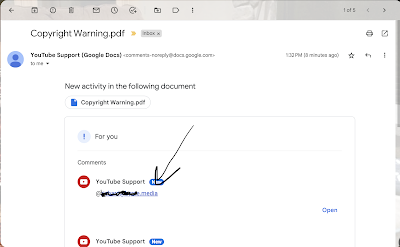
Last fall I wrote about and made a short video about a phishing scam in which the sender pretends to be from YouTube support. Yesterday, I saw a new variation on that same scam appear in my inbox. As you can see in the screenshot above, the email subject line is Copyright Warning.pdf and the […]
Best of 2022 – Exposing DMCA Email Scams
As I do at this time every year, I’m taking the week off to ski and play with my kids, shovel snow, and generally not think about work. I have some of the most popular posts of the year scheduled to republish this week. New posts will resume in the new year. About a month […]
A Quick Way to Check the Safety of Links

One of the best ways to protect your computer and network from malicious software is to simply avoid opening links that appear in your email from unfamiliar senders. Additionally, you should avoid clicking on links that you weren’t expecting and those that just set off your spidey senses. When you do come across a link […]
An Update to Unraveling an Email Scam

About a month ago I published a video and blog post in which I explained the process that I used to unravel an email scam in which someone claimed to be an intellectual property attorney pursuing a case against me. That blog post turned out to be one the most popular things that I’ve published […]
A Neat Way for Students to See What Their Computers Are Connecting To

Knowing just a few commands to use in the command terminal can be quite helpful in diagnosing problems with your computer and or the network that your computer is using. (Bonus, it’s an easy way to make yourself look “super techy” in front of non-techy friends). One of those helpful commands is the Netstat command. […]
How to See What’s Hidden Behind a TinyURL

Last week I wrote a blog post about how to see what’s hidden behind a Bitly shortened URL without actually clicking on the link. The trick is to add “+” to the end of the Bitly URL to see what’s behind it without clicking on it. A few people emailed me to ask if the […]
What’s Hidden Behind a Bitly Link?

Bitly is a handy URL shortener that I’ve used for many years. As a registered user I can create custom, shortened URLs that people can actually spell. I use these whenever I need to share a link to a Canva or Google Slides presentation because the default URLs provided by those services are always long […]
Your Password Isn’t as Strong as You Think It Is – And Other Lessons in Cyber Safety

Last night I got an email from a former colleague who I hadn’t heard from in a while. The email didn’t have a subject line and simply read “Here’s the summary for Monday” and a PDF was attached. My Spidey Senses were triggered and I deleted the email without viewing the PDF. Obviously, his old […]
Good Video Lessons About Cyberbullying and Digital Privacy

Students in my school district, like students in many other school districts, have more unsupervised time on their hands than ever before. That factor combined with the general “cooped up” feeling that many are having as a result of measures prevent the spread of COVID-19 in our community has led to an increase in cyberbullying […]
Are You Being Phished? – A Lesson from Google

Phishing Quiz With Google is an online activity for testing your ability to identify phishing emails. The activity begins when you enter a fake name and fake email address of your choosing. You will then see a series of emails that are addressed to your fake email address. When you see the emails you have […]
A Great Series of Cyber Safety Videos for Students

This morning someone asked me for a recommendation for some good resources to help students learn cyber safety lessons. The first thing that came to mind was Planet Nutshell’s Net Safe series. Planet Nutshell’s Net Safe series has eighteen episodes covering topics like protecting personal information, responsible posting of pictures, and mobile location privacy. The videos are […]
18 Great Cartoons That Teach Cyber Safety Lessons

Planet Nutshell is a video production company that produces short, animated videos to explain products, services, and concepts. Within their education section you will find videos addressing topics in mathematics, physics, climate science, and cyber safety. Their series of videos about Internet safety consists of eighteen videos for K-12 students. The series is called NetSafe and it has eighteen episodes […]
Google’s “Be Internet Awesome” Curriculum is Now Available in Spanish

At about this time last year Google introduced Be Internet Awesome. Be Internet Awesome offers an interactive site called Interland. Interland is a game in which students navigate a virtual world by correctly answering questions about internet safety. Starting today that game is available in Spanish and English. The rest of the Be Internet Awesome […]
Phishing Explained by Common Craft
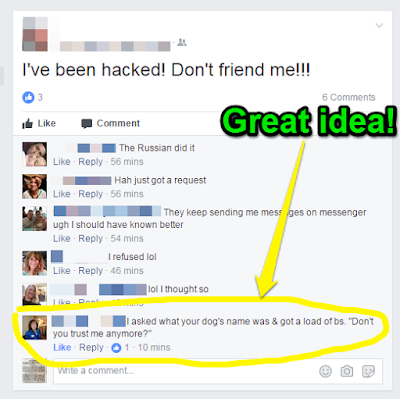
Last week’s viral Google Docs phishing scam provided a good reminder to many that we should always give a critical eye to emails and social media posts that don’t look quite right. It also served as a reminder that we need to educate students and, sometimes, our colleagues about phishing attempts. Common Craft has an […]
Cyberbullying Explained by Common Craft

Lee and Sachi at Common Craft have released a new video that tackles a topic that every student, teacher, and parent should understand; cyberbullying. By watching Cyberbullying Explained by Common Craft viewers can learn how what cyberbullying is, how it happens, and the actions that students and adults can take to stop cyberbullying. Applications for […]
18 Cartoon Videos About Cyber Safety for Students

Planet Nutshell produces short animated videos to explain products, services, and concepts. One of their series of videos is all about Internet safety for K-12 students. The series is called NetSafe and it has eighteen episodes covering topics like protecting personal information, responsible posting of pictures, and mobile location privacy. The videos are labeled with grade levels […]