

How to Create Your Own Online Connecto Game
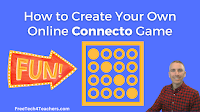
Connecto is one of the many online game creation templates that Flippity offers. Flippity calls it Connecto, but the style of game is exactly like the classic Connect 4 board game (I’m sure that for trademark reasons Flippity can’t use that name for their Connecto game template). In a Connecto game students see a question […]
Create a Snowman Word Game
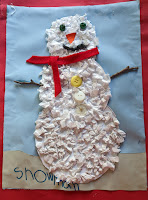
Earlier today when I picked up my daughter from preschool she proudly showed me the snowman artwork that she had made during art class. A picture of her artwork is the featured image of this blog post. Seeing my daughter’s snowman art reminded me of the snowman word game template offered by Flippity. Flippity’s Snowman word game […]
Use TinyTap to Create Online Courses Featuring Your Favorite Games
Disclosure: TinyTap is currently an advertiser on FreeTech4Teachers.com For the last couple of months I’ve highlighted all of the ways that you can create online games and activities for your students to play on TinyTap. All of those games and activities can be shared individually in a variety of ways including embedding them into your […]
Say Something – A Fun and Easy TinyTap Activity

Disclosure: TinyTap is currently an advertiser on FreeTech4Teachers.com Last week I wrote about using TinyTap soundboards to create interactive games and lessons. This week we’ll continue with the theme of sound and make a Say Something activity on TinyTap. TinyTap’s Say Something activity type lets you record your voice to accompany anything and everything that […]
Use TinyTap to Create Interactive Lessons and Games With Soundboards

Disclosure: TinyTap is currently an advertiser on FreeTech4Teachers.com Over the last four weeks I’ve highlighted different ways to use TinyTap to create educational games for your students. This week I’m going to take a slightly different approach and share ideas for using TinyTap’s soundboard option to make interactive lessons and games. What is a TinyTap […]
Create an Educational Puzzle Game With TinyTap

Disclosure: TinyTap is currently an advertiser on FreeTech4Teachers.com. Over the last two weeks I covered the basics of creating an educational game with TinyTap and how to make it look good. This week I’m going to start diving into some of the more interesting game types and formats available in TinyTap. The first of those […]
Making Your Educational Games Look Good With TinyTap
Last week I introduced you to the basics of creating your own educational games with TinyTap’s web-based educational game creation tool. In case you missed it, in that post I outlined how you can create an educational game in which students hear you reading questions aloud and then have to identify objects on the screen. […]
Three New Flippity Templates to Try
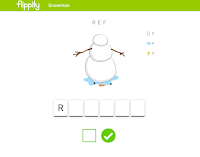
Flippity is one of my go-to recommendations for anyone looking to make interesting things with Google Sheets. A couple of days ago I published a video about Flippity’s new board game template. That’s not the only new template recently added to Flippity’s catalog of offerings. The other new templates on Flippity are an updated progress […]
An Easy Way to Create Your Own Online Jigsaw Puzzles

Jigsaw Explorer is a free site that hosts tons of online jigsaw puzzles. It also offers a free tool for creating your own online jigsaw puzzles. To create your own puzzle simply visit the Jigsaw Explorer Create a Puzzle page then enter the URL of the image that you want to use as the basis […]
Ten Fun and Challenging Geography Games for Students of All Ages

Over the years I’ve tried dozens of online geography games for students of all ages. Many have come and gone over the years but the following geography games are still going strong. WikiWhere is a neat map-based trivia game. The goal of the game is to identify cities based on their descriptions. The descriptions come from […]
Two Ways to Create Your Own Online Memory Games

Last week I was asked if it’s possible to use the MIT App Inventor to create a matching game. It certainly is. In fact, I have a student who is working on doing that right now. It’s a great exercise through which she’s learning about all of the variables and parts of the app that […]
Vortex by ClassTools – Create Your Own Sorting Game
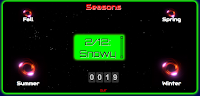
Vortex is the latest game template published by ClassTools. Vortex lets you create an online game in which players have to sort words or phrases into up to four categories. Vortex replaces the Dust Bin sorting game that ClassTools used to offer but ran on Flash. Vortex doesn’t use Flash which means it can be […]
Create a Sorting Game With a Free ClassTools Template
In last week’s episode of The Practical Ed Tech Podcast I answered a question about tools for creating sorting games. The Dust Bin game template from ClassTools was one of the tools that I suggested using for creating a sorting game. The template lets you create a review game in which students sort answer choices into […]
How to Make & Play “Fling the Teacher” Games

Earlier this week I wrote a post about a new game template from Classtools called Fling the Teacher. The game lets students slingshot or “fling” an image of their teachers after they answer fifteen multiple choice questions. In the following video I demonstrate how the game is played and how you can create your own […]
How to Create Vocabulary Games on Educandy
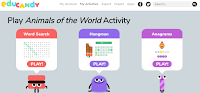
Educandy is a new service for creating simple vocabulary games and multiple choice trivia games. A convenient aspect of the service is that once you’ve created a list of vocabulary words it will automatically be applied to multiple game formats for you. In other words, write one word list and you’ll get three games that […]
7 Places to Create Your Own Educational Games for Students to Play at Home

The Internet is not lacking for websites that offer games that students can play online. Despite that fact, there are still occasions when you can’t find exactly what you or your students need. In those cases you might want to just create your own game instead of conducting more fruitless searches. Here are seven places […]
My Ten Favorite ClassTools Templates
There are dozens of great game builders, writing templates, and handy classroom tools on Classtools.net. I’ve tried nearly all of them over the years. My ten favorite Classtools tools are featured below. The Dustbin game is an activity in which students sort vocabulary terms. Playing a Dustbin game can be a good way for your […]
Twelve Tools for Building End-of-year Review Activities (That Aren’t Kahoot Games)

The end of the school year is quickly approaching. At this time of the year I start to get a lot of requests for suggestions for tools to create review activities. Here are twelve good options for creating review activities. Video-based review activities: Vizia is a free tool for creating video-based quizzes. On Vizia you an […]
Create Your Own Geography Game With Mission Map Quest
Mission Map Quest is a free tool for creating geography games. The concept is simple, you create a series of clues that your students need to follow to identify places around the world. You can add as few or as many clues to your Map Quest as you like. When you’re ready to have students try […]
Create Your Own Typing Games
Two of the most popular posts of the month so far have included typing games. One of those posts featured ABCya’s free typing games and the other one featured TypeTastic’s collection of free typing games. But you don’t have to rely on other people making typing games for your students. You can use the Flippity […]
TinyTap – Create Image Reveal Games and Identification Games

This morning I answered an email from a reader who was looking for a way to create educational games in which students have to correctly answer questions in order to reveal a picture or part of a picture. My suggestion was to try TinyTap. TinyTap is a free iPad app and free Android app that […]