

Free Shapegrams from Tony Vincent!
I’ve known Tony Vincent for at least a dozen years. In all that time he’s always had awesome graphics on his website and in his presentations. So when he recently reached out to tell me about his new page of free Shapegrams, I knew I had to share it with all of you. Shapegrams are […]
Where I’d Like to Go – A Geography Lesson With Google Drawings

I originally wrote this blog post and recorded the video in 2021 while thinking about icebreaker activities for the start of the school year. The activity is also great for Geography Awareness Week. As the new school year starts many you may find yourself looking for some new ideas to break the ice and get […]
Fun Facts About Turkeys – And a Digital Turkey Project
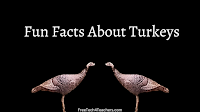
We frequently have wild turkeys come through our backyard. And almost as frequently one of my dogs will chase them until they fly off. I was recently telling a friend about this pattern and he said, “I didn’t know that turkeys can fly.” That’s actually a pretty common response if you don’t live where wild […]
Five Ways to Create Online Drag-and-Drop Activities

Last week I wrote about Classwork’s new drag-and-drop online activity creation tool. It’s a nice tool for turning documents into online sorting and matching activities for your students. Of course, there are other ways to create online drag-and-drop activities for your students to complete. I’ve written about a handful of them over the last couple […]
Prompt Conversations With Google Drawings

One of the lesser-utilized features of Google Drawings is the ability to comment on images. Drawings allows you to collaboratively create drawings from scratch and or alter images that you upload to Drawings. By uploading an image you can draw on it and write on it to add labels. Google Drive Drawings supports commenting just […]
Two Ways to Create Virtual Manipulatives for Elementary School Math Lessons

Earlier this week I received an email from a reader who was looking for some ideas for creating virtual manipulatives she and her elementary school students to use during remote instruction days. I had two ideas immediately come to mind that I shared with her and I’ll share with you. The first idea I shared […]
My Big List of Resources for Teaching & Learning About American Thanksgiving

American Thanksgiving is later this week. All month long I’ve been sharing Thanksgiving-themed resources and ideas. This post combines all of them into one place. If you have school this week and you’re looking for some last-minute Thanksgiving resources, take a look through this list. The Science of Thanksgiving Foods The Reactions YouTube channel, produced […]
How to Create Digital Thankfulness Turkeys

Last fall the switch to online and hybrid classes presented lots of challenges and required changing the way that we have done some of our “old standby” activities. For example, last fall I received a few emails from readers looking for some ideas on how to do a digital version of the classic Thanksgiving Thankfulness […]
Combine Canva and Google Drawings to Make Graphic Organizer Activities

Last fall I published some videos about using Google Drawings and Google Jamboard to create labeling activities, mapping activities, and some graphic organizer activities. Those all relied on using the drawing tools built into Google Drawings and Jamboard. The aesthetics of the activities was limited by your imagination and what you could do with the […]
Fish, Moose, Jam, and Drawings – The Week in Review
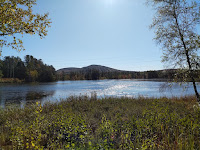
Good morning from Maine where we’re getting ready for a day of outdoor fun. My youngest daughter wants to go catch a fish and my oldest daughter wants to see a moose. Fortunately, a little time in the boat on Mooselookmeguntic Lake provides a great opportunity to make both of my daughters happy. I hope […]
Five Ideas for Using Google Drawings This Fall
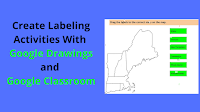
A couple of weeks ago I shared directions for an icebreaker activity that can be done in Jamboard or Google Drawings. Jamboard and Google Drawings have a lot of similarities. There are some differences between the two that can make one better than the other depending upon the use case. Here are five ways to […]
Where I’d Like to Go – An Icebreaker With Google Drawings

As the new school year starts many you may find yourself looking for some new ideas to break the ice and get to know your new students while they also get to know each other. One thing that I’ve always asked my students is “where in the world would you go if you could go […]
Some of my Favorites – Create Labeling Activities in Google Drawings

This week is school vacation week here in Maine. I usually take this week off to go ice fishing on Moosehead Lake. Unfortunately, that’s not happening this year. Instead I’ll be “staycationing” and working on some projects around home. While on my staycation I’ll be sharing some of my personal favorite tools and blog posts. […]
Flowcharts in my Classroom Today

One of the courses that I’m teaching this year has an emphasis on computer repair and support of computers in a small business environment. Documenting everything is one of the things that I emphasize in this course. That includes documenting problems as first observed, documenting troubleshooting steps, and documenting resolutions. Recently, my class acquired a […]
How to Make Digital Thanksgiving Thankfulness Turkeys
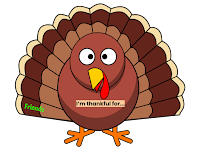
The switch to online and hybrid classes presents lots of challenges and requires changing the way that we have done some of our “old standby” activities. For example, this morning I received an email from a reader who was looking for some ideas on how do a digital version of the classic Thanksgiving Thankfulness Turkey […]
How to Create Labeling Activities With Google Drawings and Classroom

Last week I hosted a webinar for a group that I’m working this summer. One part of that webinar included making online activities for students. I included some of the typical things like Kahoot and Wizer but I also included a demonstration on how to use Google Drawings to make online labeling activities. In the […]
Ten Free Tools for Creating Mind Maps and Flowcharts – Updated for 2019-20

Creating a mind map is an excellent way to generate and write down ideas connected to a central topic. I frequently use mind maps to generate ideas for blog posts and for workshop topics. Students can use them to generate ideas for creative writing, to plan presentations, and to record all of the factors contributing […]
Flowcharts Explained by Common Craft – And How to Make Them
Common Craft has released a new explanatory video all about flowcharts. The new video explains what a flowchart is, why they are used, what they can be used for, and the structure of a basic flowchart. Applications for Education After your students learn what flowcharts are and what they are used for, have them try […]
Six Online Whiteboard Drawing Tools
Thanks to an email from a reader I was alerted that a few of the online whiteboard tools that I have reviewed in the past are no longer working. Here’s an updated list of online whiteboard tools that you and your students can use for free. Scratchwork is an online whiteboard and video conferencing tool designed […]
A New Way to Add Drawings to Google Docs
It’s the first full week of the year and Google has already added new features to G Suite for Education. Yesterday, Google’s G Suite Updates Blog carried the announcement that we’ll soon have a new way to add drawings to Google Documents. Google Docs has long given you the option to launch a new drawing […]
Canvas – A Good Alternative to Google Drawings for Tablet Users

Canvas is a new drawing tool from Google. Canvas is a great alternative to Google Drawings for iPad and Android tablet users. Canvas lets anyone create a drawing in his or her web browser by simply going to Canvas.apps.chrome. Once there you can start drawing on a blank canvas. There are four drawing tools that […]
Three Ways to Make Social Media Profiles for Historical and Literary Characters

Earlier this week I received an email from a reader who was looking for a way that her students could create fake Facebook and other social media profiles based on historical and literary characters. The tool that I used to recommend for creating that kind of fake Facebook profile hasn’t been reliable in recent years. […]
EDU in 90 – Short Overviews of Google’s Education Products
I have published more than 250 Google tools tutorial videos over the last few years. But if my dry screencasts aren’t your style, try Google’s EDU in 90 series of videos. EDU in 90 offers 38 videos designed to introduce viewers to some of the things that students can do with Google’s various products like […]
Five Ways to Create Mind Maps and Flowcharts Online
Earlier this week Tony Vincent Tweeted an excellent graphic that he made to show the process of creating a flowchart in Google Drawings. Tony’s graphics are always top notch and this one was not an exception to that rule. Check it out. 🔀 You can use the Line tool in Google Slides to create flowcharts and […]
7 Ways for Students to Use Google Drawings
Google Drawings is an often overlooked, yet useful tool that students can access within their G Suite for Education accounts. As I shared in one of yesterday’s posts, Google Drawings can be used to create hyperlinked images much like you can do in Thinglink which now requires a subscription in most cases. There are other […]
Use Google Drawings as an Alternative to Thinglink
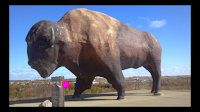
Thinglink recently made some changes to their free plans that further limited access for students. Because of those changes, a few days ago I received an email from a reader who was looking for an alternative to Thinglink. One of my suggestions was to try using Google Drawings to create hyperlinked images. In the following […]
Collection of Google Drive Templates

Google Drawings and Google Slides are two of the most underutilized of all of the tools in GSuite for Education. They can be quite powerful once you grasp how to use them. I’m not sure anyone has mastered Google Drawings quite like Darren Maltais, a Technology Integration Facilitator from Canada. Darren has created an extensive […]
Create Mind Maps in Google Drawings
In a webinar that I hosted last week I was discussing using mind maps to generate ideas for blog posts. Someone in the webinar asked for a demonstration so I opened Google Drawings and quickly put together a mind map of blog post ideas. In the video embedded below I demonstrate how to use the […]
My Secret Method for Developing Blog Post Topics
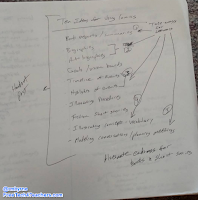
Yesterday, on Anchor.fm I answered the question that I’m probably asked more than any other about blogging, that is “how do you come up with so many blog posts?” One of the things that I do to develop blog post topics is to have mind mapping sessions on a regular basis. For every blog post […]
5 Neat Things Students Can Do With Google Drawings
Google Drawings is one of the tools in the Google Drive suite that often gets overlooked by students and teachers. It can be a handy tool if you know how to use it. In the short video embedded below I provide a demonstration of five things that students can do with Google Drawings. The five […]
How to Create Historical Facebook Profiles With Google Drawings
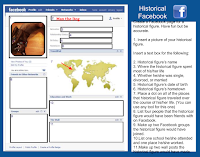
Creating a fake Facebook profile for a character in a book or of a famous person in history could be a good way to get students interested in writing about that person. Doing that on Facebook.com is a violation of Facebook’s terms of service, but there are ways to create fake Facebook profiles without using Facebook.com. One […]