
10 Tools for Gathering Real-time Feedback From Students

Chat tools and polling services provide good ways to hear from all of the students in a classroom. These kinds of tools, often referred to as backchannel tools, allow shy students to ask questions and share comments. For your more outspoken students who want to comment on everything, a feedback mechanism provides a good outlet […]
Creating and Conducting Polls in Google Slides and PowerPoint

Poll Everywhere is a polling tool that I’ve used off and on throughout the past decade. It’s a great tool for gathering questions from an audience, polling an audience, and seeing word clouds of sentiment from an audience. People can respond to your poll questions from their laptops, tablets, and phones. You can use Poll Everywhere […]
Mentimeter – Share Slides and Poll Your Class on One Screen

Mentimeter is an online polling and quiz tool that I’ve used since its launch over a decade ago. In that time it has evolved and added lots of helpful features for teachers. One of those features is the ability to broadcast your slides to your students’ computers, tablets, and phones. Doing that makes it easy […]
Create Your Own Chatbot for Surveys and Quiz Practice

Acquainted is a free polling tool that has been around for a few years. It recently reappeared on my radar when a reader sent me a question asking for help creating a chatbot for her website. Acquainted is a conversational polling tool. What that means is that people who take your poll get an instant […]
Three Ways to Conduct Polls in Google Slides

I have one group of freshmen this fall that is quiet and will rarely speak unless directly called upon. This is true of them when they’re in my classroom and when they’re on Zoom. So I call on them directly and I have them complete exit tickets in Flipgrid. Recently, I’ve started polling them at […]
Using Mood Clouds in Virtual and Hybrid Classrooms

Earlier this I published a video about creating and hosting polls in Google Slides with the Poll Everywhere Chrome extension. When I published that I mentioned that I use the word cloud option and have students respond to simple questions like “how do you feel after the long weekend?” and “what’s the best word to […]
How to Create and Run Polls in Google Slides

Slido is a polling service that recently released a free Google Slides add-on and companion Chrome extension. The combination of the two tools makes it easy for anyone who uses Google Slides to quickly create and launch polls directly within the Google Slides editor. The thing that I like about Slido is that you can […]
How to Create a Video-based Poll
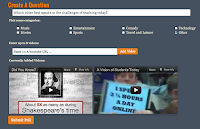
ClipChoose is a free polling tool that I featured in a blog post last month. On ClipChoose you can create a poll that is based on a comparison of two or more videos. In the video embedded below I demonstrate how to create a video-based poll on ClipChoose. Applications for Education ClipChoose could be a […]
Create Video-based Polls on ClipChoose

There is not a shortage of online polling tools to use in your classroom. Most of those polling services are simply text-based or text and images. Clip Choose is different because your polls are based on videos. To create a Clip Choose poll you enter the URLs of up to eight YouTube videos. After entering […]