
Create Location-based Reminders in Google Keep

Other than the Chrome web browser, Google Keep is the app that I use more than any other on my Pixel 5 phone (a phone I like, but don’t love). I use it for bookmarking websites, creating to-do lists and shopping lists, and to set reminders for myself throughout the day. My favorite aspect of Google […]
Taskade – Collaboratively Create Meeting Notes and Task Lists in One Place

Taskade is a task management tool that you can use on your computer, phone, or tablet. The service is collaborative because you can invite other people to join you to work on lists and notes in the same online space. The best part of Taskade is the selection of templates that you can use to […]
5 Alternatives to Google Keep for Task Management

Last weekend I received an email from a reader named Shayne who had experienced a problem with Google Keep notes randomly disappearing. Shayne’s research indicated that other people had the same problem. So if you’re someone who has run into glitches with Google Keep, here are some other task management tools that you might consider […]
Taskade – A Feature-packed Task Management Tool

Taskade is a task management tool for individuals and teams. Like many task management tools you can create lists, share those lists, and check-off items when they’re completed. You can do that with Google Keep, OneNote, and a host of other task management tools. What makes Taskade different is the list of additional features that […]
Google Tasks to Become a Core G Suite Service

In late April Google launched a new stand-alone app called Google Tasks. Last week Google announced that at the end of June Google Tasks will become a core service of G Suite. It will be on by default for all domains. Google Tasks is kind of like Google Keep without a bookmarking function. At its […]
Google Tasks – A Very Simple Task Management App

On Wednesday Google announced a bunch of updates to Gmail. That story was covered by every blog under the sun and garnered lots of commentary on social media. What didn’t get nearly as much attention was Google’s launch of a new task management app called Google Tasks. Google Tasks is a free app that is […]
Todost – A Simple Task Management Tool

Todost is a free and simple tool for keeping track of items on your to-do list. To make a list just go to the website on your laptop or on your phone. Once at the site you can start entering your list of tasks for the day. Click the check box next to each task […]
By Request – 5 Task Management Tools for Students

This morning I received an email from a reader seeking suggestions for to-do list management tools her students can use to keep track of assignments and other things that they have to do during the week. Here are my suggestions for task-management tools for students. OneNote If your school uses Microsoft products, I’d take a […]
Make Lists Fun With Emojis In Google Keep
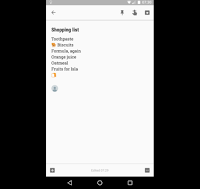
Last week’s most popular post was 7 Ways to Use Google Keep In Your Classroom. This morning I was using Google Keep on my phone to make a shared shopping list and I stumbled into the option to use emojis in my list. You can use the same emojis/ emoticons that you use in text […]
5 Google Keep Tutorials for Teachers and Students
This afternoon at the CSLA 2017 conference I was asked about Google Keep. Specifically, I was asked why I preferred using Google Keep to the tasks list option Gmail. In short, Google Keep provides more utility for me compared to using the text-based options for tasks in Gmail. For example, Google Keep lets me add […]
Create Location-based Reminders in Google Keep Notes
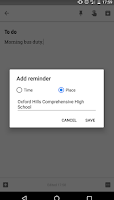
Google Keep has been my favorite bookmarking and reminder tool ever since Evernote made their free plan worthless earlier this year. I use it on a daily basis to bookmark interesting links and to write notes to myself. One of the neat features of Google Keep is that you can set reminder alarms for your […]
6 Tools That Can Help Students Keep Track of Tasks
Services like Cel.ly and Remind are great for sending reminders about important school and classroom events to parents and students. That said, students shouldn’t rely on teachers to remind them of their assignments. These are some of my favorite tools that students can use to keep track of their assignments and other school-related tasks. Google […]