

How to Collaborate on Canva Documents

The new Canva Documents tool has a lot of great features for teachers and students. Not the least of which is the ability to collaborate on documents and designs. The collaboration feature on Canva Documents enables you to invite anyone to work with you as a full editor or commenter on any document that you […]
Take a Look at Padlet’s New Notification Options

Padlet is a tool that I’ve been using for over a decade in a wide variety of classroom settings. In fact, I’ve been using for so long that I’ve seen it evolve from a simple tool called Wall Wisher in 2009 to the multimedia sharing, brainstorming, and mapping tool that it is today. The latest […]
Prompt Conversations With Google Drawings

One of the lesser-utilized features of Google Drawings is the ability to comment on images. Drawings allows you to collaboratively create drawings from scratch and or alter images that you upload to Drawings. By uploading an image you can draw on it and write on it to add labels. Google Drive Drawings supports commenting just […]
Ten Cool Things You (And Your Students) Can Do With Lumio

Disclosure: Lumio is currently an advertiser on FreeTech4Teachers.com. Advertisers help keep the lights on here. Lumio was one of my favorite new tools in 2021. I wrote about it back in November, but I don’t think I fully captured everything that makes Lumio great. And since Google Analytics tells me that people prefer articles that […]
Taskade – A Complete Project Planning Solution for Teachers and Students

Disclosure: Taskade is currently an advertiser on FreeTech4Teachers.com. Taskade is a flexible, collaborative project planning and task management tool. The thing that I appreciate about Taskade is that it can be used for things as simple as a daily, personal to-do list or as complex as collaboratively planning a year-long curriculum writing project. Like […]
Five Fun Breakout Games for Online and In-person Classrooms

Disclosure: Breakout EDU is an advertiser on FreeTech4Teachers.com. Like a lot of teachers, one of my biggest challenges last year was building a sense of community in my classroom. Without having more than half of my students in my physical classroom for more than a few days before we went back to online or hybrid […]
A Tip for Structuring Group Notes in Google Docs

Fourteen years ago when I first started using Google Docs with students I got the idea to have my whole class take notes on the same document. It sounded good in my head on my drive to school. In practice it was a disaster as my students were quickly frustrated by accidentally writing over each […]
Four Important Padlet Updates to Note

For more than a decade I’ve been using Padlet to facilitate online brainstorming sessions, create KWL charts, to make multimedia timelines, and to host many more online activities for more my students. Just like any well-loved tool, Padlet has gone through some changes over the year. In the last week or so Padlet has announced some […]
How to Collaboratively Create Presentations With Canva

Regular readers of my blog probably know that I’m a big fan of Canva. I use it almost daily for making everything from YouTube thumbnails and presentations. And over the years I’ve used for making timelines, simple websites, comic strips, certificates, and lots more. In that time I’ve also seen Canva add new features on […]
How to Use Version History in Google Slides

Last week I received an email from a reader who wanted to know if there was a way to share a set of Google Slides with a group of students but restrict them to working on one or two slides within the slideshow. Unfortunately, there isn’t a way to lock students into specific slides within […]
How to Collaborate on a YouTube Channel

Like many other schools, this spring my school held our awards ceremonies virtually. A colleague and I managed the distribution of the recordings of those ceremonies. We did this by collaborating on one YouTube channel. You can enable collaboration on a YouTube channel through the permissions settings in YouTube Studio. In the permissions you’ll find […]
How to Create a Multimedia Map on Padlet

Last week I shared the news that Padlet now includes multimedia map creation options. Like all other Padlet layouts, the map option includes the capability to collaborate. The maps that you create on Padlet can have placemarkers that include pictures, videos, links, text, and audio files. You can even record audio and video within the […]
How to Use Wakelet to Gather Feedback from Students

Wakelet is a great tool for creating collections of bookmarks, pictures, documents, videos, and more. It is free, easy to use, and offers privacy settings that you can easily control. It also offers a couple of easy ways to have students collaborate on creating collections. Because of the collaboration option I have been suggesting to […]
Six Online Whiteboard Drawing Tools
Thanks to an email from a reader I was alerted that a few of the online whiteboard tools that I have reviewed in the past are no longer working. Here’s an updated list of online whiteboard tools that you and your students can use for free. Scratchwork is an online whiteboard and video conferencing tool designed […]
Updated – 5 Online, Collaborative Whiteboard Services

Online, collaborative, whiteboards can be great tools for hosting quick review sessions for your students. Your students can also use these tools to conduct online study sessions with each other. Here are five free online whiteboard tools to try. Draw Chat is a free service that allows anyone to create a video chat over a whiteboard, […]
New Shared File Organization Coming to Google Drive

In an blog post published yesterday Google stated, “searching for content by owner is the most popular way to search for content in Drive today.” That’s why they a new file organization option is coming soon to your Google Drive dashboard. In the next couple of weeks the “shared with me” section of your Google […]
Three Ways to Collaboratively Create Video Playlists

From cats doing tricks to documentaries about cats in Egyptian art, we watch more videos today than we ever have before. The challenge is weeding through all of the ridiculous cat videos to find the good stuff that you can share with your students. And once you find the good videos, you’ll want to organize […]
5 Ways for Students to Create Multimedia eBooks

Writing a multimedia ebook or magazine can be a good way for students to illustrate and or further explain portions of fiction and non-fiction stories that they develop. Multimedia publishing tools that include a collaboration component can further help students as they work together with each other or with you to improve their work. The […]
Why You Should Give Google Sites Another Try
Google Sites was not always the most user-friendly product. It was confusing, clunky, and difficult even for people who were comfortable using technology. While Google updated other products on a regular basis, Sites largely ignored. Then the new version was released and it was not just an update, it was an entirely new product. The updated […]
Collaborative Computing vs One to One
This is a guest post from Tracy Dabbs, Coordinator of Technology and Innovation for the Burlington-Edison School District. I have been supporting Ed-Tech in classrooms for nearly 15 years and during this time we have all experienced some big changes in tools and ideas. There is always some new learning design that promises to transform […]
Classkick to Learn Together
Classkick is an app that allows students and teachers to learn together in real time. Teachers can create lessons using existing worksheets, or new text, audio, or videos. Students complete their work on a Chromebook, iPad, laptop, or desktop. Teachers can view the work that students are doing in real time and can see anyone […]
Draft – A Distraction-free Collaborative Writing Tool
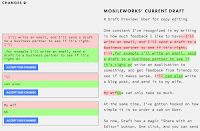
Draft is a free, collaborative writing platform that provides a distraction-free environment. When you write in Draft you won’t see anything but the text in front of you. Draft is stripped of options for messing about with font colors or inserting pictures. Anyone who has an email address can participate in editing a document in […]
Draft – Focused, Collaborative Writing
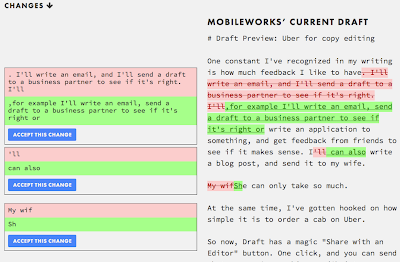
Draft is a collaborative writing tool that makes you focus on writing and revising by giving users a simple interface. In Draft you won’t find options for inserting images or messing around with font types. In Draft you just write. When you’re ready to get feedback about your writing, you can invite someone to read […]
Six Tools for Collaborative Brainstorming – A Comparison Chart
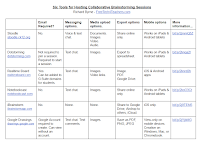
Sitting down to map out your thoughts can be a great way to get yourself organized before embarking on a big writing project. It’s also something that I do before I begin creating slides for any of my keynote presentations. While it is great to start the mind mapping process on your own, it is […]
How to Collaboratively Create YouTube Playlists – Updated
Last year I published a video about how to collaboratively create YouTube playlists. Since then the steps for doing that have changed a little bit. Also this week I had someone ask if I could make a video about making YouTube playlists. To address both items I created the new tutorial video, How to Collaboratively […]
How to Use WriteReader to Collaboratively Create Multimedia Books
One of last month’s most popular posts was about WriteReader. WriteReader is a free service designed to help elementary school students create multimedia books with the help of their teachers. Teachers can create online classrooms in WriteReader in which they can view and edit their students’ work. This afternoon I created a tutorial to show […]
How to Create Shared Google Calendars
Last week on the Free Technology for Teachers Facebook page someone asked me for a recommendation for creating and maintaining a shared calendar. My immediate suggestion was to use Google Calendar. Google Calendar can be used in your web browser as well as in its respective iOS and Android apps. In the video embedded below […]
BandLab – Collaboratively Create Music Online
BandLab is a free service that enables you to create music in your web browser or through free Android and iOS apps. In BandLab’s you can create soundtracks using any of the virtual instruments that are provided. You can also speak or sing to record a track. Within the BandLab editor you can mix your […]
Padlet Adds Helpful New Attachment Previews
Padlet is a fantastic tool that I have used and recommended countless times over the years. My tutorial video about it is the most viewed video in my YouTube channel. This week Padlet introduced some improvements that might not jump out at you right away, but will be helpful to you in the long run. […]