

Hello History – An AI App for Chatting With Historical Figures
Hello History is a new iPhone and Android app that lets you chat with historical figures. The list of characters with whom you can chat ranges from pop culture icons to artists, politicians, and civil rights activists. Hello History uses AI in a manner similar to that found when using AI tools like ChatGPT. You […]
Kikori App – Social Emotional Learning Activities for All Ages
Kikori App is a new mobile app and website that offers a large library of social emotional learning activities for students of all ages. The mobile app (Android and iOS) and the web versions of Kikori work the same way. On Kikori you can search for social emotional learning activities according to age, energy level, […]
Overviewer – Turn Your iPhone or iPad Into a Document Camera in Zoom

Thanks to a recent article on The Verge I just learned about a new, free iPhone and iPad app called Overviewer. Overviewer is a free app that lets you use your iPhone or iPad as a document camera during a Zoom meeting. The app essentially mirrors your iPhone or iPad camera into Zoom via Airplay […]
Try Your Hand at Bird Identification With the Audubon Bird App

We have a bunch of bird feeders hanging outside of house. My daughters love seeing the various birds that visit our feeders. I particularly enjoy seeing orioles come to one of our feeders. My daughters (2 and 3 years old) are curious about the names of many of the birds that come to the feeders. […]
Create a Directory App for Your School

Last week’s most popular post was Dozens of Apps for Physical Education. In that post I highlighted the work that Kevin Shephard at Support REAL Teachers has done to develop apps through the free Glide service. Glide enables anyone who can create a Google Sheet to create a mobile app. You can start building an […]
Dozens of Apps for Physical Education

Glide is in my top five favorite new tools in 2019. Glide makes it incredibly easy for anyone who can make a spreadsheet to make a mobile app. We had fun using at the Practical Ed Tech Summer Camp and many other people have shared their apps with me over the last few months. Perhaps […]
Quik – Quickly Create Audio Slideshow Videos

Quik is a free app from GoPro for quickly creating videos on your Android or iOS phone or tablet. With the app installed on you can import pictures and videos that you have stored on your phone, in Google Photos, or in a GoPro Plus account. After you’ve selected a few pictures or video clips […]
Quick Key – Quickly Score Paper-based Quizzes With Your Phone or Tablet

This morning I answered an email from a reader named Eric who was looking for an alternative to GradeCam. His school district is possibly not renewing their subscription to GradeCam, but based on his message (copied below), it sounds like he likes the technology of GradeCam. Here’s the message I received: I teach an AP […]
An Overview of Fishbowl – A Professional Discussion App for Teachers

Last week I published a post about Fishbowl that generated some good questions from readers about how the app works. Fishbowl is more than an app, it’s a professional discussion network. Teachers can join Fishbowl to engage in discussions on issues important to educator community. Fishbowl will let you participate in discussions anonymously, on the […]
Fishbowl – A New Professional Network for Teachers
This week Fishbowl joined Free Technology for Teachers as a new advertiser on the site. Fishbowl is a professional networking service for professionals in many fields including education. Based on that description you might think it’s just another LinkedIn or Twitter, but you’d be wrong. Fishbowl features dedicated communities for discussions about the issues that […]
The Google Science Journal App Now Saves Data in Google Drive

Google’s Science Journal app is one that I regularly feature in my presentations and workshops about blending technology into outdoor lessons. With the app (available for iOS and Android) students can record data about acceleration, location, sound, light, and barometric pressure. Those are just a handful of the things that students can measure and record […]
Five Observations Students Can Record With Google’s Science Journal App
The new school year will be here soon and I haven’t taken a break all summer. I’m taking a short break from the Internet to go fishing at one of my favorite places in the world, Kennebago Lake. I’ll be back with new posts on Saturday. While I’m gone I’ll be republishing some of the […]
Google Tasks to Become a Core G Suite Service

In late April Google launched a new stand-alone app called Google Tasks. Last week Google announced that at the end of June Google Tasks will become a core service of G Suite. It will be on by default for all domains. Google Tasks is kind of like Google Keep without a bookmarking function. At its […]
Capsure – Share Collections of Images With Audio Notes

Capsure is a photo sharing service that lets you create private and public collections of photographs. Lots of other services do the same thing. What makes Capsure a little bit different is that you can add audio notes to your collections. To add audio notes to image collections in Capsure you have to use either […]
Unsplash for iPad – Quickly Add Public Domain Pictures to Keynote & iMovie

Unsplash is one of my favorite places to find high quality pictures to use in presentations. This week Unsplash launched a new iOS app. The new Unsplash app lets you search through the entire Unsplash collection. The best part of the Unsplash iPad app is that once you find a picture that you like you […]
Play and Learn Science – An App for Students and Their Parents

Play and Learn Science is a free app (Android and iOS versions available) designed for kids to learn science concepts. Not only that, the app is designed to help parents help their kids learn science concepts. Play and Learn Science has four sections for kids. Each of those sections contains three activities related to science […]
Try Quick Key’s Gridded Response Format for Your Next Math Assessment

Quick Key is a free app that I have liked and written about since my friend Mike Morrell showed it to me almost five years ago. Every year since then Quick Key has improved by adding new features that teachers want. The latest feature added to Quick Key is a gridded response format. Quick Key’s […]
Try This Fun, Free AR App for Outdoor Lessons – A 2017 Favorite
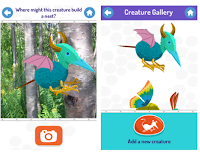
For the last five days I have featured the most popular posts of 2017. On this last day of the year, I’m going to highlight my favorite posts of the year regardless of their popularity. This post features an augmented reality app for elementary school students. Spring is here in the northern hemisphere and those […]
Three Apps That Solve Math Problems Through a Picture
A few years ago when Photomath hit the App store there was all manner of debate about whether or not it was a good app for students. I fall into the side that argues that students are going to find apps like Photomath whether we tell them about it or not. Therefore, we need to […]
5 Observations Students Can Record With Google’s Science Journal App
Google’s Science Journal app provides some neat tools for recording data and writing observations. Within the app students create notebooks for recording experiment data and observations. Students can also use those notebooks to simply organize observations by topic. There are sensors built into the app for recording sound, speed, light, direction, and magnetism. Here are […]
A Handful of Apps for Exploring the Potential of AR in Education
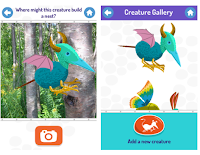
Earlier this week I shared a neat augmented reality app called SkyView that helps users identify constellations, planets, and satellites in the night sky. SkyView could be helpful in sparking students’ curiosity about space. SkyView shows some of the potential for augmented reality in education. There are other apps that I often share with people who […]
SkyView – An Augmented Reality App to Help Students Find Constellations

SkyView is a free augmented reality app (an Android version and an iOS version is available) that helps students identify stars and constellations. With the free app installed students can point their phones at the sky and see constellations identified on their screens. In addition to constellations the app will identify planets, satellites, and some […]
The StoryCorps Recording App Gets Updated Privacy Controls
StoryCorps offers a free app for recording interviews. I’ve used the app for a couple of years. In fact, I like it enough to include it in my Teaching History With Technology class. The one complaint that people have had about it is that your recorded interviews are automatically made public in the StoryCorps archives. […]
Stitcht – Make Videos With Friends
Stitcht is a free iOS app that lets you create a video from a combination of video clips captured by your friends. To make a video on Stitcht you simply start a project then invite others to add their video clips to the project. Stitcht will then combine the shared clips into one video that […]
Membit – Augmented Reality Photo Maps
Membit is a neat augmented reality app for use on iPhones. The app lets you place view images superimposed over the current backdrop that you see through your phone’s camera. For example, you could open the app, point your camera at a building, and then see an image of what the building used to look […]
How to Create Virtual Reality Panoramas

A couple of years ago Google launched the Cardboard Camera app for capturing your own virtual reality panoramas. At the time that it was launched it was only available on the Android platform and it didn’t include a mechanism for sharing your panoramas with others. Both of those things have since changed. You can now […]
Convert Physical Sticky Notes Into Digital Notes
Post-it Plus is a free iPad app that you can use to turn your physical sticky notes into digital notes. With this free app installed on your iPad or iPhone you can snap a picture of a collection of physical sticky notes and have them quickly digitized. Once your notes are digitized you can re-arrange them, […]
How To Use Emojis In Google Keep
Earlier this week I shared that I had stumbled into adding emoticons/ emojis to my lists in Google Keep. A couple of people have asked how I did this. The answer is that you have to use the app on your Android phone or iPhone. I haven’t found an easy way to do it in […]
10 Apps & Sites for Promoting Healthy Eating and Fitness

In all of my Best of the Web presentations I try to present resources for a wide variety of classroom settings and subject areas. Health and physical education resources are always included because of my personal interest in the field as well as its importance in giving students lifelong skills. Here are ten of my […]
Anchor Adds New Features for Simple Podcasting

Anchor is a simple and free platform for creating short podcasts. I started using it in December to publish occasional podcasts. A couple of things initially drew me to Anchor. First, recording is simple of matter of just holding down the record button on your phone then releasing it when you’re done talking. Second, when […]
Google Keep Is Now Part of G Suite’s Core Services
Google Keep is my favorite tool for bookmarking, taking notes, and setting reminders. I use it on my laptop, Chromebook, my phone, and my iPad. For a couple of years it has been my go-to recommendation for anyone looking for a bookmarking tool, a reminder app, or a note-taking app. But the one drawback to […]
VocApp – Multimedia Flashcards on iOS and Android
Last week I shared a few tools that students can create digital flashcards. Two of those tools offer the option for including audio in flashcards. Another option is to use the VocApp app for iOS and Android. To create flashcards on VocApp you need to create an account and sign-in. Once you’re signed-in you can click “create […]
Memrise – Learn New Languages
Memrise is a service through which you can learn vocabulary for a new-to-you language, study science flashcards, review math problems, or review content from any of the hundreds of online course offerings on Memrise. Review on Memrise happens in a manner that is a blend of flashcard flipping and quiz question answering. After signing into your Memrise account […]
Use Google Keep to Help You Reach Your Goals

How are you doing on your New Year’s resolutions? How about your students? If one of your resolutions is a daily habit like reading more often or exercising regularly, Google Keep can help you reach your goal. Within Google Keep there is an option to set daily reminders for yourself. I have three of them […]
Anchor – Simple Podcasting

Earlier today I Tweeted a link to my first Anchor.fm recording. Anchor provides a simple way to create and publish short podcasts. In fact, you can’t record for more than two minutes at a time on the Anchor apps. I like that you cannot record for more than two minutes at a time. The time […]
Create Location-based Reminders in Google Keep Notes
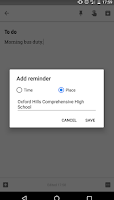
Google Keep has been my favorite bookmarking and reminder tool ever since Evernote made their free plan worthless earlier this year. I use it on a daily basis to bookmark interesting links and to write notes to myself. One of the neat features of Google Keep is that you can set reminder alarms for your […]
5 Quick Key Features That Can Save You Tons of Time
Quick Key is a powerful and popular grading tool developed by a teacher for teachers. The service utilizes the camera on your Android phone or iPhone to help you quickly grade a series of quizzes. When it initially launched a few years ago Quick Key only worked for multiple choice or true/false questions and was […]
QuickKey + Inexpensive Phone = Time Saved On Grading

QuickKey is a popular iOS and Android app that can help you save a ton of time when grading multiple choice or true/false quizzes. I first learned about it a few years ago when a colleague of mine was raving about it on Facebook. Here’s the basics of how it works; create your quiz on […]
Remind Introduces a New Way to Coordinate Activities
Remind is one of my favorite tools for keeping parents informed about what’s happening in your school. Last week Remind released a new feature that could help you organize and keep track of registrations for school events like field trips. The new feature is called activities. Remind’s new activities feature enables you to create activity […]
Keep Kids Active With GoNoodle or Sworkit Kids
GoNoodle is a free service that is designed to promote physical fitness in a fun environment. GoNoodle features tons of free videos that lead students in short, 2-5 minutes, exercises. These are fun exercises like dancing that can be done in your classroom or at home with parents. GoNoodle provides an online environment in which […]
Hopscotch – Learn Coding Basics on Your iPad or iPhone
Hopscotch is a free iOS app that introduces students to programming logic. The app originally launched as an iPad-only app. Last week the developers released an iPhone-friendly version of the free app. In Hopscotch students put command boxes into order to make cartoon avatars move and draw lines. Students can program one or all of […]
Explain VR Virtual Zoo – Animals in Virtual Reality
Explain VR Virtual Zoo is a free iPhone app that is designed to work with Google Cardboard. The free app features ten animals in virtual reality. Some of the animals featured in the app include giraffes, elephants, tigers, and bears. Each animal appears individually and students can see them move in virtual reality. Audio in […]
Haiku Deck Releases a New iPhone App for Creating Presentations
This morning Haiku Deck, a popular presentation creation tool, released a new iPhone app. This new app brings the features of the Haiku Deck iPad app and web app to the iPhone. The Haiku Deck apps allow anyone to create beautiful slide presentations. One of the core features of Haiku Deck that has made is […]
How to Create Bookmarks & Reminders With the New Google Keep Extension
Google Keep is a handy tool to taking notes in your web browser, on your Android phone, or on your iPhone. I’ve previously featured ten ways that students can use Google Keep. This week Google announced some updates to Keep. The latest version of the Google Keep Chrome extension and the Google Keep Android app […]
Kaizena for iPad – Add Voice Notes to Students’ Printed Documents
Kaizena is a great tool for adding voice comments to your students’ documents and slides. When Kaizena originally launched it was designed for adding comments to Google Documents and Google Slides in the Chrome web browser. It then expanded to add support for Word files and PDFs. The latest update to Kaizena introduces support for […]
Set and Track Goals in Google Calendar

The Google Calendar app on your iPhone or Android phone had a great new feature added to it this week. Google Calendar now helps you set and track goals. Now when you tap the “add item” icon in Google Calendar you will see an option to set a goal. When you select “goal” you will […]
Wikipedia Releases an Updated App for Exploring Interesting Content

The Wikimedia Foundation has released a new version of their Wikipedia iPad and iPhone app. The latest version, available now, features an aspect they’re calling the Explore feed. The Explore feed will provide users with personalized content updated daily. In the Explore feed users will see featured articles of the day, recommended articles based on reading […]
Three Mobile Apps That Can Help Students Search
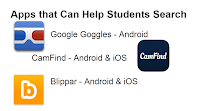
Students might forget their lunches, their gym shoes, and their homework assignments when they leave their houses in the morning, but they never forget their mobile phones. We can help students put those mobile devices to good use through the use of mobile search apps. Google Goggles is a free Android app that lets students […]
Perspecs Shows Students Three Sides to Every Story

Perspecs is a new app that aims to provide users with three sides to every news story. On Monday through Friday the free Android and iPhone app offers a selection of articles about current topics in the news. The topics could be breaking news or they could be topics of a more evergreen nature like […]
CamFind – Conduct Research With the Help of Augmented Reality
In my last presentation at the NCTIES 2016 conference I shared some mobile apps and ideas for using them with ELA and social studies classes (slides are available here). CamFind is one of my favorite apps in the presentation. CamFind is a free iOS and Android app that enables you to take a picture of […]
Newsela’s iPad App Offers News Stories Sorted by Reading Level
Newsela is a service that helps teachers find current events articles that are appropriate for their students’ age and reading abilities. This week Newsela launched a free iPad app and iPhone app. The Newsela iPad app and iPhone app delivers current news articles to students. The stories are matched to students’ reading abilities. At the end of each […]
10 Things Students Can Do With Google Keep
As I do every year, I am taking this week to relax, recharge, and ski with friends. While I’m away I will be re-running the most popular posts of the year. This was one of the most popular posts in November, 2015. At the end of October Google added a drawing option to Google Keep. […]