

Blackbird Provides an Innovative Way for Anyone to Teach Coding

Disclosure: Blackbird is currently an advertiser on FreeTech4Teachers.com. Around this time every year I get emails that go something like this, “Hi Richard, I have a new job this fall and I’ll be teaching coding for the first time. Do you have any resources you can share with me?” Usually these emails come from folks […]
7 Tools for Teaching Programming

This is an excerpt from the 2021-22 version of The Practical Ed Tech Handbook. Two weeks ago a copy was sent to everyone who is subscribed to my Practical Ed Tech Newsletter. If you’re not subscribed, you can do so here. For some of us of a certain age, Logo was our introduction to computers […]
PBS Kids ScratchJr – Scratch With a PBS Twist

PBS Kids ScratchJr is a PBS Kids-themed version of the popular ScratchJr app. PBS Kids ScratchJr is available as a free iPad app and as a free Android app. The app is designed to help five to eight year old students learn basic programming concepts through a drag-and-drop interface. Just like the ScratchJr app, on […]
56 Examples of Using Scratch Across the Curriculum

Scratch is one of the ed tech tools that I always mention in my Built to Last presentation. That presentation is an overview of ed tech tools that have stood the test of time. As I shared a couple of weeks ago, Scratch 3.0 is now available in a public beta. Scratch is a free […]
Scratch 3.0 and a New Creative Computing Curriculum Guide

Earlier this summer I shared the news that Scratch 3.0 would be available in a beta form in August. August is still a couple of hours away, but Scratch 3.0 is actually available now. I just went to the Scratch 3.0 beta site and it is live. You can try the new Scratch online editor […]
Exciting New Features Coming to Scratch Later This Year

Thanks to a Tweet from Helen Maddox I found an announcement from the MIT Scratch Team about the new features that will be available in Scratch starting in August. Scratch 3.0 will roll-out as a beta product in August. Scratch 3.0 will offer some exciting new features including: A new extension system for programming physical […]
Three Ways to Develop Programming Skills This Summer

Summer is almost here and it’s a great time to learn a new skill that you can bring into your classroom next fall. One of the skills that seems to be mentioned in almost every education periodical these days is programming or coding. Learning to program isn’t as difficult as you might think that is. […]
Snap vs. Scratch

Yesterday, I shared a student-produced video from Next Vista for Learning. This morning I have a good example of a teacher-produced video found on Next Vista. In the following video Brian Ellis explains what the Snap programming language is, demonstrates how it works, and explains the differences between Snap and Scratch. Take a look at […]
Three Classic Ed Tech Tools to Try in 2018

Over the last decade I’ve reviewed thousands of free educational technology tools. Some have been a hit, some haven’t, and some have stood the test of time to become “classics” in the world of educational technology. Here are three classics with which every educational technology specialist should be familiar. Scratch Scratch is a is a free […]
Five Tools for Creating Animations on Chromebooks
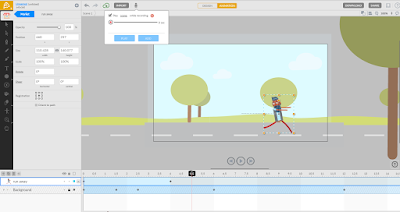
Yesterday’s post about the PuppetMaster app prompted a couple of people to ask me if there is anything similar available for Chromebook use. While I can’t think of anything that is free and exactly like PuppetMaster, here are some options for creating animated videos on Chromebooks. Animatron is a nice tool for creating animated videos and […]
Built to Last – Scratch
This fall will mark the tenth anniversary of Free Technology for Teachers. Over those ten years I have reviewed thousands of free resources for teachers and students. Some of those free resources have come and gone in a blaze of glory (remember when Second Life and Nings were the cat’s meow?) while others have stood the […]
Introducing Programming to Elementary School Students
Earlier this week a reader emailed me with the following question: How would you introduce / start coding with a Grade 2 and 3 class? Snap or Scratch? My suggestion was to start with ScratchJr then move into Scratch. ScratchJr is available to use on iPads, on Android tablets, and on Chromebooks. ScratchJr uses the […]
Snap – A Great Way for Students to Try Programming
Earlier this week I Tweeted that anyone who is going to the ISTE conference in San Antonio needs to put Gary Stager’s presentation titled Logo at 50: Children, Computers and Powerful Ideas on his or her calendar. Understanding the development of Logo is key to understanding how many of the programming apps we have in […]
Great Ideas for Using Scratch in Elementary Math – Best of 2016
As I usually do during this week, I’m taking some time off to relax, ski, and work on some long-term projects for the next year. This week I will be re-publishing the most popular posts of 2016. Last month I received an email from Jeffery Gordon in which he shared with me an online binary […]
CS First – Lesson Plans for Teaching Computer Science
CS First is an initiative from Google to promote computer science classes and clubs in schools. CS First features computer science lesson plans based on nine themes. Within each theme you will find up to ten hours of activities to conduct with your students. The themes in CS First are storytelling, friends, fashion & design, […]
ScratchMath – Great Ideas for Using Scratch in Elementary Math
Last month I received an email from Jeffery Gordon in which he shared with me an online binary calculator that he created for his students. When I asked him for more information about the calculator and what he was teaching in general, he shared another cool resource with me. That resource is ScratchMath. ScratchMath, written […]