
How to Use Remind to Send Messages to Multiple Classes at the Same Time

Yesterday I posted a video about how to get started using Remind to send text messages from your computer to students and their parents. This morning a high school teacher asked me if it would be better to have just one large class in Remind or multiple classes in Remind representative of her schedule with […]
ClassDojo Adds an Events Feature

This week ClassDojo introduced a new feature that, according to Twitter responses, seems to be exciting for many teachers who use ClassDojo. The new feature is called Events and it lets teachers post event notices for parents to see in the ClassDojo app and website. ClassDojo even handles sending automated reminders of the events that […]
More Good News for Remind Users – And a Bit of Bad News

Last night I shared the great news that Verizon has reversed their policy on the fee that they were going to start charging Remind to deliver free text messages. That means that the 7 million Remind users who were due to stop receiving texts via Remind will not experience any service disruptions. This morning in […]
Huge News! No Service Disruptions for Remind Users on Verizon Mobile Plans

Eleven days ago Remind announced that they would be discontinuing delivery of text messages to students and parents who were on Verizon wireless plans. That change was due to a change in the way that Verizon was classifying Remind messages and a huge increase in the fee that Verizon was going to charge Remind to […]
Here’s How Parents Can Receive Text Notifications in the SeeSaw App

In all of last week’s kerfuffle about Remind and Verizon it got lost that there are other ways for students and their parents to receive mobile updates from you. SeeSaw is one of the services that offers a way for parents to receive text notifications. SeeSaw’s parent app includes the option for parents to enable […]
ClassDojo Releases Three New Features for the New School Year

If you’re a ClassDojo user, you should have recently received an email about three new features that have been added for the 2018-19 school year. One of those features is significant and two are just convenient. The significant update is found in ClassDojo’s new Student Portfolios service. This free service was announced at the end […]
ClassTag’s Marketplace Opens Tomorrow – Enter to Win Free Supplies

Last month ClassTag announced that they were launching a Marketplace through which teachers can earn classroom supplies and other products as rewards for having a high level of engagement with parents through the ClassTag system. The ClassTag Marketplace was initially going to launch last week but its launch was delayed until tomorrow. To generate interest […]
ClassTag’s Parent-Teacher Engagement Contest Will Award $10,000 for Classroom Supplies (Kind of)

ClassTag is a teacher-parent communication service that I’ve watched develop for a couple of years now. I like a lot of what it offers including the option to track how your students’ parents respond to messages and adjust your messages accordingly. This month ClassTag announced that they are opening an online marketplace in which teachers […]
ClassTag Adds New Ways to Communicate With Parents

ClassTag is a free service for communicating with parents about what’s going on in your classroom. ClassTag lets you send email, push, and SMS/text announcements to parents from one streamlined dashboard on your computer. ClassTag also provides teachers with free tools for scheduling conferences, events, and for coordinating parent volunteers. You can take a tour […]
10 Blog Post Ideas for Your School Blog

“I don’t know what to write about” is one of reasons that many people cite for not regularly updating their school or classroom blogs. One of the ways that teachers and principals can avoid running out of blog post topics is to think about the questions that parents frequently ask during parent-teacher conferences or during […]
ClassTag Helps You Streamline Communication and Reach More Parents

From SMS to email to old fashioned paper notes there are plenty of ways to send classroom updates to parents. There is one service that covers all three options in a streamlined manner for you. That service is ClassTag. ClassTag lets you send on-demand (anytime you choose) and weekly summaries to parents. Weekly summaries can […]
How to Use SeeSaw’s New Messaging Option

SeeSaw is a great digital portfolio tool that works on Chromebooks, iPads, Android tablets, and any computer with a modern web browser. Earlier this year at the ISTE conference SeeSaw announced some new features including a new messaging option. The new messaging option is now available to all teachers. In the video embedded below I […]
How to Use ClassTag to Streamline Communication With Parents
ClassTag is a free service that lets you send email, push, and SMS/text announcements to parents. Additionally, ClassTag offers free tools for scheduling conferences, events, and for coordinating parent volunteers. In the video embedded below I provide an overview of how to use ClassTag.
ClassTag’s Newest Features Bridge the Gaps in Teacher-Parent Communication
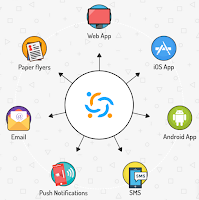
This morning at ISTE 2017 I met with Vlada Lotkina from ClassTag to talk about teacher-parent communication. ClassTag originally launched as a tool for streamlining parent-teacher conference scheduling and volunteering planning. It still does that, but it now has more features for communicating with parents. ClassTag lets you send email, push, and SMS/text announcements to […]
How to Download Your Remind Message History
At about this time last year I published a video that showed you how to download the history of the messages that you sent through Remind. Since then the process has changed slightly. In the new video embedded below I demonstrate how to download your Remind.com message history. Applications for Education You might want to […]
5 Blog Posts Your Students’ Parents Will Appreciate

Posting useful, practical tips is one of the best ways to get your students’ parents to frequently read your classroom blog. Coming up with those tips to write as blog posts can be challenging at times. Therefore, I’m offering you these five blog post topics that parents will appreciate. Consider turning any or all of […]
An Easy Way to Distribute Contact Info During an Open House

At back-to-school night parents usually end up with collection of papers that they may or may not be saved for reference throughout the school year. Use QR codes to put the odds in your favor of the information in those papers being saved. I figure that if parents and or students scan and save information […]
How to Download Your Remind Message History

This morning I received an email from Remind (formerly Remind 101) that reminded that I can download my message history. The history option lets me choose a range of dates in which messages were sent and then save those messages in PDF format. In the video embedded below I demonstrate how easy it is to […]
FreeConferenceCall.com Now Offers Free Video Conference Calls

Last summer I wrote about how pleased I was with the performance of FreeConferenceCall.com. We continue to use it at MindRocket Media Group for all of our conference call needs. This morning I learned that FreeConferenceCall.com now offers free video conference calls. The video conference call feature of FreeConferenceCall.com allows you to have up to 25 people […]