
How to Enable Collaboration on a YouTube Channel
This is the time of year of end-of-year celebrations captured on video. If you have multiple people in your school recording videos to share with a wider audience, you could have everyone send those videos to one person to post to YouTube. Another option, perhaps a bit easier option, is to have those people collaborate […]
Blurring Faces and Two Dozen Other YouTube Tips for Teachers
Earlier this week I took a few hours off from work to go see a play at my daughter’s elementary school. Doing that reminded me that we’re getting to part of the school year that tends to have a lot of special events. Many of those are events that you or someone in your school […]
YouTube Studio Settings for Teachers

Many years ago I was at the annual ISTE conference when I heard a speaker say, “if you want the biggest authentic audience for your students’ work, put it on YouTube.” I think he had a good point because it is possible for your students’ work be seen by millions of people if it’s really […]
Three Ways to Share Videos Without Using YouTube

The days of heated arguments about whether or not YouTube should be accessible in school seem to be behind us. That doesn’t mean that YouTube is always the best option for hosting and sharing videos in your school. In fact, just yesterday someone emailed me to ask for suggestions on how her students can share […]
Five Helpful YouTube Features for Teachers

YouTube offers a bunch of features that are sometimes overlooked or under-utilized despite being quite helpful when sharing videos in your classroom. In this new video I demonstrate five of those features. Playlists By default your Google/ YouTube account has a playlist titled “watch later.” That’s a private playlist to which you can save any […]
Five Screencasting Tools Compared and Ranked – Fall 2020

The launch of Vimeo Record earlier this week made me think that perhaps it was time to write a comparison of popular screencasting / screen recording tools. For this comparison I selected the five options that pop into my head whenever I’m asked about screencasting (which has been almost daily since March). With the exception […]
How to Share Your Videos in Google Classroom – With and Without YouTube

A lot of teachers are making their own instructional videos for the first time. Whether you make them using screencasting tools, by converting slides into videos, or by just using the camera on your Chromebook, you’re going to need a way to share your videos with your students. In this post you’ll see a few […]
Watch2Gether – Host Live Online Discussion About Shared Videos

Watch2Gether is a service for sharing videos that I’ve used off and on since 2011. When I first started using it you could share YouTube videos and host live chats about those videos on the same page. Over the years it has expanded to offer support for using videos from Vimeo, Facebook, Instagram, and half […]
How to Share Videos Through OneDrive

A few days ago I shared directions for sharing videos through Google Drive. Microsoft’s OneDrive has a similar capability that in some ways is actually better than using Google Drive. In OneDrive you can share videos via unique URLs that you can password protect. Additionally, in OneDrive you can set an expiration date on the […]
Try Flipgrid as an Alternative to a Classroom YouTube Channel

Whenever I lead a workshop or webinar about classroom video projects I always talk about the importance of respectfully sharing students’ videos online. That often leads into discussions about YouTube privacy settings and alternatives to using YouTube to publish students’ videos. Recently, I’ve started share the idea of using Flipgrid to have students share videos […]
Use ViewPure to Share a Portion of a Video With Password Protection

Over the weekend I shared information about ViewPure’s curated playlists for teachers and students. Another feature of ViewPure that you should note is the option to share just a portion of a video and to password protect it when you share it. To share a portion of a YouTube video through ViewPure you first need […]
5 Ways to Show YouTube Videos Without Related Content
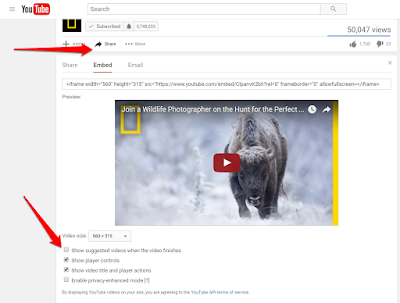
Anyone who has ever opened YouTube in front of a classroom knows the feeling of dread that comes with hoping that the “related” content in the sidebar really is related content. Likewise, you hope that the “related” videos at the end of the one you’re showing are appropriate for your classroom. Here are five ways […]
How to Clip and Share a Portion of a YouTube Video
Online videos can be quite useful for reiterating a lesson to your students, for inspiring thought and conversation, and for introducing a new concept to your students. The struggle we have sometimes is finding a video that gets to the point quickly. And sometimes we don’t need students to watch all of a TED Talk […]
Five Tools for Sharing Portions of Videos
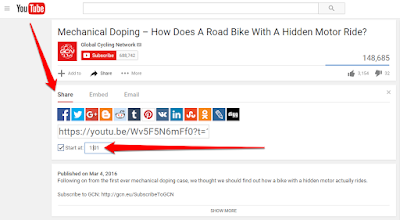
Online videos can be quite useful for reiterating a lesson to your students, for inspiring thought and conversation, and for introducing a new concept to your students. The struggle we have sometimes is finding a video that gets to the point quickly. And sometimes we don’t need students to watch all of a TED Talk […]