
A New Limit on Zoom Meetings
Most readers of Free Technology for Teachers who are hosting Zoom meetings on a regular basis are probably using a Zoom subscription through a school account. If that isn’t the case for you and you’re using a free Zoom account, there is a change coming that you need to note. All Zoom meetings, regardless of […]
How to Use Calendly and Zoom Together

A few days ago I published a blog post about how I was able to streamline my appointment scheduling process. In that post I wrote about using Calendly’s free appointment booking tool and its integration with Zoom. A long-time reader of my blog asked if I could make a video about that process. I was […]
One Simple Tool Streamlined My Appointment Scheduling Process

For as long as it has been available I’ve used appointment slots in Google Calendar when scheduling meetings with colleagues and or students. That works very well when everyone is in the same Google Workspace domain, but it gets a little quirky when you try to use it with people who are outside of your […]
Try These Zoom Presentation Tips from Garr Reynolds
Garr Reynolds is one of the world’s foremost experts on presentation design. If you haven’t seen any of his TED Talks or read Presentation Zen, put it on your to-do list. I follow Garr Reynolds on Twitter and this morning he Tweeted a link to a new video of his in which he explains why […]
Try Virtual Backgrounds and Immersive Views for Virtual Events

This afternoon I was asked to help organize a virtual holiday concert for my daughters’ preschool. The event is going to happen in Zoom and there will be ten children (plus parents) performing together. I might be making things a little more difficult on myself, but I plan to try to put all of the […]
Zoom Tip – Screen Share Zoom Windows

If you have recently updated the desktop version of Zoom you may have noticed a new option in your “in meeting” settings. That option is “show Zoom windows during screen share.” By enabling that option your screen shares will include the webcam or profile picture windows of the people who are in your meeting. See […]
Zoom Now Offers a Cool Immersive View
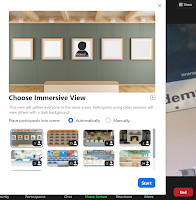
Are you tired of looking at the same old view in your Zoom meetings? You’re not alone! It appears that even the people who work at Zoom are tired of the same old views. To remedy that problem, on Monday Zoom introduced a new immersive view option for Mac and Windows users. Zoom’s immersive view […]
Live Transcription in Zoom – Free for All Who Need It

About six weeks ago I published a video about how to enable automatic captions in Zoom. At the time, that feature was only available in the paid versions of Zoom. Since then Zoom has made two updates to their policy about access to live captioning. First, Zoom now refers to live captioning as live transcription. […]
How to Mute Everyone in a Zoom Meeting

Are you tired of starting every Zoom meeting with five minutes of “please remember to mute yourself” as people straggle into the meeting? Are you tired of muttering to yourself, “why doesn’t the host use the mute everyone function?” If so, this video is for you! In this short video I demonstrate how to create […]
Create Infinitely Recurring Zoom Meetings

Last week one of my colleagues asked me for help setting up some Zoom meetings. He needed to hold a series of meetings that were not going to be held at the same time each day. He could have set a series of individual meetings. That would have required students to have a different link […]
How to Use Google Calendar to Book Zoom Meetings

This week and next week at my school we have to hold short interviews with students who want to be in our technical programs next year. In normal years this happens in our classrooms. This year we’re doing it over Zoom. To streamline the process of scheduling Zoom meetings with prospective students I created a […]
My Most Popular Tutorial Videos in February

My YouTube channel now has more than 34,000 subscribers. According to the analytics that YouTube provides, more than half of all of the views of my videos happen through embeds on my blog. YouTube also provides analytics of what was watched the most over the last month. In case you’re curious, here’s a list of […]
Filters, Captions, and Other Zoom Features You Might Have Missed

A few weeks ago I published an article in which I mentioned that Zoom didn’t have a native transcription or captioning feature. Within minutes of hitting publish on that article, people emailed me to point out that I was wrong. I’m thankful for that because it opened my eyes to a feature that I was […]
How to Save Your Zoom Meeting Annotations

Last week a colleague asked me if there was a way she could save the sketches that she made for students during her Zoom calls. Since we work in the same building I just walked to her room and showed her how to save the annotations. But I’m sure that there are other teachers who […]
Use Zoom and Adobe Spark to Make Green Screen Videos

As I do every year, I’m taking this week off from writing new blog posts. This week I’ll be re-running a few of the most popular posts in 2020. This year more of us used Zoom than ever before. As is the case with many tools, the more that I used Zoom and answered questions […]
Get the Wiggles Out With Sworkit Kids

Sworkit Kids is a free app that I’ve been using and recommending for a few years. It provides prompts for one to five minute physical activities that kids can do in their classrooms or at home relatively small spaces. These activities are great for short brain breaks or to “get the wiggles out” during a […]
Five Ideas for Online Breakout Room Activities

Breakout rooms in Zoom, Microsoft Teams, or Google Meet provide a good way to get students talking and working in small groups. For some students, talking to a couple of classmates in a small breakout room is a lot less intimidating that talking to you “in front” of the whole class. Small breakout rooms give […]
How to Create Breakout Rooms in Zoom, Microsoft Teams, and Google Meet

Breakout rooms can be useful to get students talking and working in small groups in a virtual class meeting. Here are directions for creating breakout rooms in Zoom, Microsoft Teams, and Google Meet. How to Create Breakout Rooms in ZoomTo create breakout rooms in Zoom you’ll first need to make a small change in your […]
How to Reduce Noise in Zoom Meetings

On Monday I shared Mike Tholfsen’s tutorial on how to reduce background noise in Microsoft Teams calls. That prompted a few people to ask me if the same thing can be done in Zoom. Yes, you can filter background noise with some tools that are built into Zoom. In the advanced audio settings for Zoom […]
How to Improve Audio Playback in Zoom

On Thursday morning one of my colleagues asked me how to improve the quality of the sound when he plays videos in Zoom meetings. Zoom actually has a simple way to do that built right into the screen sharing menu. To improve the quality of the audio when playing a video in a Zoom meeting […]
Lucidspark – A New Collaborative Online Whiteboard Option

Lucidspark is a new collaborative whiteboard tool from the makers of the popular Lucidchart service. Lucidspark has all of the features that we’ve come to expect in an online whiteboard tool. It contains tools for placing pre-made shapes, drawing with a pen tool, and adding text to the screen. There is a wide array of […]
Use a Zoom Virtual Background for Lesson Outlines

One of the many challenges of teaching in a hybrid classroom setting this fall is giving the kids who are attending virtually a similar experience to those who are attending class in-person. To that end, one of the things that I’m trying this week is using virtual background in Zoom that lists the bullet points […]
What Did You Watch in October?

More than 30,000 people are now subscribed to my YouTube channel. On my channel I publish screencast videos about all kinds of things including how to make videos, how to do interesting things with Google Slides, how to publish a podcast, and many other topics. Most of the videos are made to address questions that […]
How to Protect Privacy When Publishing Recordings of Virtual Meetings

During yesterday’s episode of Two Ed Tech Guys Take Questions & Share Cool Stuff someone asked for a suggestion on how to blur or mask students’ faces when publishing the recording of a Zoom class meeting. My suggestion was to upload the recording to YouTube and then use the automatic blurring tool built into YouTube’s […]
Watch You Watched in August

My YouTube channel has nothing but short screencast videos on it (mostly made with Screencast-o-matic) but it keeps growing. More than 28,0000 people now subscribe to it. In August those 28,000 people watched nearly 15,000 hours of my videos. These were the ten most-watched videos on my YouTube channel in August. Zoom Tip – How […]
The Five Things I’ve Been Asked About the Most at the Start of the New School Year

Every week I receive dozens of emails from teachers asking me for advice on all kinds of things related to education and technology. Many of those questions get answered during Two Ed Tech Guys Take Questions and Share Cool Stuff on Thursday afternoons. Many of the questions I answer directly via email. As many of the […]
Five Zoom Features You Need to Know

As the new school year gets going there is going to be a lot more Zoom calls in our future. At my school students are going to be on Zoom or Google Meet for at least two days of every week to start the year. If that sounds like you, here is a handful of […]
Seven Zoom Tutorials to Watch Before School Starts

As the new school year approaches I’ve been getting a lot questions about Zoom. I have published some tutorials on my YouTube channel that address most of those questions. Until this morning I haven’t put them all together in one place. Here are my Zoom tutorial videos. The Basics of Hosting a Zoom Meeting Zoom […]
All About Zoom Breakout Rooms

Breakout rooms is one of the best features of Zoom. If you’re anticipating using Zoom this fall and you haven’t tried the breakout rooms function, you need to try it. Breakout rooms will let you create small group work environments within your Zoom meeting. Breakout rooms let you start your meeting will all students in […]
Zoom from Teacher and Student Perspectives

As the new school year gets closer I’m getting a lot of requests for help with Zoom. I have published a few video tutorials about Zoom including this one that covers the basics of setting up a meeting with students. I’ve also published this one about how students see Zoom meetings on Android phones. But […]
Stream Multiple Sources at Once With OBS Studio

Last week I got an email from a reader who was looking for a means to stream or broadcast from multiple sources. Zoom, Google Meet, and Microsoft Teams can do that if you use screensharing. There are other tools available that provide a bit more “professional” level of mixing sources into your broadcast than what […]
Preparing for the Worst With Zoom, Dual Monitors, Microphones, and More

In the last couple of weeks I’ve received a bunch of emails and Tweets from people who are panicking about going back to school and having to simultaneously teach students in their classrooms while also live-streaming and or recording their lessons for students who are staying home. I think it is completely unrealistic to expect […]
How to Use Zoom and Adobe Spark to Make Green Screen Videos

We’re halfway through 2020. This week I’m taking some time off from the blog to work on some other projects. The rest of this week I’m going to re-run some of the most popular posts and videos of the year so far. This year more of us used Zoom than ever before. As is the […]
Tips & Tricks for Using Zoom and Google Meet – Free Webinar Tomorrow

Tomorrow at 5pm ET/ 2pm PT Rushton Hurley from Next Vista for Learning is hosting the next installment of his Activities Across Grade Levels series. Tomorrow’s free webinar is all tips for improving your use of Zoom and Google Meet with students. You can register for the webinar here. Recordings of all previous installments in […]
How to Create Whiteboard Videos With Zoom

One of the things that I often mention in my webinars and workshops is the idea of getting to know an instructional technology tool well so that you can use it in many ways. A good example of that is found when dive into all of the ways that you can use Zoom. For example, […]
How to Create a Green Screen Video Without a Green Screen

If you have ever wanted to make a green video but didn’t have access to iMovie and couldn’t make the investment in other video editing software, this new video is for you. In the following video I demonstrate how you can use Zoom and Adobe Spark together to create a green screen video. Zoom’s desktop […]
5 Things You Should Never Do In a Virtual Staff Meeting

At this point we’ve all had our fill of virtual staff meetings. Hopefully, all of yours are going as well as possible. But even the best virtual staff meetings still have “that one person” who doesn’t quite understand the norms of a virtual staff meeting. That’s what inspired my list of 5 Things You Should […]
How to Reverse the Mirroring Effect in Zoom

In my recent article titled What’s On My Desktop I mentioned using a small physical whiteboard during live lessons delivered via Zoom or Google Meet. Since then a few people have emailed to ask how I am able to make the writing on the whiteboard not appear reversed to students. It’s actually really easy to fix […]
Schedule Individual Online Office Hours Meetings via Google Classroom

A lot of us are hosting online office hours for our students these days. Based on what I’ve seen from my colleagues as well as folks posting on social media, a lot of people are scheduling an hour of time and just hanging out in a Google Meet or Zoom meeting waiting for students to […]
A Student View of Joining a Zoom Meeting on an Android Phone

A few days ago I got an email from a reader asking me what it looks like when a student tries to join a Zoom meeting on an Android phone. It was a good question because it is important to have an understanding of what a student experiences when he or she tries to use […]
A Solution to Zoom “Not Responding” on Windows 10

On Friday morning I started having problems with every Zoom meeting that I tried to launch or join on my Windows 10 computer resulting in the annoying “application not responding” message. I didn’t have the same problem on my Mac. Based on the response to a Tweet that I posted, I wasn’t the only one […]
Three Free Webinars About Transitioning to Teaching Online

In my previous post I mentioned Rushton Hurley’s Emergencies and Switching to Online Learning. Later this week Rushton is going to host three free webinars on the topic. The webinars are Wednesday at 4pm ET and 7pm ET and then again on Friday at 4pm ET. You can register for the webinars here. In describing […]
How to Host an Online Meeting With Zoom

In my recent post titled Tips and Tools for Teaching Remotely I mentioned using Zoom to host online classes if Google Hangouts Meet or Microsoft Teams aren’t available to you. I’ve used Zoom’s free plan for about five years and it has been more than adequate for one-on-one and small group meetings. Zoom’s free plan lets […]