
This Little Trick Makes Podcast Editing Easier
When editing a video there are visuals that make it relatively easy to know where to cut. The same is not true when editing audio for a podcast unless you use the “clap and pause” trick. That trick, demonstrated in the short video that is embedded below, gives you a clear audible sign of where […]
A Simple Trick to Make Audio Editing Easier
In this week’s Practical Ed Tech Newsletter I featured five podcasting tips for students and teachers. One of those tips was to “clap and pause.” That tip is demonstrated in the short video that is embedded below. Editing an audio recording is much easier if you make a loud clap before a brief pause and […]
Three Ways to Convert Video into Audio

Earlier this week I had a colleague ask me how she could extract the audio from a video that she had made. Some video editing tools, including iMovie and WeVideo, have an option to export just the audio from your video projects. But if the video was created by just filming with a smartphone or […]
A Quick & Easy Way to Combine Audio Tracks

Last week I published a video that outlines how I produce my podcast. Within that video I included some tips about using Garage Band to extract audio from a video and how to combine audio clips in Anchor.fm. This morning I had an email from a reader who wanted to know what her students could […]
How to Extract Audio from a Video

One of the questions that I answered during today’s Practical Ed Tech Live episode was, “is there a way that I can just take the audio out of the videos to publish it as a podcast?” There are a few ways that you can extract the audio from a video. One of the easier ways […]
Twisted Wave – Create and Edit Audio on Chromebooks

When it comes to recording and editing audio Mac users have Garage Band and Windows users have Audacity (it’s available for Mac too). Chromebook users have Twisted Wave. Through TwistedWave you can create and edit spoken audio recordings from scratch. Your completed tracks can be exported to Google Drive and SoundCloud. If you have existing […]
A Couple of Free Online Alternatives to Audacity

On Monday someone Tweeted at me a request for an alternative to Audacity that his students could use online to record and edit audio tracks. My first thought was to try SoundTrap, but they no longer offer a free version of their product. So my next suggestion was to try Twisted Wave. This morning I […]
17 Audacity Tutorials for Beginners
Audacity is a free, open-source program for recording and editing audio. It’s available for Windows, Mac, and Linux computers. For classroom podcasting projects or other classroom audio recording projects, it is hard to beat Audacity. The only trouble is that it can feel a bit overwhelming the first time that you open it up on […]
Podcast Recording and Editing Tips

Podcasting has made a resurgence in recent years. Many teachers are now including podcasting projects in their classrooms. Edublogs recently published a great guide to help you get your classroom podcast started. Editing a podcast before publication can often be the most tedious part of the podcasting process. Dennis Grice has a tip that can […]
This Online Audio Editor Is Beautiful
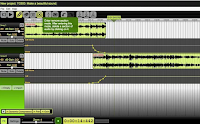
Beautiful Audio Editor is a free audio editor that you can use in the Chrome and Firefox web browsers. Beautiful Audio Editor lets you record spoken audio directly and or import audio that you have previously recorded in MP3 and WAV formats. You can edit and blend multiple tracks in the Beautiful Audio Editor. When […]
3 Online Alternatives to Audacity
Earlier today I received this question on Twitter: @rmbyrne hi!! is there a free sound editor similar to audacity but online? To add music, effects still seems to require software. THANKS:)!! — Sonia Guilana (@sguilana) March 24, 2017 My suggestions were to try SoundTrap, BandLab, or Soundation. Soundtrap is a fantastic tool for creating music online. […]
4 Audio Editing Tools for Chromebooks – A Comparison Chart
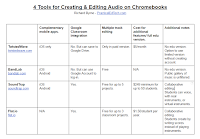
Yesterday’s post about Twisted Wave sparked quite a few comments on Facebook, Twitter, and in my email. People wrote to ask about and or suggest other audio editing tools to use on Chromebooks. So I decided to create the following chart to compare four tools for creating and editing audio file on Chromebooks. You can […]
Twisted Wave – Your Chromebook Alternative to GarageBand
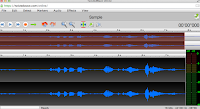
Yesterday, I was asked on Twitter for an alternative to GarageBand that will work on a Chromebook. Twisted Wave was the first tool to come to mind. Twisted Wave is a browser-based audio recording and editing tool that functions in a manner similar to GarageBand. Through TwistedWave you can create and edit spoken audio recordings […]
Six Audio Recording Tools That Work In Your Web Browser
As I have mentioned over the last couple of days, last week someone rightly pointed out to me that the Practical Ed Tech Tips playlist on my YouTube channel was getting a bit too long (it has more than 200 videos in it). To rectify that problem I’ve created some smaller playlists consisting of videos that I’ve published on […]