
How to Add Audio to Almost Anything in Google Workspace
Mote is a great tool for adding audio comments to Google Docs, Google Classroom, and Google Slides. You can also use Mote to add audio to Google Forms and insert audio into Google Slides with just one click. Mote also lets you record audio messages to share directly in Gmail and or via QR codes. All of […]
Swords, Airplanes, and Cartoons – A Big Collection of Free Sound Effects

The Internet Archive’s USC Optical Sound Effects Library is a collection of hundreds of sound effect recordings created for Hollywood studios in the beginning in the 1930’s through the 1980’s. The recordings were donated to USC and have now been digitized for playback and download on the Internet Archive. The Internet Archive’s USC Optical Sound […]
Two Ways to Create Short Audio Recordings to Share via QR Code
A couple of weeks ago a loyal reader reached to me for my thoughts about sharing audio recordings via QR codes. His idea was to place QR codes on objects within his classroom and school so that students could scan them to hear his audio recordings. There were two tools that I recommended to him. […]
Synth Relaunches With a Renewed Focus on Asynchronous Audio Conversations

This week Synth released an updated user interface and a renewed focus on helping teachers and students engage in asynchronous audio conversations. In this post I’ll provide an overview of what Synth does, what has been updated in its user interface, what’s still the same, and how Synth can be used by teachers. What is […]
Voicepods – Automatically Turn Text Into Voice Recordings

Voicepods is a neat service that will create voice recordings based on the text that you write. Voicepods offers eight voices in which you can have your text read-aloud. The voice recording that is generated from your text can be listened to online and you can download it as an MP3 to use wherever MP3 […]
Anchor Adds New Ways to Craft Podcasts
In the last year Anchor.fm has become my go-to recommendation for easily creating podcasts with students. The web version of Anchor.fm lets you record, edit, and publish podcasts in a matter of minutes. The Anchor mobile apps are even easier to use. This week Anchor added a couple of new features to their free iOS […]
SpeakPipe Has New Customization Options
SpeakPipe is a great little service that lets you collect voice messages from visitors to your blog. I used it for many years on a classroom blog so that parents could leave voice messages by just clicking the “send a message” button on my blog. I could then either listen to the message or read […]
The Microphones I Use for Video and Audio Recordings
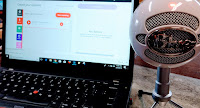
After my recent posts about creating classroom podcasts I’ve answer a bunch of emails and Tweets from readers who were looking for suggestions on microphones to use. There are two microphones that I have used for years and continue to recommend. I use a Snowball iCE microphone and an Insignia omnidirectional lapel microphone (disclosure: affiliate links). […]
How to Add Audio, Video, and Picture Notes to Padlet Walls

Padlet has a new audio recording option that allows you to record for up to fifteen minutes at a time. This is a great addition to the video and picture note options that Padlet already offered. In my video embedded below I demonstrate how to create audio, video, and picture notes on Padlet. Applications for […]
Three Thanksgiving Activities You Can Do Today!

It’s Thanksgiving Eve here in the U.S. If you have school today and you’re still looking for some Thanksgiving-themed activities to do today, I have three suggestions for you. 1. Build a thankfulness Padlet wall with your students. Create a Padlet wall and have students share text and picture notes in which they share the […]
The StoryCorps Recording App Gets Updated Privacy Controls
StoryCorps offers a free app for recording interviews. I’ve used the app for a couple of years. In fact, I like it enough to include it in my Teaching History With Technology class. The one complaint that people have had about it is that your recorded interviews are automatically made public in the StoryCorps archives. […]
Anchor – A Good Alternative to AudioBoom

Anchor.fm is a free podcasting service that I started using about ten months ago. It has steadily added features throughout the year. If you find yourself looking for a replacement for AudioBoom which this week announced the removal of all free accounts, Anchor.fm is a service that you should try. Here are some highlights of […]
Anchor Offers the Easiest Way to Publish Podcasts
Anchor is a free audio publishing service that I started using last winter. I was drawn to Anchor by its ease of use. Recording on Anchor is simple of matter of just holding down the record button on your phone then releasing it when you’re done talking. When I started using Anchor it only let […]
This Online Audio Editor Is Beautiful
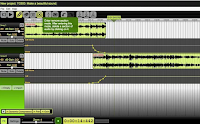
Beautiful Audio Editor is a free audio editor that you can use in the Chrome and Firefox web browsers. Beautiful Audio Editor lets you record spoken audio directly and or import audio that you have previously recorded in MP3 and WAV formats. You can edit and blend multiple tracks in the Beautiful Audio Editor. When […]
How to Use SoundCloud to Record and Comment

During Thursday’s Practical Ed Tech Live session I answered a question about recording and sharing audio. The person asking was looking for a way for students to record conversations in French and then share those recordings with their teachers. One of my recommendations was to try SoundCloud for recording and commenting on the recordings. In […]
SpeakPipe – Collect Voice Messages Through Your Blog
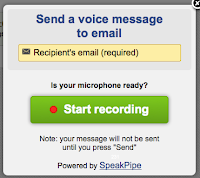
SpeakPipe is a great tool to add to classroom blogs. SpeakPipe allows you to collect voicemail messages through your blog. With SpeakPipe installed on your blog anyone can click on the “send voicemail” button and leave a message for you. When a visitor clicks the “leave voicemail” button she will be prompted to allow access […]
Anchor Adds New Features for Simple Podcasting

Anchor is a simple and free platform for creating short podcasts. I started using it in December to publish occasional podcasts. A couple of things initially drew me to Anchor. First, recording is simple of matter of just holding down the record button on your phone then releasing it when you’re done talking. Second, when […]
Four Tools for Making Audio Recordings on Chromebooks

A couple of weeks ago I was mentioned in a Tweet from someone who was looking for suggestions for tools that his students could use to create audio recordings on their Chromebooks. The following are my suggestions based on my preferences. 1. Vocaroo – this is the simplest of all of the recording tools. To […]
Six Audio Recording Tools That Work In Your Web Browser
As I have mentioned over the last couple of days, last week someone rightly pointed out to me that the Practical Ed Tech Tips playlist on my YouTube channel was getting a bit too long (it has more than 200 videos in it). To rectify that problem I’ve created some smaller playlists consisting of videos that I’ve published on […]
Recording History With Students – Tools & Ideas
Over the weekend at the Native Innovation Education conference I facilitated a short workshop titled Recording History With Students. The focus of the workshop was on helping students record interviews with their elders. We started out by looking at the great questions list offered by StoryCorps. We then moved on to using the StoryCorps.me app, […]
Mic Note – Create Time-stamped Multimedia Notes
Mic Note is a free Chrome app that allows you to create voice recordings, text notes, and image-based notes on one concise notebook page. The notes that you record with your voice can be time-stamped by clicking on your Mic Note note page while you’re recording. You can also take notes without recording any audio. […]