
Three Ways to Make Whiteboard Videos on Your Chromebook

Last week I published a video on how to make a simple video on a Chromebook without installing any extensions or apps. That video was fairly popular and it prompted some follow-up questions from readers and viewers who wanted my recommendations for making whiteboard videos on a Chromebook. Besides just recording in front of an […]
EDpuzzle Live Mode – Turn Video Lessons Into Group Activities

EDpuzzle has been my go-to tool for making video-based lessons and quizzes for many years. Just in time for the new school year EDpuzzle has released a new feature called Live Mode. EDpuzzle’s Live Mode lets you take your existing EDpuzzle lessons or any new lessons that you create and turn them into group activities. […]
ClassHook Gets a New Look

ClassHook is a service that I recommend trying when you’re looking for video clips to illustrate a concept and don’t want just another “how to” video. ClassHook provides a search tool for finding clips from well-known television shows and movies to be used in your lessons. You can search according to topic, standard, grade level, […]
How to Create Video-based Lessons

Earlier today I answering a question about uploading videos to EDpuzzle when I realized that I haven’t made a complete tutorial video on how to use EDpuzzle since its design was updated. My previous videos about the service are all a few years old and while the functions are largely the same, the layout has […]
Three Ways to Use Video in End-of-Year Review Activities

The end of the school year is rapidly approaching. If you’re a high school teacher you probably planning for final exams and final exam review session. You might have in-classroom review sessions planned. But you probably have some students asking for review activities that can be done outside of classroom hours. That’s when video is […]
Timelinely – Annotate Videos With Text and Pictures

Timelinely is a new tool for annotating videos that are hosted on YouTube. I learned about Timelinely through one of Larry Ferlazzo’s recent blog posts. I tried Timelinely for myself this afternoon. Timelinely makes it easy to get started. You just have to copy a YouTube URL into the Timelinely homepage to get started. Once […]
5 Video Projects for Almost Every Classroom

Update: This webinar is now available on-demand. In this one hour webinar you will learn how to create and complete five video projects that can be done in almost any classroom. You’ll learn how your students can make five types of videos in your classroom. Examples from real students and teachers will be shared during […]
Making Maple Syrup – A Science and Math Lesson

The days are getting warmer here in Maine, the sun is shining a bit longer each day, and the snow is starting to melt. That means that two of a Mainer’s favorite seasons are starting; mud season and maple syrup season. My friend Gardner Waldeier AKA Bus Huxley on YouTube collects maple sap to make maple […]
Common Craft Explains Flipped Classrooms

The flipped classroom concept, in the right setting, can be an effective way to maximize classroom time. Perhaps you’ve tried it yourself and have been looking for a way to explain it to parents or colleagues. Common Craft recently released a good video that could help you do just that. Flipped Classroom Explained by Common […]
What is a Grand Jury?

One of the topics that some of my civics students struggled with was understanding the court system in the United States. Keith Hughes recently published a video that I wish he had made about 10 years ago because some of those students would have benefited from watching What is a Grand Jury? In What is […]
How to Embed Flipgrid Videos Into Your Blog
On Sunday I featured Flipgrid in my tip of the week. My video tutorial on getting started with Flipgrid included how to share your video prompts with students and how they can reply to your prompts. One method of sharing that I didn’t include in Sunday’s video was embedding Flipgrid videos into blog posts. You […]
How to Use Flipgrid – A Guide for Getting Started

Flipgrid is a fantastic service for collecting video responses to prompts that you pose to your students. It has been a hit whenever I have demonstrated it in a workshop or conference presentation during the last year. The basic idea behind Flipgrid is that it enables you to post a video prompt and then have […]
Create Great Video Lessons on iSL Collective

iSL Collective offers a huge gallery of video-based lessons designed to help students learn English. It also offers a fantastic tool for teachers to use to create their own video-based lessons. iSL Collective’s video lesson creator lets you build questions into videos found on YouTube and on Vimeo. The lesson creator allows you to add […]
Three Things That Can Help You Teach With Video
Whether you want to make your own instructional videos or you just want to make sure that your students are learning something from the videos that you share with them, there are a few basic things that you should know. 1. Short and sweet. Two well-made videos that are each two minutes long are better […]
How Deep Is the Ocean? – This Video Puts It Into Perspective

Understanding the scale of something like depth of the ocean or distance to the moon is best done with visuals that are familiar to students. That’s why I am excited to share this video from Tech Insider about the depth of the ocean. It does a great job of helping viewers understand the depths of […]
417 History and Civics Lessons In One Place
On Friday I featured Tom Richey’s YouTube channel which is full of great content for Advanced Placement U.S. and European History students. Today, I want to point out or remind you about the excellent videos that Keith Hughes produces. Keith has at least 417 video lessons about a wide range of topics in U.S. and […]
Try YouTube Live To Reach More Students
Back in May I shared how Tom Richey was using YouTube Live to host AP World History review sessions for students. That’s one way to use YouTube Live to help your students. Another way to use YouTube Live is to broadcast and record lessons from your classroom. As I explained and demonstrated yesterday at the […]
Know Recorder – Create Whiteboard Videos on iPads and Android Tablets
Know Recorder is a free iPad app and free Android app for creating whiteboard-style instructional videos. With Know Recorder installed on your iPad or Android device you can draw and talk while the app records everything that you do and say. Your video can have multiple pages which is a nice feature when you want […]
MoocNote Offers a Chrome Extension for Taking Notes on Videos
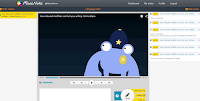
MoocNote is a good tool for adding time-stamped notes to the videos that you watch. You can also use it to create time-stamped questions for others to answer while watching a shared video. MoocNote works with videos from YouTube as well as videos that you import from Google Drive or Dropbox. The latest update to […]
EDpuzzle – Readers’ Favorite App

At the end of December I asked you to submit your nominations for favorite educational apps. The nomination form was divided into three sections. Those sections were iOS, Android, and Web/Chrome apps. In all three sections EDpuzzle was nominated more than any other app. If you are not familiar with EDPuzzle is a neat tool […]
Three Tools Students Can Use to Add Annotations to Videos – Best of 2016

As I usually do during this week, I’m taking some time off to relax, ski, and work on some long-term projects for the next year. This week I will be re-publishing the most popular posts of 2016. When we talk about flipped lessons it often involves a lot of heavy lifting on a teacher’s part. […]
EDpuzzle Offers an Android App for Students

Thanks to David Kapuler I have just learned that EDpuzzle now offers an Android app for students. The EDpuzzle Android app lets students join your EDpuzzle classroom, find assignments, watch videos, and answer the questions that you have added into videos in your EDpuzzle classroom. Students who have more than one teacher using EDpuzzle can […]
TurboNote Adds New Features for Syncing Notes to Videos
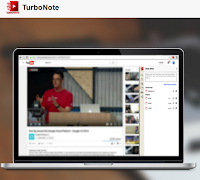
TurboNote is a great Chrome extension that lets you take time-stamped notes while watching videos on YouTube, Vimeo, Facebook, and many other video sharing sites. I was immediately impressed by TurboNote when I reviewed it last month. This week TurboNote released two great updates. Those updates feature transcript search and synced viewing. In the updated […]
Three Tools That Help Students Take Notes While Watching Videos

Creating flipped lessons in which students answer questions about a video that you make them watch can be one way to check whether or not they watched a video. Another way is to have them simply record their own observations and or write their own questions while watching a video. The following three tools are […]
TurboNote – Take & Share Notes While Watching Videos

TurboNote is a great Chrome extension that enables you to take notes while watching a video in the same web browser window. Unlike some similar extensions, TurboNote isn’t limited to working with YouTube videos. TurboNote can be used on Vimeo, Netflix, and Facebook videos. With the TurboNote extension installed you can take notes while watching […]
The Threat of Invasive Species

When you drive into my home state of Maine two of the first signs you’ll notice are a sign to watch for moose and a sign banning the importation of firewood. The reason for the moose crossing sign is fairly self-explanatory. The reason for the ban on importing firewood may not be so obvious. Importing […]
HipHughes History Celebrates 300 Video Lessons
This week Keith Hughes celebrated the publication of the 300th video on his massively popular HipHughes History channel. His latest video is a short explanation of the flipped classroom model and how it uses it. That video is embedded below. Along with his 300th video, this week Keith published a Google Document that lists all […]
How to Move from Zaption to EDpuzzle In Three Steps (Zaption is closing)
A couple of weeks ago when I shared the news that Zaption is closing I also shared some suggestions for alternatives to using Zaption. One of those suggestions was to try EDpuzzle. The folks at EDpuzzle saw that post and created a video for followers of this blog who would like to switch from Zaption […]
Zaption is Closing – Try These Alternatives
At the end of June Zaption announced that they had been acquired by another company and would be shutting down at the end of September. That announcement prompted many people to start looking for alternatives to Zaption. These are the tools that I am recommending at this time. EDPuzzle is a neat tool that allows […]
Three Things to Consider Before Flipping Your Classroom

Flipping your classroom with video lessons can be a good thing in the right situation. Before you decide to completely flip your classroom there are a few things that you should consider. 1. Do the majority of your students complete their homework assignments on time on a consistent basis? If not, there may be a […]
Zaption Expands Free Options for Creating Flipped Lessons
Zaption is a popular tool for creating video-based lessons and quizzes. The service operates on a freemium model in which they offer a mix of free and paid options. Last week Zaption announced that the free options have been expanded. Teachers can now utilize all of the video lesson creation tools that Zaption offers. Those […]
Vibby – Annotate YouTube & Vimeo Videos on Your Own Site
Last fall I wrote a couple of posts about a new video annotation tool called Vibby. Over the last few months the Vibby developers have been hard at work to add some useful new features for teachers. You can now use Vibby to annotate Vimeo videos as well as YouTube videos. To annotate a YouTube […]
Three Tools Students Can Use to Add Annotations to Videos

When we talk about flipped lessons it often involves a lot of heavy lifting on a teacher’s part. From finding a video to adding questions to the video, it is a time-consuming process and in the end we’re still not always sure if the students actually watched the video or they just guessed at the […]
The Instructional Technology Tool I Recommend in Email More Than Any Other
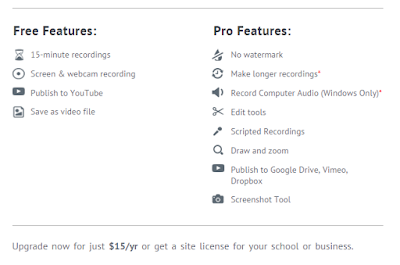
Every week I receive at least a handful of emails from readers who have watched one of my Practical Ed Tech tutorial videos and wanted to know how I created the video. Often those people want to know how I get the yellow circle to appear around my cursor in my videos. The answer to […]
Valentine’s Day Science and Statistics

With Valentine’s Day coming up this weekend it’s a good time looking for at science and statistics related to the day. The following video from It’s Okay To Be Smart (produced by PBS Digital Studios) explains why humans kiss, the history of symbols associated with kissing, and some cultural views of kissing. When I saw […]
Two Good Tools for Building Online Discussions Around Videos

Watching videos then answering questions about them is the basic premise of a lot of flipped classroom lessons. To take that idea to higher level, invite students to ask questions and or and notations to videos that you have shared with them. Vialogues and VideoNot.es are excellent tools for building online discussions around shared videos. […]