
How to Add Audio to Almost Anything in Google Workspace
Mote is a great tool for adding audio comments to Google Docs, Google Classroom, and Google Slides. You can also use Mote to add audio to Google Forms and insert audio into Google Slides with just one click. Mote also lets you record audio messages to share directly in Gmail and or via QR codes. All of […]
One Good Way to Record a Video in Gmail

Sometimes it is easier to reply to an email with a video than it is to write out a reply. For example, when a colleague asks me for help with Google Classroom I could write step-by-step directions or I could record a short screencast that would accomplish the same thing. Loom’s Chrome extension makes it […]
How to Move Your Gmail in Bulk
A few weeks ago I published directions on how to use Google Takeout to move your most important Google Workspaces assets out of one account to use in another. Late last week a reader asked me about just moving Gmail messages from one account to another. You can do that with Google Takeout, but there […]
25 Gmail Tips for Teachers and Students

As part of my on-going quest to bring some organization to the more than 1,500 videos on my YouTube channel, I’ve created a new playlist of 25 Gmail tips for teachers and students. The playlist includes everything from how to sort your Gmail messages to filtering and blocking senders to email etiquette tips we all […]
Automatically Forward Important Google Workspace Email to Secondary Email Address

It’s summer (in the northern hemisphere) and for many people reading this blog that means it’s time to cut back on reading work email. Some folks simply turn on a vacation responder for the summer and come back to a pile of email in late August. Others like to occasionally check their email during the […]
How to Quickly Record Voice and Video Messages in Gmail

Sometimes it is easier, faster, and more effective to record a video or audio reply to an email than it is to type a response. For example, when I get asked for technical help it is often faster and more effective to create a screencast video than it is to write directions. Sending an audio […]
How to Disable or Limit Google Classroom Notifications

If you’re like a lot of the teachers I’m hearing from this fall, you’re using Google Classroom more than ever. And if that’s the case you might be feeling like you’re getting overrun with notifications from Google Classroom. That was certainly the case for someone who asked me and Rushton Hurley for help in the […]
Three Time-saving G Suite Features for Teachers

This afternoon I hosted a webinar in which I shared some time-saving tips for teachers using G Suite for Education. I shared them in the context of talking about providing feedback to students as quickly as possible in asynchronous online learning environments. Aside from that context, these I don’t know any teacher who wouldn’t like […]
How to Create an Approved Senders List in Gmail

Have you ever signed up for a webinar like this one and then wondered why you never got any information about how to join the webinar? Or have you had someone say, “yeah, I emailed that to you yesterday” but you didn’t see it in your inbox? If so, you should create an approved senders […]
A Tip for Your Colleagues Who Unnecesarily Use “Reply All”

In a presentation that I occasionally give about the evolution of educational technology I have a slide that lists classic online discussion tools. On that slide I have a bullet point that reads, Group Email (which everyone hates). That slide always gets a chuckle from the audience because everyone has a colleague that uses “reply […]
How to Set a Vacation Responder

For the last week my Facebook feed has been filled with posts from friends who are celebrating the last day(s) of the school year. This is a good time to set a vacation responder in your email. If you use Gmail (either consumer or G Suite for Education), watch my video below to learn how […]
Using Canned Responses in Gmail
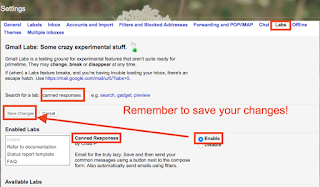
Gmail Labs are something that often go unnoticed because they are somewhat hidden and hard to find unless you are looking for them. A word of caution about Gmail Labs. These features can be killed off at any given time with no warning so try to not get too attached to any of them. One of […]
Sushi, Gmail, and Kahoot

At the end of every month I like to take a look at the search terms visitors frequently use on Free Technology for Teachers. It gives me a sense of what people are interested in learning about. That information helps me brainstorm new blog posts for the next month. The three most commonly searched terms in […]