

18 Google Keep Tutorials for Teachers
A couple of weeks ago I published a short tutorial on how to use Google Keep to scan and search handwritten notes. Publishing that tutorial prompted me to update my playlist of tutorials on ways that teachers and students can use Google Keep. The full playlist of 18 Google Keep tutorials can be seen here […]
How to Scan and Search Handwritten Notes in Google Keep and Docs
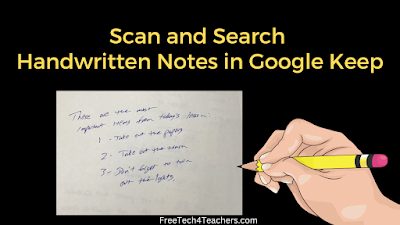
In this week’s Practical Ed Tech Newsletter I shared a couple of studies that support the benefits of handwriting notes over typing notes. In the newsletter I also shared a couple of tips for digitizing handwritten notes. One of the things that I mentioned was using Google Keep to digitize handwritten notes. Google Keep’s free mobile […]
15 Things That Caught My Eye at ISTE Live Today
This morning I got up at 2:30, drove to the Portland Jetport (PWM), and flew to Philadelphia to attend ISTE Live. My lack of sleep combined with having to remotely deal with some things at home meant that I wasn’t as focused as I would have liked to have been today. So rather than committing […]
22 Lessons and Posts Inspired by My Daughters

Those of you who have followed my blog over the last few years may have noticed my occasional series of posts inspired by questions from my daughters who are now five and six years old. (Some of you have followed the blog long enough to remember when getting a dog was a major lifestyle change […]
How to Add Voice Notes to Pictures in Google Keep

Google Keep is the app that I probably use more than any other on my Pixel 5. It’s an app that does everything I need to save notes, clip bookmarks, and set reminders for myself. It also has a lot of little “hidden” features that I use from time-to-time. For example, you can use to add […]
Bookmarking With the Updated Google Keep Chrome Extension

A little over a month ago I was worried that my days of using the Google Keep Chrome extension to bookmark websites were coming to an end. Based on the number of views of that blog post and the emails that I got in response to it, I wasn’t the only one who had that […]
Is This the End of the Google Keep Chrome Extension?

I’ve been using Google Keep for nearly all of my bookmarking for the last half-dozen years or more. It nicely syncs my bookmarks, notes, and reminders between my phone and any computer that I use when logged into my Chrome profile. Unfortunately, my days of using Chrome as my primary bookmarking tool may be coming […]
Five Google Workspace Tips That Can Make Your Day Better

The best part of a being a teacher is making connections with kids. Making those connections takes time. Unfortunately, teaching also comes with a lot of procedural and administrative tasks that take away from the time that can be used to build those connections with students. But you can get some of that time back […]
Create Location-based Reminders in Google Keep

Other than the Chrome web browser, Google Keep is the app that I use more than any other on my Pixel 5 phone (a phone I like, but don’t love). I use it for bookmarking websites, creating to-do lists and shopping lists, and to set reminders for myself throughout the day. My favorite aspect of Google […]
Try Screencastify & Google Keep for Adding Comments to Google Docs

On Sunday evening I got an email from someone who had seen my videos about Mote and wondered if there was something similar for adding video comments to Google Docs. One of my suggestions was to try the e-Comments Chrome extension which I reviewed last spring. Another option is to use a combination of Screencastify […]
How to Use Google Keep as a Comment Bank

Last week I had a reader ask me if there was a way to have a comment bank in Google Documents without using Chrome extensions or Google Classroom. My suggestion was to try using Google Keep as a comment bank in Google Documents. To use Google Keep as a comment bank in Google Keep you […]
Five Helpful Google Keep Features for Students

Google Keep is a great tool for middle school and high school students to use to create assignment reminders, bookmark important research findings, organize information, save images, and re-use notes in their research documents. All of those features and more are demonstrated in my new video, Five Google Keep Features for Students. Five features of […]
How to Create Task Reminders in Gmail and Google Keep

As the new school year approaches we’ll all, teachers and students, have goals to do something better this year. If one of those goals is to do a better job of keeping track of homework assignments and other tasks, Google Keep and Gmail have some built-in tools that can help you reach that goal. Add […]
Five Tools for Staying On Task

It’s school vacation week here in Maine. I have a long list of things that I want to accomplish on this blog and on Practical Ed Tech. To get that list done and still have time for fun things like riding bikes with my kids, I have to be focused when I’m online and resist […]
The Google Keep Chrome Extension is Back!

Last week the Google Keep Chrome extension stopped working. After five days of no responses from Google on the support page for the extension, the extension was updated today and has started working again. If you disabled or removed the extension last week because you were getting an “extension corrupt” message, you can now reinstall […]
It’s Not Just You – The Google Keep Chrome Extension is Broken – Update! It’s Back!

Google Keep is a great tool that can be used for all kinds of things including setting reminders, taking notes, and bookmarking websites. The Google Keep Chrome extension makes it easy to do all of those things, when it’s working. Unfortunately, for the last couple of days the Keep Chrome extension has not been working. […]
How to Get Reminders Based On Your Location
Without using reminders in Google Keep, I’d forget half of the things that I’m told asked to do every day. I use time-based reminders and location-based reminders in Google Keep. The location-based reminders are particularly useful to me when running errands around town. In the following video I demonstrate how to use Google Keep’s location-based […]
My Top 5 Google Tools for Social Studies Teachers and Students

As longtime readers of this blog know, my background is largely in social studies with a smattering of special education and corporate training thrown in for good measure. It’s teaching social studies that will always be my first professional love. That’s why I always get excited when readers send me questions like the one I […]
5 Highlights of Getting Organized With Google Classroom, Calendar, and Keep

This Thursday at 4pm ET I’m hosting a Practical Ed Tech Webinar titled Get Organized With Google Classroom, Calendar, and Keep. It is the first of four webinars that I’m hosting on Practical Ed Tech in August. In the video embedded below I highlight the key elements of Thursday’s webinar. Register Here 5 Highlights of […]
Get Organized With Google Classroom, Calendar, and Keep

The primary way that Free Technology for Teachers stays afloat is through the sale of my on-site professional development workshops and professional development webinars. As of this morning, more than 300 of you have purchased and participated in one of my Practical Ed Tech online webinars in 2019. Thank you! The next professional development webinar […]
Five Google Product Updates for Teachers to Note

Every month Google pushes updates to all of their products. The ISTE conference is held in June so there were a lot of updates made then that directly impact teachers and students. July was a bit slower in terms of updates that directly impact teachers and students, but there were still some to note. Here […]
Alt Text, Google Keep, and Posters – The Week in Review

Good morning from sunny Paris, Maine where it’s going to be a great day to play outside. Before my kids wake up and and we start our day of play, I have this week’s list of the most popular posts of the week to share with you. Take a look and see if there is […]
Five More Handy Features of Google Keep

Last week I published a video that highlighted ten handy features of Google Keep. Since then a few people have emailed me to point out other features that I should have included in that video. So thanks to some reminders from Matt, Susan, and Kevin here are five more features Google Keep for teachers and […]
300+ Google Tools Tutorial Videos

In early 2015 I started to make an effort to publish more tutorial videos on my YouTube channel. Since then I’ve created more than 1,000 tutorial videos. Included in those is a playlist of 331 tutorials about the Google tools that teachers and students use most. You can find all 331 of my Google tools tutorial videos […]
Ten Handy Google Keep Features for Teachers and Students

Google Keep is a great tool that students and teachers can access through G Suite for Education and through Gmail. Google Keep works just as well in the Chrome web browser as in the mobile apps. There are many some obvious features of Google Keep, like bookmarking, and there are some “hidden” features that are […]
How to Save Time When Adding Comments to Google Docs

This morning I showed one of my favorite time-saving tricks to a great group of adult education teachers. The “trick” is to save time when adding comments to students’ Google Docs. You can do this with canned comments in Google Classroom and there are some Google Docs Add-ons that do similar things. The most straight-forward […]
How to Use Location-based Reminders
I started this year with a goal of improving my fitness. As I wrote on January 2nd, I use Google Keep to set reminders to do things that will help me reach my goals. I use Google Keep to get reminders on my phone at various points in my day. Those reminders are time-based. But […]
5 Alternatives to Google Keep for Task Management

Last weekend I received an email from a reader named Shayne who had experienced a problem with Google Keep notes randomly disappearing. Shayne’s research indicated that other people had the same problem. So if you’re someone who has run into glitches with Google Keep, here are some other task management tools that you might consider […]
How Google Keep Can Help You Reach Your Goals

Google Keep is one of the most overlooked tools that students and teachers can access through their G Suite accounts. It can be used for bookmarking, writing notes, annotating images, sharing task lists, and creating reminders. I use the reminders function every day. The reminders function in Google Keep can be helpful in working toward […]
Join Me Tomorrow Evening to Get Organized With Google Classroom and More

Tomorrow at 7pm EDT I’m hosting a Practical Ed Tech webinar titled Get Organized With Google Classroom, Calendar, and Keep. In the webinar I will showcase the new features that were added to Google Classroom for the 2018-19 school year. We’ll then dive into how you can use Google Classroom, Calendar, and Keep to stay […]
A New Way to Add Google Keep Notes to Google Documents

Last year Google added the option to insert your Google Keep notes into your Google Documents. That feature made it easy for students who use Google Keep to bookmark resources while conducting research to then insert those bookmarked resources into their Google Documents. This week Google changed the way that you can access Google Keep […]
Get Organized With Google Classroom, Calendar, & Keep

If you have been following this blog throughout the summer, you know that Google has made a bunch of updates to Classroom. If you haven’t kept up with those updates or you just need some guidance on how they will affect you, join me next Thursday at 7pm Eastern Time for a Practical Ed Tech […]
Five Chrome Extensions for Teachers and Students

Extensions for Google Chrome can do all kinds of helpful things for you and your students. This is the time of year when teachers who have Chromebooks for the first time ask me what they should add in addition to the standard things that their IT staff installed. Usually my suggestions begin with a few […]
A Lesson From the Evolution of My Bookmarks

One of the questions that readers ask me on a fairly regular basis is, “how do you keep track of everything?” The answer to that has remained largely the same for the last decade. My process is that when I find something interesting I bookmark it, review it, and, if I like it, I write […]
How to Save Bookmarks Using OneNote for Android

In 2018 I have been using OneNote as my primary tool for saving bookmarks and quick notes. Previously, used Google Keep for all of my bookmarks and notes on my Android phone. I made the switch because I found OneNote’s Android app to have more features that I use on a regular basis. The feature […]
5 Features of OneNote That You Won’t Find in Google Keep

Earlier this year I shared that I have moved almost all of my online bookmarking and note-taking to OneNote. That’s not to say that don’t like Google Keep anymore, in fact, I still like and even have a whole lesson about it in my G Suite training course. In a side-by-side comparison for bookmarking and […]
By Request – 5 Task Management Tools for Students

This morning I received an email from a reader seeking suggestions for to-do list management tools her students can use to keep track of assignments and other things that they have to do during the week. Here are my suggestions for task-management tools for students. OneNote If your school uses Microsoft products, I’d take a […]
Write Notes and Save Bookmarks to Sync With Google Docs & Slides

This morning I was browsing Product Hunt when I saw someone pitching a Chrome extension that promised to let you write notes while browsing the web and save those notes to Google Drive. As I read the description I thought to myself, “that’s what Google Keep does.” The Google Keep Chrome extension will let you […]
Three Good Tools for Annotating Images Online
Annotating images can be a good activity for students to do illustrate their understanding of a process by adding information to a blank flowchart. Annotating images is also a good way for students to highlight and identify parts of a diagram like one of a plant cell. I have had students annotate images to identify […]
5 Ways to Record Notes With OneNote for Android

Back in December I decided that I needed to spend some time giving some of Microsoft’s products a good, honest try. I did this to be able to give a more balanced comparison to rival Google products. Some of the Microsoft products I don’t like as much as Google’s offerings, I still prefer Google Forms. […]
Taking Notes on a Touchscreen – Three Options Compared

iPads, Android tablets, and touchscreen laptops that fold flat make it easy for those who prefer to handwrite their notes to preserve those notes in a digital format. I’ve used Google Keep for this purpose for a number of years, but as a part of my on-going effort to feature more non-Google tools I spent […]
7 Ways to Use Google Keep in Your Classroom – Best of 2017
As I do during this week every year, I am taking some time off to relax and prepare for the new year. Every day this week I will be featuring the most popular blog posts of the year. This was one of the most popular posts in May. This week’s Practical Ed Tech Tip of […]
One OneNote Feature I Wish Google Keep Had
As many readers know, I’m a long-time user of all things Google. That includes Google Keep which I have been using for all of my bookmarking and note-taking since Evernote gutted its free plan about two years ago. Recently, I’ve embarked on a quest to give other bookmarking and note-taking tools an honest try. So […]
Zoho Notebook – Your Evernote and Google Keep Alternative
Zoho Notebook is the alternative to Evernote and Google Keep that I mentioned in last week’s edition of Practical Ed Tech Live. Zoho Notebook is a free and advertising-free tool for taking notes in typed, drawn, and spoken form. Zoho Notebook is available to use on Android, iOS, and Mac OS. There is a Zoho […]
Get Your Year Organized With Keep, Calendar, and Classroom
Tomorrow afternoon at 4pm EST I’m hosting a Practical Ed Tech webinar titled Keeping Track With Google Keep, Calendar, and Classroom. In the webinar you will learn: 1. How to streamline your workflow through Google Classroom. 2. How to organize and share resources with students. 3. How to keep track of goals (yours and your […]
Ten Things Students Can Do With Google Keep
Ever since Evernote gutted their free plan, Google Keep has been my go-to recommendation for bookmarking, note-taking, and task management. There is more to Google Keep than meets the eye. Here are ten ways that students can use Google Keep. 1. Draw notes. 2. Make to-do lists. 3. Type notes. 4. Color-code and sort notes. […]
Diigo vs. Google Keep – A Comparison of Bookmarking Tools
During Practical Ed Tech Live last Thursday afternoon I answered a request for a comparison of Diigo and Google Keep as alternatives to Delicious. The video of that explanation was a little muffled by some background noise so I decided to write out my explanation of the key differences between Diigo and Google Keep. Social Sharing […]
A Clever Use of Google Keep for Grading in Google Docs
Earlier this year Google Keep became a core service of G Suite for Education. That update brought with it an improved integration of Google Keep into Google Docs. Eric Curts who writes the blog Control Alt Achieve has a great idea for using Google Keep to give students feedback in Google Documents. Watch his video, […]
If You’re Still Using Delicious, Stop and Try Something Else

Delicious (Del.icio.us), once the darling of the Web 2.0 bookmarking community, has been sold again. This marks the fifth time that the service has been sold. This time it looks like this is really the end for Delicious. The service was acquired by Pinboard who earlier this week announced that on June 15th Delicious would […]
How To Use Emojis In Google Keep

Earlier this week I shared that I had stumbled into adding emoticons/ emojis to my lists in Google Keep. A couple of people have asked how I did this. The answer is that you have to use the app on your Android phone or iPhone. I haven’t found an easy way to do it in […]
Make Lists Fun With Emojis In Google Keep
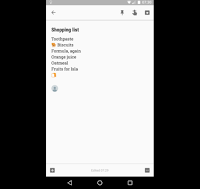
Last week’s most popular post was 7 Ways to Use Google Keep In Your Classroom. This morning I was using Google Keep on my phone to make a shared shopping list and I stumbled into the option to use emojis in my list. You can use the same emojis/ emoticons that you use in text […]
7 Ways to Use Google Keep in Your Classroom
This week’s Practical Ed Tech Tip of the Week featured a demonstration of how to use Google Keep to annotate images. That is just one of many ways that you and your students can use Google Keep. G Suite for Education users, remember that Google Keep is now a core product in G Suite. 1. […]
How to Annotate Images on a Chromebook

From time to time you may find yourself needing to highlight portions of an image or point out features of a diagram for your students. Or you may want students to do the same. For example, in an photography class you may have students mark an image to illustrate use of lighting and framing. On […]
Keeping Track With Google Keep and Calendar – PD Webinar Tomorrow

From keeping track of the websites you bookmark to keeping track of your to-do list to scheduling appointments, Google Keep and Google Calendar have you covered. In Keeping Track With Google Keep and Calendar you will learn how to use these powerful tools to bring order to the task lists in your professional and personal […]
7 Google Product Updates You Might Have Missed in March
It can be hard to keep up with all of the changes and updates that Google makes to the products that have become an integral part of many teachers’ lives. Some of the changes are minor and insignificant to the average end-user while others are significant to a larger portion of end-users. Here are some […]
Google Calendar Now Optimized for iPads- Finally

My life seems to be run by Google Calendar and Google Keep these days. I use it to schedule and keep track of appointments, to keep track of how many hours the babysitter worked in a week, and to remind of the things I need to do everyday to reach my goals. The one complaint […]
How to Insert Google Keep Notes Into Google Docs
A couple of days ago Google announced that Google Keep is becoming a core product of G Suite. With that announcement came a new integration of Google Keep into Google Docs. You can now insert your Google Keep notes and bookmarks into your Google Documents. In the video embedded below I demonstrate how to insert […]
Google Keep Is Now Part of G Suite’s Core Services

Google Keep is my favorite tool for bookmarking, taking notes, and setting reminders. I use it on my laptop, Chromebook, my phone, and my iPad. For a couple of years it has been my go-to recommendation for anyone looking for a bookmarking tool, a reminder app, or a note-taking app. But the one drawback to […]
Feedly Limits New Users to 100 Feeds In Free Plan
Feedly has been my favorite RSS reader since Google shuttered for good Google Reader back in 2013. Feedly makes it easy to subscribe to your favorite blogs and websites and read them all in organized collections on your phone, tablet, or laptop. Yesterday morning I noticed that Feedly is now charging to subscribe to more […]
5 Google Keep Tutorials for Teachers and Students
This afternoon at the CSLA 2017 conference I was asked about Google Keep. Specifically, I was asked why I preferred using Google Keep to the tasks list option Gmail. In short, Google Keep provides more utility for me compared to using the text-based options for tasks in Gmail. For example, Google Keep lets me add […]
Use Google Keep to Help You Reach Your Goals

How are you doing on your New Year’s resolutions? How about your students? If one of your resolutions is a daily habit like reading more often or exercising regularly, Google Keep can help you reach your goal. Within Google Keep there is an option to set daily reminders for yourself. I have three of them […]
Create Location-based Reminders in Google Keep Notes
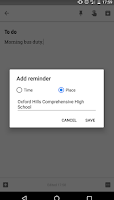
Google Keep has been my favorite bookmarking and reminder tool ever since Evernote made their free plan worthless earlier this year. I use it on a daily basis to bookmark interesting links and to write notes to myself. One of the neat features of Google Keep is that you can set reminder alarms for your […]
Use Feedly & Google Keep to Keep Track of Your Favorite Blogs
A few months ago Evernote made changes to their free plan that essentially made it worthless. At that time I completely switched all of my bookmarking and mobile note-taking activities to Google Keep. It has been a few months now and I can honestly say that I don’t miss Evernote one bit. The primary way […]
6 Tools That Can Help Students Keep Track of Tasks
Services like Cel.ly and Remind are great for sending reminders about important school and classroom events to parents and students. That said, students shouldn’t rely on teachers to remind them of their assignments. These are some of my favorite tools that students can use to keep track of their assignments and other school-related tasks. Google […]
Evernote’s Free Plan Is Almost Worthless – Here Are Two Good Alternatives
At the end of June Evernote announced some significant changes to their subscription plans including the free service that they had offered for years. Last night I received a reminder email from Evernote prodding me to buy up to one of their premium plans. I deleted the email because I switched away from Evernote and […]
Evernote Shrinks Free Plan – Here’s What I’m Using Now

For a long time I have used Evernote as my primary tool for personal bookmarks. That’s about to change because today Evernote announced that their free plan will soon only allow you to use Evernote on two devices. As I use three devices or more in the course of a typical week, the new Evernote […]
10 Things Students Can Do With Google Keep – Best of 2015-16 School Year
All of this week I am on the road working with teachers in Texas, Kansas, and Arizona. Rather than scrambling to write blog posts at the end of each day, I’m taking this time to feature some of the most popular posts and new tools of the 2015-2016 school year. At the end of October […]
Add Voice Notes to Pictures in Google Keep

This morning I was frustrated trying to get the new annotations feature in Evernote for Android to work correctly so I went back to using Google Keep to annotate my pictures on my Android phone. As I was annotating a picture I noticed that I could add a voice comment to the same note that […]
How to Create Bookmarks & Reminders With the New Google Keep Extension
Google Keep is a handy tool to taking notes in your web browser, on your Android phone, or on your iPhone. I’ve previously featured ten ways that students can use Google Keep. This week Google announced some updates to Keep. The latest version of the Google Keep Chrome extension and the Google Keep Android app […]
10 Things Students Can Do With Google Keep
As I do every year, I am taking this week to relax, recharge, and ski with friends. While I’m away I will be re-running the most popular posts of the year. This was one of the most popular posts in November, 2015. At the end of October Google added a drawing option to Google Keep. […]