

One Good Way to Record a Video in Gmail

Sometimes it is easier to reply to an email with a video than it is to write out a reply. For example, when a colleague asks me for help with Google Classroom I could write step-by-step directions or I could record a short screencast that would accomplish the same thing. Loom’s Chrome extension makes it […]
Loom Adds New Features That Will Be Helpful to Teachers and Students

Loom is one of the tools that I regularly recommend when I’m asked to recommend a video tool for creating instructional videos. This week Loom announced two new features that could prove to be quite helpful to teachers and students. The first new feature to note is a floating speaker notes tool in the Loom […]
Updated – Screencasting on Chromebooks – Built-in Tool vs. Third-party Tools

Back in June Google introduced a new screencasting tool for Chromebooks. Back then I wrote a comparison of the Chrome OS screencast tool and some others that are available to use on Chromebooks. Since then Screencastify has changed their free plan and Flipgrid has been renamed as Microsoft Flip. So I think it’s time that I […]
How to Suppress Background Noise in Loom Recordings
If you use Loom to create screencast videos, there’s a new feature that you should be aware of. That feature is an option to have background noise automatically suppressed when you publish your videos. You’ll find this option under “video preferences” after you have finished recording your video. In this short video I demonstrate where […]
Google’s Favorite Chrome Extensions of the Year

On The Keyword Google has announced their favorite Chrome extensions of the year. I have no idea what the criteria was to be included in the list. That said, I took a look at the list and noticed that some of Google’s favorite Chrome extensions are also some of my favorite Chrome extensions. Those favorites […]
Loom Adds Transcriptions and Captions

Loom is one of my favorite Chrome extensions for making short tutorial videos. In the last year I’ve made a few tutorials about different ways to use Loom. Some of those include recording videos from your Gmail inbox and making whiteboard videos. Loom recently added two new features. Those are a transcription/ captions tool and […]
Two Ways to Create Videos in Your Gmail Inbox

Last week Google introduced a new video recording tool called Threadit. A Chrome extension is one aspect of what Threadit offers. With the Threadit Chrome extension installed you can record a video without leaving your Gmail inbox. Threadit is now the second tool that I can recommend for recording screencast videos directly from your inbox. […]
How to Record a Video in Gmail

Sometimes it is easier to reply to an email with a video than it is to write out a reply. For example, when a colleague asks me for help with Google Classroom I could write step-by-step directions or I could record a short screencast that would accomplish the same thing. Loom’s Chrome extension makes it […]
Five Screencasting Tools Compared and Ranked – Fall 2020

The launch of Vimeo Record earlier this week made me think that perhaps it was time to write a comparison of popular screencasting / screen recording tools. For this comparison I selected the five options that pop into my head whenever I’m asked about screencasting (which has been almost daily since March). With the exception […]
Loom Updates With Some Great Features for Teachers

The question that people email to me more than any other is some variation on “how do you get that circle in your YouTube videos?” There are two tools that I typically recommend for that. One is Screencast-o-matic and the other is Loom. Loom recently announced a bunch of updates including some that will be […]
How to Use Loom to Make a Whiteboard Video

This week I published a couple of videos about making whiteboard-style instructional videos with Screencastify (you can see those videos on my YouTube channel). Of course, Screencastify isn’t the only browser-based screencasting tool available to teachers. Loom is also an excellent and popular choice for making screencast videos right from your web browser. In the following […]
Loom is Introducing a Desktop Screencasting Tool

Loom is a screencast recording tool that I started to use earlier this year and have found to be excellent for making short videos directly from my inbox. This afternoon I received an email from Loom that announced their plans to introduce a desktop app this fall. There are not many details about it available […]
Three Tools That Can Help You Save Time on Routine Tasks

Time is the one thing that we want more of. We can’t create more time for ourselves but we can be more efficient on some routine tasks so that we have more time for the fun things we want to do. Here are three tools that you might want to try to use to save […]
Loom Adds Options for Grouping and Sharing Videos

Loom is a free tool for creating screencast videos in your web browser. Loom even has an option to create screencasts directly from your inbox to use as responses to emails. Today, Loom announced two beta features. The first new feature allows you to organize your Loom screencast videos into groups. The second new feature […]
How to Create & Send Screencasts from Your Inbox

On Thursday morning I featured Loom 2.0 which offers a convenient way to create screencasts on a Chromebook, Mac, or Windows computer. One of the “hidden” features of Loom is that once you have connected it to your email account, you can launch Loom’s screen recorder directly from your inbox. Not only can you launch […]
Loom 2.0 – Create and Edit Screencasts

Loom is a free screencasting tool that works in the Chrome web browser. In addition to using it on a Chromebook, you can use Loom on a Mac or Windows computer as long as use the Chrome browser. Loom will let you create a recording of anything on your computer’s screen. There’s also an option […]
Comparison of Screencasting Tools
Screencasting is a fast and easy way to capture what is happening on your screen along with your voice or video of you speaking. Teachers can use screencasts to create self-paced lessons for students, tutorials, and supplements to sub plans. Students can use screencasting to tell stories or demonstrate their understanding of a topic or […]
Loom – Screencast on Chromebooks, Macs, and PCs
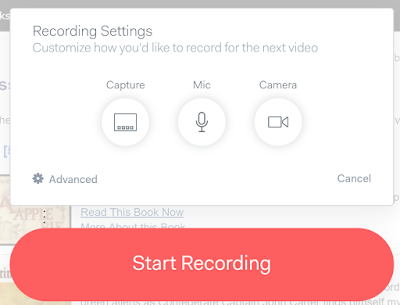
Loom is a free screencasting tool that works on Chromebooks, Macs, and Windows computers. Loom is a Chrome extension. With Loom installed you can record your desktop, an individual tab, and or your webcam. That means that you could use Loom to just record a webcam video on a Chromebook. Of course, this also means […]