
Bring the Joy Back to School With Book Creator
Disclosure: Book Creator is an advertiser on FreeTech4Teachers.com Book Creator has been one of my go-to multimedia creation tools for nearly a decade. For back-to-school season they’ve created a hub of resources arranged around the theme of bringing joy back to school. Amongst many excellent resources in that hub you’ll find registration links for a […]
How to Embed Videos Into Book Creator Pages
Book Creator is a tool that I’ve been using and recommending for many years. It provides a great way for you and your students to create all kinds of multimedia books. In the pages of Book Creator books you can include text, comics, pictures, audio, maps, and videos. The process of including YouTube videos in […]
My Five Favorite Features of Canva Documents

A couple of weeks ago Canva opened the public beta of their new Documents tool. I’ve previously highlighted Docs to Slideshow conversion tool within it and the AI writing feature within Canva Docs. Those are two of my favorite features of Canva Docs. In this new video I highlight some other great features including the […]
How to Import PDFs Into Book Creator Projects

About a week ago Book Creator rolled-out the third or fourth new feature of this school year. That feature is the ability to import PDFs to use in your Book Creator projects. I had a cold and couldn’t speak well last week so I had to wait until this week to give Book Creator’s new […]
Now You Can Import PDFs Into Book Creator

Earlier this fall Book Creator added some helpful new features in the form of audio, video, and text commenting. This week the folks at Book Creator rolled-out another new and helpful feature. That feature is the ability to import PDFs to use in your Book Creator multimedia books. Here’s a thirty second demo of the […]
Book Creator Now Offers Audio, Video, and Text Commenting

Last week Book Creator introduced a great new feature just in time for the start of the new school year. That feature is the option to add video, audio, text, and emoji comments to students’ books. The new feature is still in beta, but you can try it right now. You can add comments to […]
WriteReader Adds New Features for Teachers and Students

WriteReader, one of my favorite tools for telling stories with pictures, recently launched four new features for teachers and students. One of the new features improves the usability of WriteReader while the other three enhance the overall experience for teachers using WriteReader in their classrooms. Phone-friendly Interface WriteReader was originally built to be used on […]
Image Search and Autodraw – My Favorite Book Creator Design Tools

Disclosure: Book Creator is currently an advertiser on FreeTech4Teachers.com. This post was written by me, Richard Byrne. In yesterday’s post about Book Creator’s back-to-school resources I mentioned the integrated image search and the autodraw feature that students can use on every page of their books. Those are probably my favorite design tools incorporated into Book […]
Book Creator Now Offers More Templates and Themes
At the end of last year Book Creator introduced a new couple of new features (new fonts and new color options) and hinted that something bigger was on the way. That new thing is here! Book Creator has just introduced eighteen new templates and themes for all teachers and students. Book Creator now offers templates […]
WriteReader Templates Can Help Students Start the Writing Process

WriteReader is a great tool for creating multimedia stories that I’ve featured a half dozen times or more over the years. The last time I wrote about it they had just added some new page styles. Last week WriteReader unveiled a new feature that I think a lot elementary school teachers will like. WriteReader now […]
WriteReader Adds New Page Styles for Students to Create eBooks

WriteReader is one of go-to tools for elementary school and middle school students to use to create multimedia ebooks. I’ve been using it since its launch a few years ago and it has only gotten better since then. Along the way it has added read-aloud features, introduced more options for comic and speech bubbles, and added […]
Storybird – Fantastic Art to Inspire Writing

Earlier this week I was browsing for new Chrome extensions to try when I stumbled upon the Chrome extension for Storybird. The extension itself doesn’t do much more than just direct you to the Storybird website. But trying the extension did remind me of the great art that you can find in Storybird. The artwork […]
How to Create an eBook on Book Creator

On Tuesday I shared five ideas for making ebooks with your students. Book Creator is a great tool for making those ebooks. With Book Creator your students can make ebooks that include text, images, audio recordings, videos, and even maps. Students can insert media that they’ve created or embed content from sites like YouTube and […]
WriteReader Is Now Available In Spanish

WriteReader is a fantastic tool for elementary school students to use to create multimedia ebooks. I have been impressed by it since the first time I gave it a try a few years ago. WriteReader provides students with a place to write stories that include pictures and their own voices. On each page of their […]
Book Creator Now Offers “Read To Me” Mode Online
Last summer the Book Creator team launched a web-based version of their popular iPad app. The web-based version, called Book Creator for Chrome, has been a hit with teachers and students. The latest update to Book Creator for Chrome includes a feature called “Read To Me.” Read To Me is a text-to-speech function that reads the […]
Telegra.ph – Multimedia Publishing That Doesn’t Require Registration

Telegra.ph is a free publishing tool that I featured last week in Three Simple Platforms for Publishing Writing. In that post I made an error in saying that it didn’t allow you to include videos in your stories. A reader named Dan emailed me this morning to correct me and explain that you can include […]
Create Sesame Street Fan Fiction on WriteReader
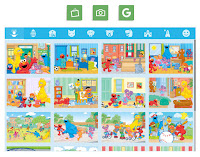
WriteReader recently announced a partnership with Sesame Street that essentially lets students use Sesame Street artwork in their own multimedia stories. As I wrote on Monday, it’s essentially fan fiction for elementary school students. Take a look at the following video to see how your students can create their own multimedia Sesame Street stories by […]
WriteReader and Sesame Street Partner to Help Kids Create Multimedia Stories

WriteReader, a fantastic multimedia writing platform, has just announced a partnership with Sesame Street. This partnership brings Sesame Street characters into WriteReader’s bank of images for students to use in their own stories. Now when students create a story in WriteReader they can choose one or all of twenty Sesame Street characters to place into […]
WriteReader Presents the Most Popular Topics Amongst Student Authors

WriteReader is a great multimedia writing tool for elementary school students and their teachers. On WriteReader students can create multimedia ebooks independently or with the assistance of their teachers. Teachers can log-in and see what their students have written. Teachers can make suggestions and corrections to what their students have written in WriteReader. Teachers’ suggestions […]
Three Good Tools for Collaboratively Creating Multimedia Books
Collaborating to create multimedia books can be a good way to get students excited about writing stories. Students can collaborate with each other and or with you. Through the process of sharing ideas and revisions students’ work improves. Writing a multimedia ebook can also be a nice way for students to illustrate and or further […]
WriteReader – Collaborative Book Creation for Elementary School Classrooms

WriteReader is a neat multimedia writing platform for elementary school teachers and students. The appeal of WriteReader is found in the collaboration between students and teachers. Students can create multimedia books that teachers log into to correct. As is seen the video below, each page of a book has a space for students to write […]