

Scholar, Books, Datasets, and More – Google Search Tools Students Overlook

In last week’s episode of Two EdTech Guys Take Questions Rushton and I answered a question about alternatives to using Google search. What we failed to emphasize is that Google offers a lot of search tools that students often overlook or don’t even know about. Some of my favorites of those are highlighted and demonstrated […]
Search Tools Your Students (And You?) Are Probably Overlooking
AI search tools like ChatGPT infused into Bing and Google’s Bard are getting a lot of attention right now. But when it’s time to search most students still default to Google.com. Unfortunately, by relying on just Google.com and trendy AI search tools students are missing out on a lot of excellent excellent and helpful material. […]
Try the Fact Check Explorer

Fact Check Explorer is a free tool from Google that anyone can use to explore the veracity of claims made on the Internet. As you can see in my brief video embedded below, on Fact Check Explorer you can enter a topic or name then see a list of articles accompanied by notations about the […]
How to Use Google Scholar to Find Federal and State Court Rulings
Earlier this week I wrote about and published a video about how to use Google Scholar to research inventions and their inventors. Case law research is a third aspect of Google Scholar that can be helpful to student researchers. The case law search function in Google Scholar enables you to find Federal and state cases […]
Patent Search and Five Other Google Scholar Features Students Should Know How to Use

Unlike search results on Google.com, Google Scholar search results isn’t a ranking of websites. Instead, Google Scholar search results are lists of scholarly articles related to your query. Google Scholar can also be used to locate United States patent filings as well as state and federal court cases. When looking at Google Scholar search results […]
Using Google Books in History Classes

As the name implies, Google Books is a search engine for locating books. Through Google Books you’ll find books that you can read in their entirety for free and books that you can preview for free. Most importantly, Google Books lets you search for keywords within books. Searches on Google Books can be refined according […]
Challenge – Introduce Students to Academic Search Engines and Databases

In the minds of many students yelling “Hey Siri, tell me about Martin Luther King, Jr.” or “Hey Google, when did the Soviet Union collapse?” is conducting research. As teachers we know that research is a process that goes far beyond telling a machine to give us some information. The challenge is to get students […]
Bibcitation – Easily Create Citations in a Wide Variety of Styles

Last week I shared a tutorial on how to use the new citation generator that is built into Google Docs. One of the complaints I’ve already heard about it is that it only supports a few citation styles. If that’s your complaint about it, you might want to try Bibcitation instead. Bibcitation is a free […]
Google Arts & Culture Presents “From a Picture to 1000 Stories”
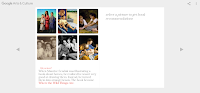
Google Books turned 15 this week. To mark the occasion Google released an interactive book titled From a Picture to 1000 Stories. The interactive book is a part of the Google Arts & Culture Institute. In From a Picture to 1000 Stories readers learn some fun facts about famous authors and their works. On the […]
How to Use WorldCat to Locate Books in Libraries Near You

Over the last couple of days I’ve seen a lot of summer reading lists floating around on Twitter. If you’re starting to acquire your summer reading books, before you hit “buy now” on Amazon, search on WorldCat to see if a library in your area has a copy of the book that you want to […]
How to Use the New Version of Google Books

On Monday I published a list of my ten go-to tech tools for social studies teachers and students. Google Books was one of the tools that I included in that list. Recently, Google Books got an updated user interface. The new interface includes some handy features including an option to quickly locate libraries near you […]
How to Use Google’s Dataset Search Tool

Yesterday, I wrote an overview of Google’s relatively new Dataset Search tool. It is a tool that is designed to help users locate publicly available datasets. As I explain in the following video, datasets aren’t limited to CSV or Excel files. Through the Dataset Search tool you will find datasets in the forms of Google […]
Scrible Helps Students Organize and Use Research

Scrible is a service that helps students organize their online and offline research findings. That is done through the Scrible’s website and Chrome extension. Scrible’s Google Docs add-on helps students use their research in their papers. Scrible’s Chrome extension includes tools for highlighting and creating notes any webpage that students view. Those highlights and notes […]
Tutorials on Organizing OneNote
To most outside observers my notebooks, both digital and physical, are a hot mess. That’s because I rarely employ tags, folders, or any of the other traditional methods used to organize a notebook. The only time I do use tags and folders is when I am working on specific research project. The rest of the […]
Another Neat Feature of Zoho Notebook
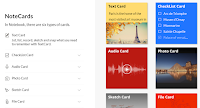
On Sunday I featured Zoho Notebook as an alternative to using Evernote or Google Keep. In that post I listed many of the features of Zoho Notebook including the options to draw notes and to record audio notes. One feature that I missed because I didn’t discover it until today is the option to save entire […]
RefME is Becoming Cite This For Me – Changes to Free Plan Coming

RefME is a great service for organizing your research and creating bibliographies out of your collections of online and offline resources. I’ve been a supporter of the service since I first tried it a few years ago. It appears that I’m not the only one who likes RefME because it was recently acquired by Chegg. […]
Three Alternatives to Wiki Summarizer
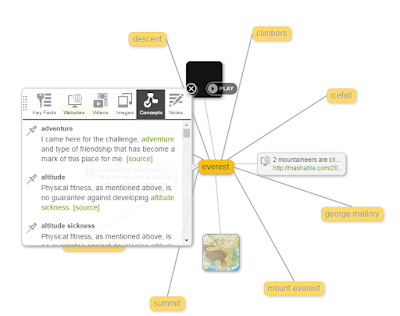
This afternoon I received an email from a reader who wondered what happened to Wiki Summarize. I don’t know other than it is no longer online. It was a nice tool that helped students see long Wikipedia entries in chunks. It also included a web of related terms to help students see how topics were […]
Google Returns the Reference Citation Option to Google Docs

Back in September when Google replaced the Research menu in Google Docs with the Explore menu many educators were upset about the loss of the citation tool that was included in the research menu. Today, Google announced that a citation function has been added back into Google Documents. Now when you use the Explore function […]
How to Use Wolfram Alpha Inside Google Docs

Wolfram Alpha is a search engine that is probably best known for helping students solve mathematics problems. But there is more to Wolfram Alpha than just computational data. Wolfram Alpha can help students quickly locate information about famous people in history, locate socioeconomic data, find science data, and even help students find information about music […]
OurStickys – Place Sticky Notes on Webpages
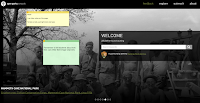
A couple of weeks ago I shared a video about how to add sticky notes to just about any webpage. In that video I used a tool called Note Anywhere. This evening I tried a similar tool called OurStickys. Both perform the same core function of letting you add sticky notes to the webpages that […]
Credo Reference – Research Starters for Students

Credo Reference is a good reference site for students that I recently learned about from David Kapuler. Credo Reference provides students with reference articles from more than 4,000 reference books. In that regard Credo Reference is a search engine for encyclopedia entries. There are a few features of Credo Reference that teachers will appreciates. First, […]
Cite This For Me – Cite Websites In One Click

Cite This For Me is a free service designed to help students keep track of the resources that they use in their research work. Cite This For Me offers a free Chrome extension that lets students cite a webpage with just one click. The free extension will format citations in APA, MLA, Harvard, or Chicago […]
Scrible Edu Helps Students Organize Research

Scrible is a free service that offers a nice tool to help students organize their online research efforts. Scrible offers a Chrome extension that includes tools for highlighting, creating sticky notes, and altering the font on any webpage that you save in your Scrible account. Scrible also offers an option for formatting bibliographies while you bookmark. And to help you organize […]
By Search Request – Bibliography Tools for Students

Over the weekend I was looking at the Google Analytics for FreeTech4Teachers.com and noticed that last week one of the most frequently searched terms that directed people to this blog is “bibliography generators.” I took that as a clue that more than a few people are interested in that topic. To that end, here are […]
Google Books for Teachers and Students – A Guide
Google Books is one of my favorite research tools that students and teachers often overlook. In a post earlier today I embedded a book that I found through a Google Books search. Google Books allows you to do that with books that are in the public domain. I have done that a lot over the […]