
Seven ClassTools Templates to Try This Year
ClassTools has long been a favorite resource of mine for creating all kinds of fun, online activities for social studies classes. As the new school year approaches it’s a good time to take a look at seven of my favorite ClassTools games and activities templates. Play Your Dates Right is one of the templates that […]
Play Your Dates Right – A History Timeline Game

ClassTools.net has many great online game templates for history teachers to use. Play Your Dates Right is one of the templates that I like to use to create a game that is focused on helping students recall the sequence of historical events. In the video embedded below I demonstrate how to create a simple timeline-based […]
A Fun Timeline Game for History Students

Play Your Dates Right is another great game template developed by Russel Tarr at ClassTools.net. The concept of Play Your Dates Right is that students have to pick the correct sequence of three historical events. The event in the middle of the game template is always the event that actually did come second. Students have […]
A New Citation Generator from ClassTools

Russel Tarr at ClassTools.net has developed another handy tool for students. This time he’s made a citation generator. The ClassTools Citation Generator will create a MLA, APA, Chicago, and HAD citations for any URL that you enter. It will also create citations for books from large publishers. I gave it a try this morning and […]
How to Create an Online Game of Connect Four

Twice this weekend I had readers email me to ask about creating an online Connect Four game for students to play to review key vocabulary and concepts. There are a couple of tools that I recommend for creating that type of review activity. First, Flippity.net offers a virtual manipulatives template that will let students drag […]
Vortex by ClassTools – Create Your Own Sorting Game
Vortex is the latest game template published by ClassTools. Vortex lets you create an online game in which players have to sort words or phrases into up to four categories. Vortex replaces the Dust Bin sorting game that ClassTools used to offer but ran on Flash. Vortex doesn’t use Flash which means it can be […]
How to Create Interactive Images With Classtools

A couple of days ago I wrote about a new tool from Classtools called Image Annotator. It does exactly what it says on the tin. I made the following short video to demonstrate how easy it is to use the Classtools Image Annotator. In the video I demonstrate annotating an image of a map, but […]
Add Interactive Annotations to Images With a New Classtools Tool

Russel Tarr at Classtools has come up with another great little tool for teachers and students. The new Image Hotspot Generator on Classtools makes it easy to add interactive annotations to any picture that you upload to the site. The annotations that you add to your pictures can include text and links. Your annotated images […]
Create Text Message Exchanges Between Fictional and Historical Characters
The Classtools SMS Generator is one of my favorite tools from the large catalog of free tools offered by Classtools. The SMS Generator is intended for creating fictional text message exchanges between fictional and or historical characters. It is free to use and does not require students to log-in. To use the SMS Generator just click the […]
ClassTools SMS Generator – Text Messages Between Historical Figures

Last week I wrote about three ways that students can create social media profiles for historical and literary characters. Writing that post reminded me of the Classtools Fake SMS Generator. You could have students use the Classtools SMS Generator to create simple conversations between historical characters as way to get them to think about those […]
History and Literature Text Messages
ClassTools.net is one of my favorite places to find templates for online activities for middle school and high school students. One of the templates on ClassTools.net that I’ve recommended for years is the Fake SMS Generator. Watch my following video to learn how to use the SMS Generator on ClassTools. Applications for Education You could […]
Create Your Own Geography Game With Mission Map Quest
Mission Map Quest is a free tool for creating geography games. The concept is simple, you create a series of clues that your students need to follow to identify places around the world. You can add as few or as many clues to your Map Quest as you like. When you’re ready to have students try […]
Three Puzzle Templates That Help Students See Content Connections
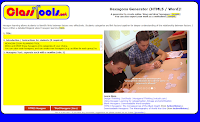
Russel Tarr publishes a lot of great educational games and instructional templates on ClassTools.net. Among those templates are three activities designed to help students see the connections between events, people, places, and ideas within a subject. The Class Tools Hexagons Generator lets you create an online hexagonal learning activity to share with your students. To use the […]
Use the ClassTools Power Search to Find Educational Games

ClassTools.net is one of my favorite places to find free educational games and templates for creating educational games. Russel Tarr, a history teacher and developer of ClassTools, has made so many games that the site now needs a power search function. You can use this search function to find games and templates according to the […]
How to Create a Simple Timeline-based Game

ClassTools.net has many great online game templates for history teachers to use. Play Your Dates Right is one of the templates that I like to use to create a game that is focused on helping students recall the sequence of historical events. In the video embedded below I demonstrate how to create a simple timeline-based […]
Play Your Dates Right – A Fun History Game

Play Your Dates Right is another great game template developed by Russel Tarr at ClassTools.net. The concept of Play Your Dates Right is that students have to pick the correct sequence of three historical events. The event in the middle of the game template is always the event that actually did come second. Students have […]
Classtools Offers a Good Way to Find Teachers on Twitter

Finding people to connect with is one of the most common challenges for teachers who are new to using Twitter. Classtools.net has a free service that can help teachers find other teachers to connect with on Twitter. Teachers on Twitter is a series of lists of teachers who are active on Twitter. The lists are […]
Classtools Offers a Handy Source Analysis Tool for Students
Classtools.net offers dozens of neat tools for students and teachers. Over the years I have featured many of those tools in blog posts and videos. One Classtools tool that I haven’t previously featured is the Source Analyser. The Classtools Source Analyser provides students with a simple template that can help them analyze the resources that […]
Two More ClassTools Templates for Showing Content Connections
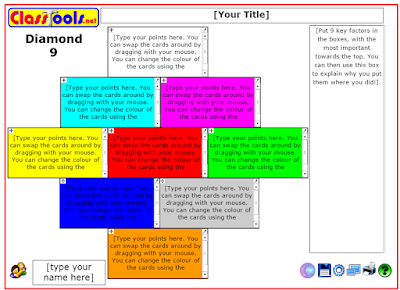
Last week I shared the Hexagon Learning Template offered by ClassTools.net. That template is great for helping students make connections between topics in a subject area. The Hexagon template is not the only one of that style that you’ll find on ClassTools.net. The Diamond 9 template and the Jigsaw template will also help students make […]
How to Use the Hexagon Learning Template from ClassTools
On Friday I wrote a post that featured links to blog posts about using hexagonal learning in elementary school and high school classrooms. That post also featured the ClassTools hexagons generator. That tool lets you create online and offline hexagonal learning activities for your students. In the video embedded below I demonstrate how to use […]
Click to Spin – Best of 2016
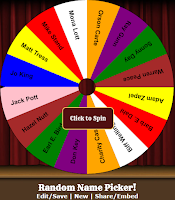
As I usually do during this week, I’m taking some time off to relax, ski, and work on some long-term projects for the next year. This week I will be re-publishing the most popular posts of 2016. Random Name Picker is free tool from Russel Tarr at Classtools.net. The Random Name Picker lets you input […]