
How to Impose Time Limits on Google Forms – And 46 Other Tutorials
Over the weekend a reader reached out to me for help with Google Forms. Specifically, he wanted to know how to impose a time limit on a Google Form. I was happy to help. The method that I use to impose a time limit on Google Forms is to enable the Google Forms add-on called […]
Two Options for Automatically Removing Choices from Google Forms

Earlier this week a reader of my newsletter sent me a question looking for a way to limit the number of times that an answer choice could be used on a Google Form. My first suggestion was to try the Google Forms add-on called Choice Eliminator 2. Choice Eliminator 2 is a Google Forms add-on […]
Certify’em – Send Personalized Certificates via Google Forms

Certify’em is a Google Forms add-on that I’ve been using for the last few years whenever I need to distribute personalized certificates. Certify’em will automatically send certificates to students when they get a minimum score on a quiz conducted with Google Forms. You set the minimum passing score that triggers the delivery of the certificate. […]
Collect Chat – Turn a Google Form Into a Chatbot

A couple of weeks ago I published a video about how to create your own chatbot with a free tool called Acquainted. This morning I discovered another tool for creating your own chatbots. Collect Chat is a free Google Forms add-on that you can use to turn a Google Form into a chatbot. I gave […]
Mote – One of My New Favorites in 2021

I’m taking this week to recharge and get ready for the next session of the Practical Ed Tech Virtual Summer Camp. For the next few days I’m going to highlight some of my favorite new and new-to-me tools so far this year. Earlier this year I shared a series of videos about how to add voice […]
Certify’em Introduces New Features

Certify’em is a Google Forms add-on that I’ve been using and recommending for the last few years. Certify’em makes it quick and easy to send personalized certificates to students who pass a quiz in Google Forms. I’ve also used Certify’em to distribute certificates to people who participate in my webinars and workshops. Last spring the […]
Certify’em Adds Two Helpful Features for Sending Certificates When Students Complete Google Forms Quizzes

Certify’em is a Google Forms add-on that I’ve been using and recommending for a few years. Certify’em makes it easy to automatically send certificates to students when they get a minimum score on a quiz conducted with Google Forms. You can set the minimum passing score that triggers the delivery of the certificate. You can […]
How to Install Google Docs Add-ons Individually and School-wide

I’ve written about Google Forms and Google Docs add-ons in a coupe of recently posts. It occurs to me that if you’re new Google Docs, you might not know how to install the add-ons that I’ve featured in those recent posts. How to Distribute Add-ons School-wide If you’re in a school that uses G Suite […]
VR, Forms, and Storyboards – The Week in Review

Good morning from Maine where more snow is in the forecast! If you like to ski, snowshoe, or snowmobile it has been a fantastic winter. If not, you’re probably hoping for it to end soon. This week I had the pleasure of working with some teachers from adult education programs in Cumberland County, Maine. They […]
My 5 Favorite Google Forms Add-ons
This morning I led a small workshop about creative uses for Google Forms and Google Slides. As often happens during those workshops someone asked me what my favorite Forms add-ons are. In no particular order, here are my five favorite Google Forms add-ons. Certify’em Certify’em is a Google Forms Add-on that makes it possible for you […]
An Update on FormRecycler – And How to Use It

This morning I received a question from a viewer of my YouTube channel. The question was about the Google Forms add-on called FormRecycler. The viewer was attempting to use the add-on but was repeatedly getting the following error message, “Error: ReferenceError: “FirebaseApp” is not defined.” So I logged into my Google Forms to see if […]
How to Send Personalized Certificates via Google Forms or Google Sheets

From perfect attendance to volunteerism to honor roll there are lots of occasions during the school year for schools to issue certificates to students. It used to be that to personalize certificates for students you would have to manually enter their names on the certificates that you were going to print for them. Today, there […]
The Return of My Favorite Forms Add-ons – And One That Never Left

On Saturday morning I shared my delight in discovering that the CheckItOut Google Forms add-on is working again. That’s not the only one of my favorite Forms add-ons to recently start working again, just in time for the new school year. Choice Eliminator, Form Recycler, and FormLimiter are also working again. Keep reading to learn […]
Check It Out – CheckItOut for Google Forms is Back!

CheckItOut is a Google Forms Add-on that makes it easy to keep track of the things that you let kids borrow from your classroom. It’s an Add-on that I recommended for a couple of years until this past spring when it, like a bunch of other Add-ons, stopped working. But some of those other Add-ons […]
Certify’em Has New Options for Automatically Issuing Certificates from Google Forms

Certify’em is one of my favorite Google Forms Add-ons. With Certify’em activated you can automatically issue certificates to students when they get a passing (or better) score on a quiz in Google Forms. You can see a demonstration of how it works right here. This week the developer of Certify’em, Dave Abouav, added some advanced […]
Using Google Forms to Track Professional Development

Last week I had the pleasure of working with teachers at Sigsbee Charter School. In doing so I gained a good idea from their librarian and technology specialist, Jay Schwermer. Jay is using a Google Form with the Certify’em Add-on installed to issue certificates to teachers when they develop skills by completing tasks in a […]
5 Add-ons I’m Utilizing More Often in 2018
Add-ons can provide a lot of additional functionality to Google Forms, Sheets, Slides, and Docs. In some cases using the right Add-on can save you a lot of time on completing routine tasks. Other times they make Forms, Sheets, Slides, and Docs do things that they could not otherwise do for you. Here are five […]
How to Quickly Copy Questions from One Google Form to Another

formRecycler is a free Google Forms Add-on that I wrote about in a blog post yesterday morning. If you haven’t seen it yet, formRecycler is an Add-on that will let you pick questions from your existing Google Forms to reuse in a new Google Form. formRecycler is demonstrated in my video that is embedded below. […]
formRecycler – Easy Reuse of Google Forms Questions

formRecycler is a free Google Forms Add-on that makes it easy to reuse questions from one Google Form into another form. When you have the formRecycler Add-on installed you can access all of your existing Google Forms and then pick questions from one of those existing Forms to use in a new form. You can […]
Automatically Issue Certificates When Students Pass a Quiz in Google Forms

Google Forms provides a great way to create online, self-grading quizzes. When you have students who cannot wait to get their scores back, enabling the option to automatically release grades is super handy. A relatively new Google Forms Add-on called Certify’em makes it possible to not only give students their grades right away, it also […]
AutoMastery Google Forms Add-on
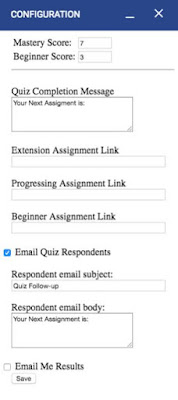
AutoMastery is a new Google Forms Add-on that was created by Mary Ellen West, a technology coordinator from Georgia. This add-on allows you to automatically differentiate assignments for students based on the score they receive on a Google Forms quiz. As the teacher, you will set a mastery score and a beginner level score. Students […]
25 G Suite Add-ons & Chrome Extensions for Teachers & Students
G Suite for Education on its own provides a powerful set of tools for your classroom. G Suite gets event better when you start to use the Add-ons available for Docs, Sheets, Slides, and Forms. On a similar note, Google’s Chrome browser becomes a better tool when you start to add some extensions to it. […]
Five Great Add-ons for Google Forms
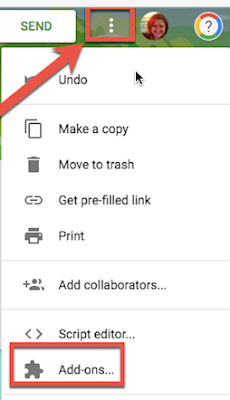
Google Forms are one of the most flexible of all of the tools in G Suite for Education. There are countless ways Forms can be used by teachers and students. There are a number of add-ons that can be used with Google Forms which can make them even better. Before we begin exploring a variety of […]
Choice Eliminator Lite – Remove Choices from Google Forms as They’re Used
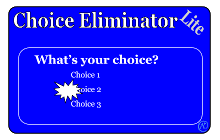
Early last month I shared my most frequently recommended Google Forms Add-ons. Choice Eliminator was one of the Add-ons on that list. Unfortunately, official support for Choice Eliminator was eliminated at the end of February. Many people have since asked me for an alternative. The best alternative that I’ve found so far is Choice Eliminator […]
Receive Email Notifications from Google Forms
In the past I have shared instructions on how to use the Form Notifications Add-on for Google Forms. Lately, that Add-on hasn’t worked as well as I would like. So I recently started using a similar Add-on called Email Notifications for Forms. This Add-on lets me receive not only a notification in my email when […]
Three Google Forms Add-ons To Help You Manage Parent Volunteers

Google Forms offers a great way to collection information from parents when you’re seeking parents to volunteer to chaperone a field trip, help out in your classroom, or bring in supplies for a classroom party. The problem that you might run into is having too many volunteers or too many people volunteer to do or […]
The Value of Add-ons and Systems

Back in June when Google launched the new quizzes feature in Google Forms I saw plenty of people Tweeting things about the evils of multiple choice. Many of those same people accused Google and bloggers like me of perpetuating the evil practice of using multiple choice. The trouble with Twitter is that people often read […]
How to Distribute Add-ons to an Entire Google Apps Domain
Add-ons for Google Sheets, Docs, and Forms can dramatically increase the features and utility of those tools. A domain administrator has the power to push Add-ons out to all users within a Google Apps for Education domain. Doing that ensures that every teacher and or student in a domain has the same set of Add-ons. […]