
Google Classroom Overview for Parents

Last Friday I published a video in which I demonstrated the teacher view and student view of Google Classroom. A lot of people replied to ask if I had a similar one about the parent view of Google Classroom. I didn’t have one, but I was happy to refer people to this section of Sam […]
18 Google Keep Tutorials for Teachers
A couple of weeks ago I published a short tutorial on how to use Google Keep to scan and search handwritten notes. Publishing that tutorial prompted me to update my playlist of tutorials on ways that teachers and students can use Google Keep. The full playlist of 18 Google Keep tutorials can be seen here […]
Three Google Slides Accessibility Features You Should Know How to Enable
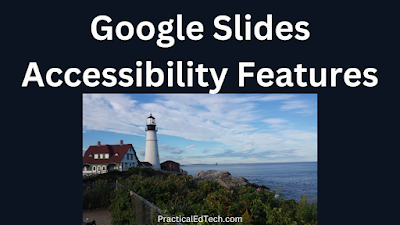
As the new school year approaches it’s a good idea to review some of the easily overlooked, but important features of some of the tools we use the most. Google Slides is one of those tools that I use a lot and has a lot of features that are easy to overlook. For example, unless […]
By Request – Teacher and Student Views of Joining Google Classroom

Twice this week readers emailed me to ask if I had any tutorials about how students join Google Classroom. I didn’t have a current one so I made one. In my new video that is embedded below I demonstrate three ways to invite students to join Google Classroom and the three ways that students can […]
How to Use AI in Google Slides

In case you haven’t heard, AI is the buzzword of the year in education and technology. If you haven’t tried any AI tools yet, Google Slides has one that it’s easy to use and that you might actually want to use on a regular basis. The “insert images” menu in Google Slides now has an […]
18 Google Calendar Tutorials for Teachers
Earlier this week I shared directions for creating appointment slots in Google Calendar. After doing that it occurred to me that I’ve made a lot of Google Calendar tutorials over the years. And while I have a big playlist of more than 700 Google Workspace tutorials, I’ve never broken out the Google Calendar tutorials into […]
Five Uses for Google Docs Besides Essay Writing
Over the last sixteen years I’ve used Google Docs and had students use Google Docs for lots of activities besides just writing essays. I’ve used Google Documents to facilitate analysis of primary sources, to create charts and diagrams, to facilitate group note-taking, to publish simple webpages, and to make collaborative task lists. All of those […]
Staying Organized With Google Drive Folder Descriptions
At the start of every new school year I have high hopes for doing a better job of staying organized than I did the previous year. This year is no exception to that rule. One area in which I hope to improve my organization is in Google Drive. For years I’ve simply relied on the […]
How to Annotate Images on Google Jamboard
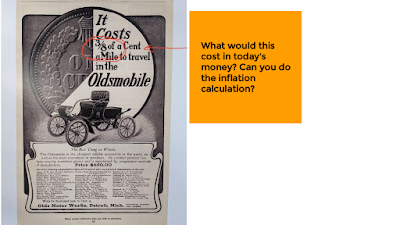
Even though it’s not as popular as it was a couple of years ago, Google Jamboard is still a great tool for conducting a variety of online activities including collaborative brainstorming sessions, creating word mover activities, and annotating images. It’s the annotating images use case that I demonstrate in this new video. Annotating images in […]
Four Dozen Google Forms Tutorials
I’m taking the week off to do a bunch of fun things with my kids. While I’m away the most popular posts of the year so far will reappear. In a video that I published earlier this year I mentioned that the vast majority of my videos don’t get more than a few hundred views. But […]
How to Add Q&A to Your Live Google Slides Presentations
I’m taking the week off to do a bunch of fun things with my kids. While I’m away the most popular posts of the year so far will reappear. There are plenty of ways to gather questions and feedback from students in a digital format. But one of the ways that is often overlooked is […]
How to Publish Google Slides Presentations
Around this time every year I field a bunch of questions from readers who are moving into new jobs at schools that use Google Workspace for Education. And while I have a lot of Google Workspace tutorials available on my YouTube channel, I think it’s time that I update many of them. That’s why over the […]
How to Collaborate on Google Slides
Around this time every year I field a bunch of questions from readers who are moving into new jobs at schools that use Google Workspace for Education. And while I have a lot of Google Workspace tutorials available on my YouTube channel, I think it’s time that I update many of them. That’s why over the […]
How to Use Audio and Video in Google Slides
Around this time every year I field a bunch of questions from readers who are moving into new jobs at schools that use Google Workspace for Education. And while I have a lot of Google Workspace tutorials available on my YouTube channel, I think it’s time that I update many of them. That’s why over the […]
How to Create Your First Google Slides Presentation
Around this time every year I field a bunch of questions from readers who are moving into new jobs at schools that use Google Workspace for Education. And while I have a lot of Google Workspace tutorials available on my YouTube channel, I think it’s time that I update many of them. That’s why over the […]
Advanced Google Forms Features for Teachers
Like I do at this time every year, in the last few weeks I’ve fielded a bunch of questions from readers who are moving into new jobs at schools that use Google Workspace for Education. And while I have a lot of Google Workspace tutorials available on my YouTube channel, I think it’s time that I […]
How to Use Pictures and Videos in Google Forms Quizzes
Like I do at this time every year, in the last few weeks I’ve fielded a bunch of questions from readers who are moving into new jobs at schools that use Google Workspace for Education. And while I have a lot of Google Workspace tutorials available on my YouTube channel, I think it’s time that I […]
How to Customize Google Forms Themes

Like I do at this time every year, in the last few weeks I’ve fielded a bunch of questions from readers who are moving into new jobs at schools that use Google Workspace for Education. And while I have a lot of Google Workspace tutorials available on my YouTube channel, I think it’s time that I […]
The Solution to a Frustrating Google Slides Problem

When Google finally added a built-in audio option for Google Slides, we were all happy because we no longer needed to use unreliable third-party add-ons to use audio in our presentations. However, four years later there are still some quirks to adding audio into Google Slides presentations. One of those quirks was recently driving me […]
How to Create Your First Google Form
Like I do at this time every year, in the last few weeks I’ve fielded a bunch of questions from readers who are moving into new jobs at schools that use Google Workspace for Education. And while I have a lot of Google Workspace tutorials available on my YouTube channel, I think it’s time that […]
How to Use Google Takeout 2023

It’s that time of year when I start to get lots of questions from readers about what to do with files in their Google Workspace accounts before they leave one school for another. In fact, just yesterday I answered that question three times. My answer was to use Google Takeout to create zip files that […]
Here’s How to Blend Images in Google Slides

The image that you see to above was used in a blog post that I wrote years ago. It recently surfaced again when I was looking for an old math resource (sadly, no longer available). The image above was made by blending two images together in Google Slides. To make the final image I went […]
Six Interesting Things You Can Add to Google Sites
Last week I shared a playlist of Google Sites tutorials that I’ve made over the last few years. Some of those tutorials focus on the basics of Google Sites while others highlight advanced features like adding third-party content to your sites. On that note, here are some things you can do to enhance your Google […]
How to Customize Page Headers in Google Sites

Yesterday morning I answered an email from a reader who was looking for advice on how to make the page titles stand-out on her Google Site. What she was referring to was the list of page titles in the header of the site itself. For years Google Sites didn’t offer many customization options that would […]
25 Gmail Tips for Teachers
If answering email takes up way more time in your day than you would like it to, take a look at my playlist of 25 Gmail tips for teachers and students. The playlist includes everything from how to sort your Gmail messages to filtering and blocking senders to email etiquette tips we all need to be reminded of from time to […]
71 Google Slides Tutorials for Teachers and Students
Over the last decade I’m made more than eighty Google Slides video tutorials. Some of them are a bit outdated now, the rest are still relevant. All of the relevant ones are now organized into one playlist. In my playlist of Google Slides tutorials you’ll find everything from the basics of using Google Slides to […]
47 Google Forms Tutorials
In a video that I published earlier this year I mentioned that the vast majority of my videos don’t get more than a few hundred views. But there are some outliers. The biggest outlier is my simple video about the basics of creating a quiz in Google Forms which has received nearly half a million views. That’s […]
How to Add Collaborators to Google Calendar
As I’m sure many of you do, I often play the role of “tech support person” for friends and family. That was the case a few days ago when a friend of mine who owns a local, small business asked for help with Google Calendar. My friend wanted a quick and easy way for his […]
How to Impose Time Limits on Google Forms – And 46 Other Tutorials
Over the weekend a reader reached out to me for help with Google Forms. Specifically, he wanted to know how to impose a time limit on a Google Form. I was happy to help. The method that I use to impose a time limit on Google Forms is to enable the Google Forms add-on called […]
How to Add Audio to Google Slides
Last week I was looking through my YouTube Studio analytics when I noticed that one of the most-searched phrases was “add audio to Google Slides.” I took that as a sign that it was time to create a new video about how to add audio to Google Slides. So that’s exactly what I did. In […]
AI Tools are Coming to Google Workspace Tools

It was only a matter of time until Google made a big announcement regarding artificial intelligence in their productivity tools. That announcement came today. All of the details about Google’s implementation of AI in Google Workspace can be read here. The short version is that new AI features will be added to Google Docs and […]
Changes are Coming to Your Favorite Google Workspace Tools
If you opened a new Google Document today you might have seen a new little clock icon appearing in the upper-right corner of the screen. But if you didn’t see it, don’t worry because you will start seeing it before too long. That clock icon is one of the updates coming to Google Docs, Slides, […]
25 Gmail Tips for Teachers and Students

As part of my on-going quest to bring some organization to the more than 1,500 videos on my YouTube channel, I’ve created a new playlist of 25 Gmail tips for teachers and students. The playlist includes everything from how to sort your Gmail messages to filtering and blocking senders to email etiquette tips we all […]
A Quick Tip for Sorting Gmail

Here’s a little tip that I shared with a friend last weekend and I figured a few of you might appreciate it as well. When an email that you are expecting to appear in your primary tab in Gmail appears in another tab, you can simply drag it over to your primary tab. When you […]
29 Google Sites Tutorials for Teachers

Yesterday afternoon a reader emailed me to ask if I had any resources she could reference while building a website with Google Sites. The first video that I thought to send her was this one covering all of the basics of creating your first Google Site. In looking for that video I came across a […]
How to Set Expiration Dates for Google Docs
Setting access expiration dates is one of the many “hidden” or frequently overlooked features of Google Documents. This is a feature you can use when you want to share a Google Document with a person or group of people for a limited time. By setting an expiration date you can grant access for as little […]
How to Add Video Playlists to Google Sites

In this week’s Practical Ed Tech newsletter I wrote about preparing for some workshops that I’ll be leading this spring and summer. Creating resource pages is one of things that I always do in preparation for leading workshops. Those resource pages always include some video tutorials that people can refer to after the workshop if […]
75 Google Documents Tutorials

Last week I published a new tutorial about how to add footnotes to Google Documents. After publishing it I decided that it was time to continue on my quest to bring some better organization to my YouTube channel. The next step in that quest was to create a playlist of my Google Documents tutorials. I […]
How to Add Footnotes to Your Google Documents
When it comes answering tech support questions it is often easier to show the solution with a screencast video than it is to write directions. That’s why I made this screencast video when earlier this week I was asked “how can I add footnotes into my Google Documents?” In the video I show where to […]
How to Find the Source for Images in Google Slides

A couple of weeks ago I published a video about using the explore function in Google Slides to find images to use in presentations. Since then I’ve had a few people ask for clarification about how to use the image source when using the other image search option in Google Slides. The process of finding […]
27 Google Drive Tips and Tricks

I’m in the process of organizing my YouTube channel to be more than just two big playlists of Practical Ed Tech Tips and Google Tutorials. To that end, this morning I went through my channel and put my current and relevant Google Drive tutorials into one playlist. My new Google Drive tutorials playlist contains twenty-seven […]
Dozens of Google Slides Tutorials

Earlier this week after publishing An Important Tip for Using Image Search in Google Slides it occurred to me that I should probably start to organize all of the Google Slides tutorials that I’d made over the years. As I started to search through my YouTube channel I discovered that I’ve made more than eighty Google Slides […]
An Important Tip for Using Image Search in Google Slides

The Explore function in Google Slides can be a good tool to use to find images to use in your presentations. The images found through the Explore function in Google Slides are supposed to be Creative Commons licensed images. However, Google doesn’t make that information readily available within the Explore image search results. That’s why […]
Dozens of Tutorials for Getting Started With Google Forms

In a video that I made last week I mentioned that the vast majority of my videos don’t get more than a few hundred views. But there are some outliers. The biggest outlier is my simple video about the basics of creating a quiz in Google Forms which has received nearly half a million views. That’s […]
5 Google Docs Features You Might Have Overlooked or Forgotten About

Google Documents has been around so long now that some of us who have been using it from the start may have forgotten about some features. I did that just the other day when I “remembered” to use the version history to go back and look at a some edits that I had made to […]
How to Sort Google Sheets and Forms Entries in Reverse Chronological Order

Last week a reader reached out to me for some guidance on how to handle a Google Form that had more than one hundred submissions. He was looking for a way to quickly find the most information submitted in the most recent entries. My solution to that problem was to use Z-A sort in the […]
How to Collect Pictures Through Google Forms
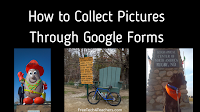
Last week a former colleague of mine reached out to me for help setting up a system to collect profile information to put into a printed event program. He was looking for a convenient way for people to submit a profile picture and brief biographies to include in a printed program. My suggestion was to […]
How to Create an Image Revealing Effect in Google Slides

About a week ago a reader reached to me to ask for a suggestion on how to create an image revealing effect without the use of proprietary interactive whiteboard software. My first thought was to give TinyTap a try because that platform does include a feature called “Houdini Mode” that can be used to hide […]
How to Search Within Your Google Drive Folders

Yesterday afternoon I shared a tip for keeping track of what you put into your Google Drive folders. This morning I have a tip on how to find the things that you and or your collaborators put into your Google Drive folders. Google Drive has contained a search function almost since its launch more than […]
How to Add Descriptions to Google Drive Folders

A few days ago I received an email from a reader who was looking for suggestions about how to keep track of what is contained with the folders of a Google Drive account. My suggestion was to try adding descriptions to the folder. When you right-click on a folder in your Google Drive account a […]
Tips for Managing Google Drive Folders

A couple of mornings ago a reader asked me to help her figure out how a Google Doc she didn’t remember sharing was accessed by a colleague. After ruling out that her account had been compromised I discovered that the document in question was part of a shared Google Drive folder. The document was created […]
Is This the End of the Google Keep Chrome Extension?

I’ve been using Google Keep for nearly all of my bookmarking for the last half-dozen years or more. It nicely syncs my bookmarks, notes, and reminders between my phone and any computer that I use when logged into my Chrome profile. Unfortunately, my days of using Chrome as my primary bookmarking tool may be coming […]
How to Adjust Playback Volume in Google Slides

Support for audio files was welcome addition to Google Slides when it was announced in the fall of 2019. But four years later there are still some quirks to it to watch out for. And sometimes the setting you need isn’t quickly found. That was the case a few days ago when someone emailed me […]
Five Google Workspace Tips That Can Make Your Day Better

The best part of a being a teacher is making connections with kids. Making those connections takes time. Unfortunately, teaching also comes with a lot of procedural and administrative tasks that take away from the time that can be used to build those connections with students. But you can get some of that time back […]
Grid Views and Timelines in Google Slides

Last week I hosted a webinar about using Google Workspace in the context of social studies classes. One of the things that I mentioned in that webinar was using Google Slides to create interactive timelines. I went into much more detail during the webinar, but you can see the basics of how to create a […]
Two Ways to Add an Image Search Tool to Your Website

In yesterday’s blog post about finding free images for school projects I mentioned that Photos for Class offers a free tool for adding their image search tool to your website. You can do a similar thing if you use Google’s Programmable Search tool to create your own image search engine. Both options enable you to […]
Write With Emojis in Google Docs

Earlier this week Google added a new emoji option into Google Docs. The new option enables you to type @ followed by an emotion to add an emoji into a sentence in your Google Documents. For example, you can type “@smile” to generate a list of smiley emojis that you can pick from to insert […]
Schoolytics – Quickly Find the Information You Need to Help Your Students Succeed

Disclosure: Schoolytics is currently an advertiser on FreeTech4Teachers.com. Schoolytics is a service that I’ve heard a lot about over the last few months. If you’re active on social media, you’ve probably seen a post or two about it too. Last week I finally got a chance to take a good look at it. To say […]
Three Google Workspace Updates to Note This Week

Just about every week Google makes updates to Google Workspace. Some only affect administrators of Google Workspace domains while others affect all end-users of Google Workspace products. This week there were three Google Workspace updates that teachers and students should note. More Accessibility Controls People who use screen readers, magnifiers, and braille now have more […]
How to Loop Videos in Google Slides

Yesterday I published a blog post about playing Google Slides on an automatically advancing loop. That blog post prompted a question from a reader about playing videos on a loop within a Google Slides presentation. Specifically, she wanted to know if she could have a video play on a loop. The answer is yes, and […]
How to Play Google Slides on an Automatic Loop
The new school year is quickly approaching and you might be thinking about your first morning with staff or students. That first morning is often filled with information that needs to be repeated quite a bit. Things like the wi-fi network and code, lunch times, and other logistical information. You could make yourself hoarse by […]
Google Docs, Slides, and Forms Accessibility

As the new school year approaches and you start to update some of your old Google Docs, Slides, and Forms take a moment to assess the accessibility of those materials. And if necessary, it’s fairly easy to improve the accessibility of your Docs, Slides, and Forms. Google DocumentsGoogle Documents has some built-in accessibility options that […]
How to Add Alt Text to Images in Google Forms

On Monday I answered a question from a reader who wanted to know if it was possible to add alt text to the images that she uses in Google Forms. My answer was, “yes, but not in the way you would in Google Docs or Slides.” To add alt text to images Google Docs and […]
Five Ways to Work With PDFs in Google Drive

Some of the questions that receive more than frequently than others revolve around working with PDFs. The answers that people are looking for are often “hidden” in plain sight. Case in point, just uploading a PDF to Google Drive gives you a handful of ways that you can work with it. In this new video […]
Ten Google Sites Tutorials for New and Experienced Users

Summer is here (in the northern hemisphere) and it’s a great time to casually work on things that we don’t always have time for during the school year. One of those things could be creating a new class website or revamping an existing site. Those who work in school districts that use Google Workspace already […]
Make a Word Game With Google Sheets – A Fun Way to Learn About Formulas

Google’s Applied Digital Skills website is a good place to find lesson plans and activities that you can use to help students learn how to use many features of Google Workspace tools. To capitalize on the recent trend of word games like Wordle, Google recently published a new Applied Digital Skills lesson called Make a […]
Five Frequently Forgotten Google Docs Features

Perhaps it’s just me, but do you ever feel like you’ve been using Google Docs for so long that you forget about the basics until you need them? For example, the other day when a friend asked me about options for sharing a Google Doc with someone who didn’t use Google Docs I completely blanked […]
The Difference Between a Chrome Profile and a Google Account

This morning as I was starting to get caught up on a backlog of email I answered a question from a reader who wanted to know if I had a video about Chrome profiles that she could share with her staff. I do, here it is. In the video I demonstrate and explain the difference […]