
Flipgrid is Dead!

If you’re attending the ISTE conference in person this week or you’re following updates from it on social media, you probably heard a thing or two about Flipgrid hosting a big event they called Flipfest. I didn’t go because I wasn’t at ISTE and even if I was there corporate “fests” are generally not my […]
How to Record a Video Lesson in PowerPoint

A few years ago I published a video about how to create a video by using the recording tool built into PowerPoint. Since then Microsoft has added more features to the recording tools in PowerPoint. So last week I recorded a new tutorial on how to record a video lesson in PowerPoint. In this short […]
Ten Updated OneNote Features to Note

Mike Tholfsen is a product manager for Microsoft Education and the producer of some excellent Microsoft product tutorial videos for teachers. I frequently reference his videos in my weekly newsletter and when answering readers’ questions about Microsoft products. This week Mike released a new video about the latest updates to OneNote. OneNote is the Microsoft tool that […]
40 OneNote and Outlook Tips for Teachers and Students

Mike Tholfsen is a product manager for Microsoft Education and the producer of some excellent Microsoft product tutorial videos for teachers. I recently mentioned one of his videos in my weekly newsletter. For those who missed it, the video I mentioned was 20 Outlook Web Tips and Tricks 2021. In 20 Outlook Web Tips and […]
My Favorite Feature of OneNote’s Chrome Extension

OneNote is the Microsoft product that I use more than any other in my daily work and personal life. I have it installed on my Android phone for taking notes and bookmarking things that I find while reading through my favorite blogs on Feedly. I also use the OneNote Chrome extension on my computers to […]
A New Microsoft Teams Feature That I Wish Google Classroom Had

If you work in a school that use Microsoft Teams or any of the other great Office 365 tools available to teachers and students, you need to subscribe to Mike Tholfsen’s YouTube channel. It was through his channel that I recently learned about a fantastic new feature in Microsoft Teams that I wish Google would […]
A Similarity Checker in Word – How Did I Miss This?

I’ve written about Google Classroom’s originality reports in the past. I’ve also posted tutorials on looking for matching documents via Google Drive. This week, thanks to Mike Tholfsen, I learned that my Microsoft-using friends have a similar feature available to them via the online version of Microsoft Word. The similarity checker in Microsoft Word uses […]
How to Share Your Computer’s Audio in Microsoft Teams

Whether it’s the basics of how the technology works or “features” right now we’re all learning a lot about hosting online meetings. For example, this week I learned about sharing system audio in Microsoft Teams meetings. Microsoft Teams isn’t a service that I use on a regular basis so when I do use it there […]
Seven Microsoft Product Updates for Teachers to Note

Over the last six or seven weeks Microsoft has rolled-out some notable updates to their products that teachers and students use most. I’ve covered some of those updates in blog posts here and some I have only shared on social media. Here’s a recap of noteworthy updates to Microsoft products made in the last seven […]
How to Use the Read-aloud Function in Microsoft Edge
Edge is Microsoft’s web browser that replaced their classic Internet Explorer. Edge has a lot of handy features including a customizable read-aloud function. The read-aloud function has been available in the Windows version of Edge for quite a while. This morning, thanks to Mike Tholfsen I learned that the read-aloud function is available in the […]
More Immersive Reader News – Thinglink Integrates Immersive Reader

Earlier I shared the news that Microsoft is adding their popular accessibility too, Immersive Reader, to Microsoft Forms. Shortly after I received that news from Mike Tholfsen I got an email from Thinglink informing me that they’re also adding Immersive Reader to their excellent image and video annotation tools. Thinglink is a service that I […]
How to Set Answer Requirements on Microsoft Forms

Microsoft Forms is a good tool for creating online surveys and quizzes. Setting answer restrictions is one of the overlooked features of Microsoft Forms. Creating answer restrictions allows you to specify the type of input that you’ll accept in response to a question. As you can see in my new video, setting answer restrictions can […]
Building Models to Understand Brain Injury – A Hacking STEM Project
I’m still working through many of the notes that I took during the 2019 BETT Show that wrapped up in a London a couple of weeks ago. One of the new things that I saw there was a new Hacking STEM project called Building Models to Understand and Mitigate Brain Injury. This is one the […]
Immersive Reader in Virtual Reality

Immersive Reader is one of my three favorite Microsoft products (the others others are Hacking STEM and Flipgrid). Today at the BETT Show I got to try a new implementation of Immersive Reader. That implementation is in virtual reality. Immersive Reader in VR is a beta product. In fact, I was told by representatives of […]
Share Rubrics and Other Improvements to Microsoft Teams for Edu
Back in August rubric grading was added to Microsoft Teams for Edu. With that feature enabled you can attach rubrics to assignments for students to see before and after completing an assignment. Equally important, you’ll be able to grade an assignment using that rubric without having to open multiple tabs or windows. This week at […]
How to Create a Survey in Microsoft Forms & Sort Results in Excel
Microsoft Forms is an excellent tool for creating online quizzes and surveys. You can use it to create multimedia quizzes like the one that I demonstrated here. You can also use it to create anonymous surveys. That’s what I demonstrate in the new video that I created on this snowy morning in Maine. The following […]
Learning About Microsoft’s Tools for Inclusive Classrooms

Yesterday Mike Tholfsen Tweeted about Microsoft’s Teacher Training Packs. Teacher Training Packs are collections of resources that are designed to help IT administrators, technology specialists, and curriculum directors lead professional development workshops centered around various Microsoft tools (most of which are completely free for educators). There are three categories of Teacher Training Packs. Those categories […]
New Accessibility Options in Flipgrid and Other Microsoft Products

This week Microsoft unveiled a slew of new accessibility options for the services that teachers and students use most. One of those features is the inclusion of Immersive Reader in Flipgrid. Immersive Reader is a free service that students can use to have text read aloud to them. Immersive Reader not only reads aloud it […]
Huge Flipgrid News! – All Features Now Free

Flipgrid has been acquired by Microsoft. That’s good news for the founders of Flipgrid and great news for all of us who enjoy using Flipgrid. As of this morning all Flipgrid features are now free for all users! If you are a person who paid for a Flipgrid Pro account, you’ll be getting a prorated […]
Three Free Webinars About Assistive Technology

At the beginning of this year I made a decision to spend more time and effort getting to know all of the free tools that Microsoft provides to teachers and students. I am glad that I made that choice because I have been impressed by many of the programs that Microsoft offers in the area […]
Hacking a “Hacking STEM” Project
In Sunday’s Practical Ed Tech Tip of the Week email I featured Microsoft’s Hacking STEM project library. The idea behind Hacking STEM is to make low-cost or no-cost hands-on STEM projects accessible to as many people as possible. You can follow Microsoft’s directions as written or modify the projects to use other materials to build […]
5 Features of OneNote That You Won’t Find in Google Keep

Earlier this year I shared that I have moved almost all of my online bookmarking and note-taking to OneNote. That’s not to say that don’t like Google Keep anymore, in fact, I still like and even have a whole lesson about it in my G Suite training course. In a side-by-side comparison for bookmarking and […]
Newspaper Templates for Google Docs & Word

This morning I answered an email from a reader who was looking for suggestions on tools that his students can use to collaboratively create a newspaper. My first suggestion was to try LucidPress. My second thought was to try using some Google Docs templates. I didn’t have any Google Docs templates of my own so […]
How to Create a Multimedia Quiz With Microsoft Forms

Microsoft Forms offers a good way for Office 365 users to create multimedia quizzes. The quizzes that you create in Microsoft Forms can be automatically graded for you. One of the features of Microsoft Forms that I actually prefer to Google Forms is the layout of images used as part of question prompt. Watch my […]
Free Hands-on STEM Lesson Plans and Projects

“Hacking STEM” was one of the initiatives that Microsoft was heavily promoting at the BETT Show last month. I asked a few Microsoft employees what “hacking STEM” meant. They all replied with explanations that centered on the idea of providing teachers with hands-on STEM lessons and projects that can be done without having to spend […]
How to Use Microsoft Translator
Last week I wrote that Microsoft Translator was the coolest thing that I saw at BETT. If you haven’t tried Microsoft Translator, watch my video below to see how it works. For a demo of Microsoft Translator working in PowerPoint in a classroom, watch this video from Microsoft. (Jump to the 1 minute mark).
Getting Out of Your Ed Tech Rut

For the last seven weeks I’ve been making it a point to try out the features of Microsoft’s offerings for teachers and students. See yesterday’s post about Microsoft Forms as an example of that. I have been doing this because it is forcing me to take an honest look at the competitor to G Suite […]
Immersive Reader – A Fantastic Addition to OneNote

For the last six weeks I have been making a concerted effort to increase my working knowledge of OneNote in order to be able to make better comparisons between it and its competitors. One of the aspects of OneNote that I appreciate is its flexibility. An example of that flexibility is found in a free […]
Microsoft Unveils a Newish OS to Compete With Chromebooks
Microsoft is clearly feeling pressure from Google’s Chrome OS growing popularity in schools. To respond to that pressure Microsoft has launched a new operating system they’re calling Windows 10 S. It is essentially a stripped-down version of Windows 10 that is designed to run on inexpensive laptops. Windows 10 S will restrict users to installing […]
Free Guides to Windows 10 Accessibility and Deployment in Schools
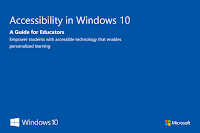
A few weeks ago Microsoft released more than 200 free ebooks. Those ebooks cover everything from Windows 10 accessibility settings to keyboard shortcuts to school-wide deployment of Windows 10 (links open PDFs). The list of free ebooks isn’t limited to just Windows 10. As you browse the list you will find free guides to OneNote, Outlook, […]