
Create Animated Timelines in Google Slides
One of my most popular Google Slides tutorials is a video about how to use Google Slides to create a timeline. A follow-up to that video demonstrates how to use the animation tools in Google Slides to add animations to a timeline. In the following video I demonstrate how to create an animated timeline in Google […]
Create Animated Simulations With Loopy
Loopy is a free tool for creating your own animated simulations or illustrations of a concept. This free animation tool is designed to showing relationships between two or more parts of a system. It’s perfect for showing cause and effect or for showing a workflow system. To create an animation on Loopy you simply have […]
Free Shapegrams from Tony Vincent!
I’ve known Tony Vincent for at least a dozen years. In all that time he’s always had awesome graphics on his website and in his presentations. So when he recently reached out to tell me about his new page of free Shapegrams, I knew I had to share it with all of you. Shapegrams are […]
HUE Animation Studio – The Complete Stop Motion Animation Kit
For the first time in more than a decade I’ve partnered with a company to give away a physical technology product. I’ve partnered with HUE Cameras to give away three HUE Animation Studio – Complete Stop Motion Studio Animation Kits. Watch my video review of HUE Animation Studio then read on for details about how […]
Create Animations from Audio in Adobe Express

I like to end the week with something fun. If you do too, head over to Animate from Audio hosted by Adobe Express. Animate from Audio is a fun little tool that matches your spoken words to an animated character of your choosing. The finished product is a fun little video that you can download […]
Three Registration-free Drawing Tools for Students

Tools like Google Jamboard and Explain Everything can be great for creating drawings to illustrate concepts. They can also be good tools for students to use to illustrate stories. But sometime you just need a quick and easy tool for students to use to create a drawing or simple animation without having to jump through […]
Seven Good Tools for Making Animations

Making animations is a great way for students to bring their written stories to life on screen. Depending upon the story, the animation could be as short frame or two that plays for twenty seconds or it could be a five minute story. Making animations can also be a good way for students to explain […]
A Video Project for the Week – Halloween Safety

Halloween is just seven days away. Ten days ago I shared my updated list of Halloween-themed activities and resources. In that list I included playing a Halloween safety review game from Kahoot. Keeping with the idea of Halloween safety, consider having students create a short video about trick o’ treat safety. There are a lot […]
An Easy Way to Make an Animated Video in Canva
Last week Canva launched a new online video editing studio. I gave it a try last week and recorded a short overview of the basics of how it works. Yesterday, I spent more time diving into all of the features within Canva’s video editor and found some gems. One of those gems is the ability […]
Two Great Ways to Quickly Create Animations

A couple of weeks ago in my weekly newsletter I explained why I value having students create simple animations. The short version of the explanation is that I agree with the premise of Dan Roam’s Back of the Napkin. The premise is that if you really understand a complex topic you can explain it in […]
Create Animated GIFs in PowerPoint

Years ago Common Craft made a fun little guide to understanding the World Cup. The guide featured a bunch of animated GIFs. It was a great example of using silent animations to explain a topic. In the years since then I’ve encouraged teachers to think about having students make animated GIFs to illustrate and explain […]
Intro to Animation and Green Screen Videos

Every Thursday afternoon in August I’m hosting a different Practical Ed Tech professional development webinar. Last week’s was all about Google Classroom, Calendar, and Keep. This week’s webinar is about creating animated videos and green screen videos with your students. In Intro to Animation and Green Screen Videos you’ll learn how your students can make […]
7 Ways to Make Animated GIFs

Whiteboard-style videos and Common Craft-style videos can be a great for helping students understand big concepts in short, easy-to-follow videos. But for smaller concepts, an animated GIF can do the trick. In the last few months I’ve come across a lot of free tools for making animated GIFs. Here’s a run down of some of the […]
Brush Ninja – Make Animated GIFs on Your Desktop or Mobile Device

Brush Ninja is a free tool for creating animated GIFs. Unlike some similar tools, Brush Ninja works equally well in the web browser on a Chromebook, Windows or Mac laptop, iPads, Android tablets, and iOS and Android phones. To make an animated GIF on Brush Ninja simply go to the website and start drawing on […]
My Go-to Tool for Making Stop Motion Movies
Update October 2020: This resource is no longer available. This evening I received an email from a reader who was looking for a free tool to use to have his students make stop-motion videos. (By the way, I get emails from readers every day and I try to answer all of them). JellyCam is the […]
Five Tools for Creating Animations on Chromebooks
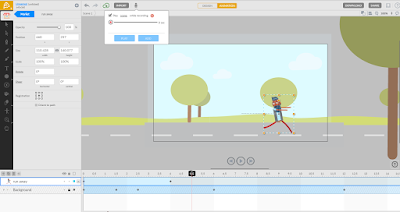
Yesterday’s post about the PuppetMaster app prompted a couple of people to ask me if there is anything similar available for Chromebook use. While I can’t think of anything that is free and exactly like PuppetMaster, here are some options for creating animated videos on Chromebooks. Animatron is a nice tool for creating animated videos and […]
Create Simple Animations With ParaPara Animation
Parapara Animation is a free animation creation tool developed and hosted by Mozilla. The tool is easy to use and it does not require registration in order to use it. In the video embedded below I demonstrate how to create an animation with ParaPara Animation. Applications for Education I first learned about ParaPara Animation when Kevin Hodgson […]
Loopy Makes It Easy to Create Animated Simulations

Loopy is a free tool for creating your own animated simulations or illustrations of a concept. This free animation tool is designed to showing relationships between two or more parts of a system. It’s perfect for showing cause and effect or for showing a workflow system. To create an animation on Loopy you simply have […]
Three Ways to Create Stop-motion Videos

Creating stop-motion and time-lapse videos can be a good way for students to tell a story that they have developed. Stop-motion and time-lapse videos can also be helpful when teachers are trying to help students see how a lengthy process like osmosis works. The following free tools make it relatively easy to create stop-motion and […]
Create Animated Videos & More With Animatron

Animatron is a nice tool for creating animated videos and images. I learned about it from Larry Ferlazzo a couple of weeks ago and I finally got some time to try it this morning. The concept behind Animatron is similar to that of Wideo and Powtoon. You drag and drop characters on a background scene […]