
How to Quickly Turn Your Writing Into Videos
I’m taking the week off to do a bunch of fun things with my kids. While I’m away the most popular posts of the year so far will reappear. ChatGPT might be the first thing you think of when you read AI today, but there have been plenty of other AI tools before it. One […]
How to Enable Collaboration on a YouTube Channel
This is the time of year of end-of-year celebrations captured on video. If you have multiple people in your school recording videos to share with a wider audience, you could have everyone send those videos to one person to post to YouTube. Another option, perhaps a bit easier option, is to have those people collaborate […]
The Microphone I Recommend for Video and Audio Recordings
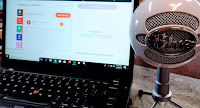
The podcasting platform that I recommend the most recently changed names. The screencasting tool that I use the most also recently changed names. One thing that hasn’t changed is the microphone that I use with those tools. For years I have used and continue to recommend the Snowball iCE microphone. The Snowball iCE microphone is the microphone […]
5 Little Things You Can Do To Improve Your Videos

Whether for it is for education or entertainment we are all watching more videos than ever before. We have more tools to record and share videos than ever before. With the tap of an app or click of a link, you and your students can be making videos to tell stories, teach lessons, or to […]
Getting Started With Microsoft Flip

Back in June Microsoft threw a big party to announce that they were rebranding Flipgrid. What was once called Flipgrid is now Microsoft Flip. Fortunately, not much else changed and all of my favorite Flipgrid features still work. That said, some people have already been asking me for tutorials about Microsoft Flip. That’s why I […]
Two Ways to Quickly Turn Writing Into Videos

Last week I shared some observations from evaluating the websites of a handful of relatively large school districts. In that blog post I mentioned that the better websites put recent and relevant information on the homepage and don’t rely solely on social media to disseminate news about their schools and their districts. That’s because when […]
A Teacher’s Guide to Creating Common Craft Style Videos

Yesterday, I published a post about a live course that I’m teaching in June. If you’re looking for something that is self-paced, Common Craft offers an interesting course about making videos. For years Common Craft videos have been used by teachers to help students understand topics including digital citizenship, personal finance, and many big technology concepts. One […]
Create Audio Slideshow Videos With Phideo – No Registration Required

Phideo is a new online tool for creating audio slideshow videos. As the title of this post states, registration is not required in order to use Phideo to create and save your video. Using Phideo to make your own audio slideshow video is quick and easy. To create a video on Phideo simply head to […]
Just a half a mile from the railroad track…

It’s Thanksgiving Day here in the U.S. I usually celebrate the day with my family in Connecticut watching the road race in my hometown. Unfortunately, that tradition is on hiatus again this year due to the COVID-19 pandemic and some other factors attributed to work schedule. One Thanksgiving tradition that isn’t going on hiatus is […]
How to Quickly Record Voice and Video Messages in Gmail

Sometimes it is easier, faster, and more effective to record a video or audio reply to an email than it is to type a response. For example, when I get asked for technical help it is often faster and more effective to create a screencast video than it is to write directions. Sending an audio […]
Some of my Favorites – Flipgrid Whiteboard

This week is school vacation week here in Maine. I usually take this week off to go ice fishing on Moosehead Lake. Unfortunately, that’s not happening this year. Instead I’ll be “staycationing” and working on some projects around home. While on my staycation I’ll be sharing some of my personal favorite tools. Flipgrid’s new whiteboard […]
How to Use Flipgrid to Make Screencast Videos

As I do every year, I’m taking this week off from writing new blog posts. This week I’ll be re-running a few of the most popular posts in 2020. On Wednesday afternoon Flipgrid announced the launch of a new recording feature for teachers and students. You can now create screencast videos within Flipgrid. The feature […]
A Crash Course in Making & Teaching With Video

About a month ago I hosted a Practical Ed Tech webinar titled A Crash Course in Making and Teaching With Video. In the weeks since I hosted that webinar I’ve had a bunch of requests to host it again. So that’s what I’m going to do next Tuesday (September 29th) at 4pm ET. This school […]
Tools for Displaying YouTube Videos Without Distractions

On Monday I answered a question from a reader who was looking for some recommendations for tools to show YouTube videos without displaying the “related” content that appears next to and below videos on YouTube. The first two tools that came to mind were Watchkin and SafeShare.tv. Another option is to put the video into […]
How to Create, Share, and Collaborate on YouTube Playlists

As the school year begins you might find yourself looking through a lot of YouTube videos that you’ll share with your students throughout the coming months. Creating playlists on is a great way to organize those videos and share them with your students. Once you’ve created a playlist you can continue to update it to […]
How to Share Audio and Video in Google Classroom Without YouTube or SoundCloud

Earlier this week I had a reader ask me for advice on sharing videos in Google Classroom with her students without having to use YouTube. My suggestion was to simply upload the videos to Google Classroom as either announcements or as assignments. When you do that the video is automatically added to your Google Drive. […]
How to Post Videos in Google Sites so Everyone Can See Them

Last week someone emailed me asking why her students couldn’t see the videos that she was posting on Google Sites. This isn’t an uncommon problem. The issue almost always is found with the settings on the video itself and not on Google Sites. When posting a video on Google Sites you need to make sure […]
Video Puppet Turns Your PowerPoint Presentations Into Narrated Videos

Video Puppet is a new tool that you can use to quickly turn your PowerPoint presentations into narrated videos. If you have less than twenty slides in your presentation you don’t even need to create an account on the site to turn your slides into a narrated video. To use Video Puppet simply head to […]
Using Video as a Reflective, Collaborative, and Data Collecting Tool
The last presentation of the Practical Ed Tech Creativity Conference was given by Brian Heyward who shared Using Video as a Reflective, Collaborative, and Data Collecting Tool. In his presentation Brian shared how video can be used to reflect on process/progress, collect data for informal/formal research, and to collaborate synchronously or asynchronously on the same tasks. […]
VidReader – Create Searchable Transcripts of YouTube Videos

A couple of weeks ago I published a blog post and a video about a neat service called SnackVids. SnackVids has since been rebranded as VidReader. With its new name VidReader does the same thing that SnackVids did. That thing is create a searchable transcript of any YouTube video that is narrated in English. As you’ll […]
Great New Features Added to Flipgrid

Just in time for the start of the new school year Flipgrid has rolled-out new features for teachers and students. I tried them out this afternoon and plan to make a video overview of them soon. In the meantime, here’s a run-down of what’s new and why you might care about the new features. Whiteboard […]
Questions to Ask When Planning a Classroom Video Project
Making videos can be a great way to get students excited and invested in the process of researching a topic and presenting their findings for others to see. But before you dive headlong into a video project with your students take some time consider the following questions as you plan the project. *Planning questions to […]
How to Upload Videos to Reply to Flipgrid Topics

I love Flipgrid for the ease with which students can record videos with their webcams to reply to prompts that you give them. But not every student likes to appear on camera. And not every Flipgrid topic has to be a free-form response. It is in those instances that your students can use the option […]
How to Use Guest Mode in Flipgrid
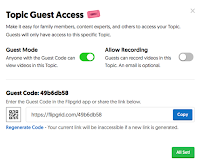
A few weeks ago Flipgrid added a new feature called Guest Mode. Guest Mode allows you to give parents access to view a specific topic within a Flipgrid grid. Guest Mode also provides the option for parents to record a video to be added to a specific topic within a Flipgrid grid. Watch my following […]
Vynchronize – Watch Videos and Discuss Them in the Same Window

Vynchronize is a new video discussion platform that I learned about through Larry Ferlazzo’s recent This Week in Web 2.0 post. Vynchronize lets you create an online room in which you can watch a video while chatting about it with other viewers at the same time. To use Vynchronize just go to the site, enter […]
Flipgrid Password-protected All Grids This Morning

This morning all teachers using Flipgrid were sent an email about privacy updates that they made to all accounts. Those updates included automatically password-protecting all Flipgrid grids that did not already have password-protection in place. That means that students will need to enter a password in order to view and or add to a Flipgrid […]
4 Ways to Use Flipgrid in 4th Grade
This is a guest post from Caroline Schaab. As a 4th grade teacher, I’m always looking for creative ways spark curiosity, promote student voice, and keeps students engaged and to want to continue learning outside of school. Last year, with a few weeks left in the school year, I was introduced to Flipgrid. Fligrid is […]
Using Video to Improve Teaching Practice

This is a guest post from Harrison McCoy. Speaking transparently, I have to admit I don’t like the way I appear in videos. To be totally truthful, I dislike the way my voice sounds even more. Yet, I recognize the effectiveness of using video in teaching, coaching, and training, and one of my professional goals […]
YouTube Management Options for Schools
YouTube can be a great source of educational videos to share with your students. I recently read a blog post in which Chris Brogan claimed that his kids go to YouTube to search before they go to Google. The chances are good that you have students who do the same. But for all of the […]
5 Simple Things That Can Improve Your Videos
Whether for it is for education or entertainment we are all watching more videos than ever before. YouTube states that more than one billion hours of videos are watched daily. We have more tools to record and share videos than ever before. With the tap of an app or click of a link, you and […]
A Cute Video About Email Etiquette for Students – Best of 2016

As I usually do during this week, I’m taking some time off to relax, ski, and work on some long-term projects for the next year. This week I will be re-publishing the most popular posts of 2016. Next Vista for Learning is a unique video sharing website because it focuses on sharing videos made by […]
Three Tools Students Can Use to Add Annotations to Videos – Best of 2016
As I usually do during this week, I’m taking some time off to relax, ski, and work on some long-term projects for the next year. This week I will be re-publishing the most popular posts of 2016. When we talk about flipped lessons it often involves a lot of heavy lifting on a teacher’s part. […]
Why You Should Try to Use Video on Your Blog
This morning Isla and I posted a short video on YouTube to explain why you should try to include videos in your blog posts. Using videos in blog posts helps to keep visitors on your blog longer. For teachers and school administrators, adding a videos to your blog is a good way to show students […]
Slides From My Presentations at PSLA 2016

One of my favorite things to do professionally is speak at conferences because I get to meet so many passionate educators. This week I had the privilege to give the opening keynote at the PSLA 2016 conference on Thursday evening. On Friday morning I gave another presentation. The slides from both of my presentations are […]
Three Tools Students Can Use to Add Annotations to Videos

When we talk about flipped lessons it often involves a lot of heavy lifting on a teacher’s part. From finding a video to adding questions to the video, it is a time-consuming process and in the end we’re still not always sure if the students actually watched the video or they just guessed at the […]