

Five Easy Ways to Improve Your Videos

With time and practice you might become adept at using the editing functions in your favorite video software. You can also improve your videos without having to learn a bunch of editing tricks. Here are some simple things that we can do to improve our videos without having to learn a whole bunch of […]
My Top Five Tips for Creating Instructional Videos

Over the years I’ve made more than 1,000 videos for my YouTube channel and nearly as many for students in my classrooms. Here are five tips that I’ve figured out along the way. Keep it short and sweet. Two five minute videos are better than one ten minute video. Even though it’s the same amount […]
Three Student Video Contests

Video creation contests can be a fun way to get students thinking about academic topics and then producing videos to demonstrate their understanding of those topics. This fall I’ve written blog posts featuring three different video contests for students. A summary of all three is included below. Economic Education Video Contest The Council for Economics Education […]
5 Little Things You Can Do To Improve Your Videos

Whether for it is for education or entertainment we are all watching more videos than ever before. We have more tools to record and share videos than ever before. With the tap of an app or click of a link, you and your students can be making videos to tell stories, teach lessons, or to […]
Type Studio – One of My New Favorites in 2021

I’m taking this week to recharge and get ready for the next session of the Practical Ed Tech Virtual Summer Camp. For the next few days I’m going to highlight some of my favorite new and new-to-me tools so far this year. Type Studio is a new video editing tool. When I used it for the […]
The Question I’m Asked the Most

I get lots of questions sent to me every week. There is one that I get asked more frequently than any other. That is, “what are you using to make your videos.” Usually, people ask that because they want to know how I’m highlighting my mouse pointer in my videos or how I’m creating the […]
Some of my Favorites – DIY Common Craft Videos
This week is school vacation week here in Maine. I usually take this week off to go ice fishing on Moosehead Lake. Unfortunately, that’s not happening this year. Instead I’ll be “staycationing” and working on some projects around home. While on my staycation I’ll be sharing some of my personal favorite tools and tips. Nearly […]
Talking Instead of Reading

It has been nearly fifteen years since I first tried my hand at making instructional videos for my students. The first ones were not good. In fact, in response to one of my first attempts I had a student say “Mr. Byrne, please don’t do that again.” But I did try again and again and […]
How to Record a Video Presentation in Canva

For years Canva has been my go-to tool for making things like infographics, video cover images, and social media posts. Increasingly, I’m using it to design slideshows. A relatively new feature in Canva is the option to record a video of the presentations that you create in Canva. It’s kind of like making a narrated […]
Video Puppet is Now Narakeet – Still Turns Slides Into Narrated Videos

Back in April I featured a neat service called Video Puppet that turns PowerPoint presentations into narrated videos. This morning I got an email notifying me that Video Puppet has been re-branded as Narakeet (why? I don’t know). Narakeet does all of the same things as Video Puppet. The only change is the name and […]
An Easy Way to Make a Stop Motion Video

Disclosure: Cloud Stop Motion is currently an advertiser on FreeTech4Teachers.com. Cloud Stop Motion is a free tool for creating stop motion videos in your web browser. I wrote about Cloud Stop Motion back in February when it was relatively new. Since then some helpful updates have been made it. The most significant of those updates […]
How to Create Split Screen Videos in Flipgrid

A couple of weeks ago Flipgrid introduced some new features and product changes for the 2020-21 school year. One of those changes was a slight relocation of the whiteboard recording tool. At the same time a new whiteboard option was added. That option is to have a split screen while recording your whiteboard videos in Flipgrid. […]
Easy Ways to Improve Your Videos

We’re halfway through 2020. This week I’m taking some time off from the blog to work on some other projects. The rest of this week I’m going to re-run some of the most popular posts and videos of the year so far. Many of us are making more videos than ever before as a way […]
5 Easy Ways to Improve Your Videos

Many of us are making more videos than ever before as a way to deliver instruction and or to simply keep our students updated about school. With time and practice you might become adept at using the editing functions in your favorite video software. You can also improve your videos without having to learn a […]
Three Ways to Make Whiteboard Videos on Your Chromebook

Last week I published a video on how to make a simple video on a Chromebook without installing any extensions or apps. That video was fairly popular and it prompted some follow-up questions from readers and viewers who wanted my recommendations for making whiteboard videos on a Chromebook. Besides just recording in front of an […]
Free Course – A Teacher’s Guide to Creating Common Craft Style Videos

For more than a dozen years Common Craft videos have been used by teachers to help students understand topics including digital citizenship, personal finance, and many big technology concepts. One of the things that makes Common Craft videos popular is the clear and concise manner in which information is presented using a whiteboard, simple cutouts, […]
How to Quickly Turn a Podcast Into a Video

Earlier this month I shared Headliner as an alternative to using Adobe Spark to make videos. One of the features of Headliner that I didn’t share in that post was their tool for turning podcast episodes into videos. In Headliner there is a tool for taking any podcast episode and having a video based on […]
How to Create Whiteboard Videos in Wakelet Collections
A couple of months ago Flipgrid introduced a new feature that enables you to create whiteboard-style instructional videos to share with your students. That feature is called Flipgrid Shorts. Wakelet has integrated the Flipgrid camera into their service so that now you can create whiteboard-style instructional videos directly within your Wakelet collections. Watch my video below […]
7 Styles of Classroom Video Projects – Tools and Tips for Making Them

In the 2019-20 Practical Ed Tech Handbook I included a section all about student video projects. In that section I outlined seven styles of classroom video projects along with tools and tips for making each style of video in your classroom. That section is excerpted and embedded below as a PDF that you can view […]
Three Ideas for Green Screen Video Projects

Making green screen videos can be a good way to engage students in researching and planning. That research and planning is fundamental to making a good video. The video is the reward at the end of the process. There are many things that students can do with green screen video production tools. Here are three […]
Turn Blog Posts and Newsletters Into Videos With Lumen5

For the last few weeks I’ve been posting on Twitter and on Facebook videos based on blog posts that I have written. To do that I have been using a service called Lumen5. Lumen5 is a service that will produce a video for you based upon your written work. To create a video with Lumen5 […]
5 Ways to Quickly Create Audio Slideshows for End-of-Year Events

Around this time every year I start to field a bunch of emails from readers who are looking for advice on how to quickly create audio slideshow videos for end-of-year events. Here are five options that I like for making audio slideshow videos. This list is arranged according to my preference for the quickest way […]
From Basic to Advanced Video Projects for Almost Every Classroom

My last presentation of the day the 2019 MACUL Conference was 5 Video Projects for Almost Every Classroom. Before the presentation started I introduced those who came early to cell phone crashing. 5 Video Projects for Almost Every Classroom is a progression of easy to difficult projects that can be adapted for use in almost […]
The Answer to the Question I’m Asked More Than Any Other
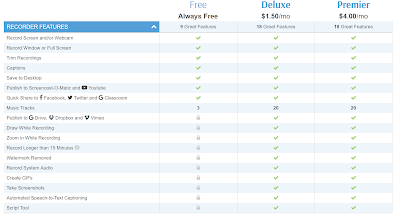
I answer a lot of emails from readers who ask all kinds of questions about educational technology. One question that I answer more often than any other is about the screencast videos I post on my YouTube channel. People often want to know how I get the yellow circle to follow my cursor around the […]
Try Pexels Videos to Find Green Screen Backgrounds
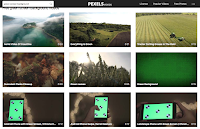
Making green screen videos can be a fun way for students to share what they’ve learned through research about a place or event. And it’s a great way for kids to make their own weather forecast and newscast videos. Last week on Twitter I was asked where I go to find video clips to use […]
Slides and Notes from LACUE
I’ve just wrapped-up two days of giving presentations at the LACUE conference in New Orleans. A huge thank you to the conference organizers for inviting me and to everyone who came to my presentations. If you’re curious about what I spoke about at the conference, my slides and brief notes are included below. Best of […]
Free Webinar – How to Make Your Own Common Craft-style Videos
If you have followed this blog for more than a few weeks, you’ve probably seen me make references to Common Craft videos. More than ten years ago Common Craft pioneered a unique style of online video that has since been imitated, but never quite duplicated by others. That style uses paper cut-outs on blank white […]
Add Adobe Spark Creations Into Book Creator eBooks

Adobe Spark and Book Creator are two of my favorite multimedia production tools. And now you can combine the two! Earlier this week Book Creator announced that you can now embed videos made with Adobe Spark into the pages of Book Creator ebooks. But it’s not just Adobe Spark videos that you can embed into […]
The Curse of Knowledge

Earlier this week I shared the 101st explanatory video published by Common Craft. More than a decade ago Common Craft pioneered using simple paper cutouts to tell stories and explain difficult concepts in videos. Six years ago Lee LeFever, the founder of Common Craft, published The Art of Explanation. It’s a great book containing concepts that […]
Fall Time-lapse – A Video Project

The fall is my favorite season of the year. I love waking up to cold, crisp mornings then enjoying mild days outside. In fact, that’s what I’m planning to do tomorrow morning. This time of year always reminds me of one of my favorite uses for time-lapse video creation tools. The outline of my time-lapse […]
Three Types of Elementary School Video Projects to Complete on iPads

On Monday I shared free five apps that I recommend for making videos on iPads in elementary school classrooms. You might have looked at the list and wondered which one(s) you should try. If so, here’s my basic break-down of how these apps can be used by students and the ages that they are appropriate […]
Free Webinar – How to Create DIY Explainer Videos

A decade ago Common Craft introduced the world to a new style of explanatory videos. That style which came to known as the Common Craft Style consisted of Lee LeFever narrating a video while displaying simple paper cutouts on a blank white background. Since then teachers and students all over the world have made their […]
25 Topics for Whiteboard Videos
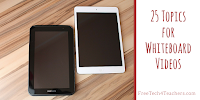
Apps like ShowMe and Educreations make creating whiteboard-style instructional videos a relatively simple process. These apps let you draw on a white screen on your iPad or Android tablet while talking at the same time. Often teachers make whiteboard videos to use as lessons for their students to watch independently. But having students make videos […]
A Complete Guide to Making Videos in Microsoft Photos

Windows Movie Maker is no longer available for download and Microsoft now recommends using the video creation tools that are built into Microsoft Photos. In Microsoft Photos you can create videos that feature your pictures or other pictures that you have permission to use (Creative Commons licensed or Public Domain). At the most basic level […]
How to Use Flipgrid to Publish Instructional Videos
In Sunday’s Practical Ed Tech Tip of the Week I mentioned three ways to use Flipgrid now that all features are free for all users. One of those ways is to have students record and publish instructional videos. They can do this is a few ways. They can record themselves in front of a whiteboard, […]
5 Ways to Make Stop-motion and Time-lapse Movies
Creating a stop-motion video or a time-lapse videos can be a good way for students to tell a story in the style of Gumby. Making stop-motion and time-lapse videos can also be a good way for students to demonstrate how a lengthy process works without making people watch a long video. The following free tools […]
The Stillmotion Method for Storytelling
Stillmotion is an award-winning video production company. According to their website they focus on telling stories to which people have an emotional response. How they do that is revealed in a five part series that they published on Vimeo. The series takes you through the planning, shooting, and editing of a video. Storytelling the Stillmotion […]
Two Easy Ways to Create Printable Storyboard Templates
Next week Common Craft is hosting a free webinar about their video creation process. I attended one of their webinars last summer. In that webinar Lee LeFever stressed the importance of planning and using storyboards as part of that planning process. Both PowerPoint and Google Slides can be used to create online and printable storyboards […]
FAQs About Tomorrow’s Video Projects Webinar

Tomorrow at 4pm Eastern Time I am hosting a webinar that is titled 5 Video Projects for Almost Every Classroom. As I write this, 25 people are registered and I’ve answered a bunch of questions from readers who are interested in registering. I recorded the following short video by using YouTube Live to answer those […]
5 Video Projects for Almost Every Classroom

Update: This webinar is now available on-demand. In this one hour webinar you will learn how to create and complete five video projects that can be done in almost any classroom. You’ll learn how your students can make five types of videos in your classroom. Examples from real students and teachers will be shared during […]
A Free Teleprompter

Thanks to Beth Holland this weekend I learned about a free teleprompter service called CuePrompter. CuePrompter displays your written script in a clear, large, scrolling format in your web browser. It’s perfect for use when recording yourself or someone else on camera. To use CuePrompter just go to the site then start entering your script […]
Important News About Adobe Spark

Adobe Spark is a great tool for making videos, storytelling websites, and simple graphics. It has been popular since its launch a few years ago. Also since its launch there have been many questions about whether or not it can be used with students under the age of 13. For while Adobe’s guide for educators […]
My Unprofessional Videos
If you follow my YouTube channel or even if you just watch the videos that I put into blog posts here, you’ll notice a significant lack of editing. In the last couple of weeks I’ve had a few people ask me why I don’t make my videos look more professional. So this morning I went […]
Six Types of Classroom Video Projects – Best of 2017
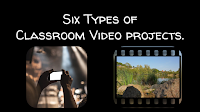
As I do during this week every year, I am taking some time off to relax and prepare for the new year. Every day this week I will be featuring the most popular blog posts of the year. This was one of the most popular posts in June. The process of creating and publishing videos […]
Four Things Students Need to Create Book Trailer Videos

This is an update of a blog post that I published about 16 months ago. The concepts are the same, but some of the resources have been updated. Creating book trailer videos is a great alternative to a traditional written book report assignment. In a book trailer video students highlight their favorite elements of a […]
Five Tools for Creating Animations on Chromebooks
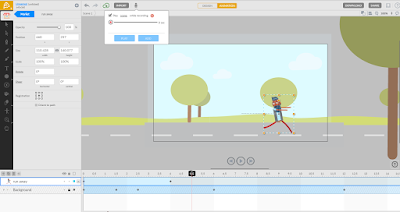
Yesterday’s post about the PuppetMaster app prompted a couple of people to ask me if there is anything similar available for Chromebook use. While I can’t think of anything that is free and exactly like PuppetMaster, here are some options for creating animated videos on Chromebooks. Animatron is a nice tool for creating animated videos and […]
PuppetMaster – A Great App for Creating Animated Movies
PuppetMaster is a free iPad app that kids can use to create animated movies. The app is designed for elementary school students and therefore doesn’t require students to create accounts in order to use it. All movies made with the PuppetMaster app are saved to the camera roll on a student’s iPad. To create an […]
How to Teach With Video

According to YouTube the average teenager spends more than 45 minutes per day watching videos. That presents a great opportunity to teach them valuable lessons from your curriculum, if you know how to do it right. In How to Teach With Video Keith Hughes, Tom Richey, and I will teach you how to create engaging […]
Intro to Teaching With Video

Last week Keith Hughes, Tom Richey, and I hosted Introduction to Teaching With Video. If you missed it, you can now view it on my YouTube channel or as embedded below. In the video we share some of our favorite tips for teachers who are new to creating instructional videos. You’ll also get hear us share our […]
5 Simple Things That Can Improve Your Videos
Whether for it is for education or entertainment we are all watching more videos than ever before. YouTube states that more than one billion hours of videos are watched daily. We have more tools to record and share videos than ever before. With the tap of an app or click of a link, you and […]
Student Use of Adobe Spark – Your Questions Answered

My post about alternatives to YouTube’s video editor has sparked a lot of questions from readers in the last 24 hours. No question has been asked more than, “can my students who are under 13 use it?” Adobe addressed this question in their free Adobe Spark Edu Guide. You can get the guide here. Here’s […]
How to Create Stop Motion Videos on a Chromebook
Last night I published an article about the Stop Motion Animator Chrome app. To clarify some of the nuances of using that app, in particular the handling of .webm files, I created the following short video demonstration. Come to the Practical Ed Tech Chromebook Camp to learn more about making videos on Chromebooks.
Six Types of Classroom Video Projects – And 18 Video Creation Tools
The process of creating and publishing videos can be a great way to get students excited about researching, storytelling, and sharing their work with an audience. For teachers who have never facilitated video creation projects in their classrooms, choosing the right style of video and the right tools can be a bit confusing at first. […]
Free Webinar – Behind the Scenes at Common Craft
Common Craft burst onto the explainer video scene way back in 2007 with RSS in Plain English. That video demonstrated a new way for students and professionals to create effective and engaging explanatory videos. In the ten years since RSS in Plain English hit the web, many teachers, students, and creative professionals have created their […]
Video Tips With Isla
Folks who follow my YouTube channel may have noticed that I’ve started using the live video option within YouTube’s Android app. This morning I used YouTube live to record a little video tip with my daughter, Isla. The tip is to look at the camera instead of the screen when you’re recording. In the video […]
Planning Your Video Project – A Guide for Students

Earlier today I published Rushton Hurley’s blog post about using video to capture your current students’ knowledge to be shared with your future students. Rushton included a sample video from a student explaining and illustrating onomatopoeia. While the final video is short, creating a good video requires planning. Over the years I’ve refined video planning […]
The Art of Storytelling – Pixar in a Box

The Art of Storytelling is part of the Pixar in a Box a project from Pixar and Khan Academy through which students can learn how the stories they see in Pixar movies come to life. The Art of Storytelling is a section of Pixar in a Box that teaches students about four elements universal to […]
Quick & Powerful Video Projects – A Wednesday Webinar

When I was a middle school student (decades ago now) my classmates and I made some videos about the countries that we were studying in our geography class. Those projects took us weeks to complete because our video creation tools were limited to the one video camera that we had to use. Today, that same […]
MySimpleShow Adds a Convenient New Way to Create Flipped Video Lessons

MySimpleShow is a great tool for creating explanatory videos. I’ve been raving about it since I first tried during the summer. It has also been a hit in many of my workshops. The thing that I, and many others, love about MySimpleShow is that students have to create a script in order to produce a […]
Try My Simpleshow for Creating Explanatory Videos
My Simpleshow is a free tool for creating Common Craft style explanatory videos. The best aspect of My Simpleshow is the emphasis that the developers have placed on storyline planing and development. As is demonstrated in my tutorial below, students have to write a script on My Simpleshow before they can begin to use the video editing tools. […]
My SimpleShow Offers a Good Way to Create Explanatory Videos

My Simpleshow is a free tool for creating Common Craft style explanatory videos. The best aspect of My Simpleshow is the emphasis that the developers have placed on storyline planing and development. My Simpleshow requires you to write a script for your video before you can start adding illustrations and sounds to it. In My […]
Three Good Apps for Creating Videos on Android Devices

Creating videos is one of my favorite activities to do with students. I never get tired of seeing what students create and I never tire of their enthusiasm for the creative process. I’m a big fan of letting students choose the video creation tool that they like best rather than prescribing that they all have […]
Three Tips for Planning Video Projects
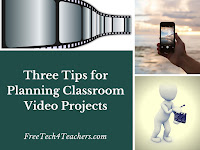
I love video projects because the entire process of developing project ideas, creating the video, and sharing the video engages almost all students. Over the years I have helped hundreds (maybe thousands) of students and teachers create videos in their classrooms. If you haven’t tried making videos with your students or you have and it […]