
Classright – A Google Sheets Add-on for Bulk Management of Google Classroom

Classright is a new Google Sheets add-on for managing multiple Google Classroom classes in one place. I gave it a try this morning and found it to have great potential as a time-saver at the beginning and end of a semester or school year. There are eight things that you can do with Classright in […]
Three Neat Things You Can Do With Google Sheets
Earlier this week my friend Beth asked me for some tutorials on Google Forms for beginners. As a follow up to that I’ve selected three Google Sheets tutorials from my library. These tutorials are for doing some interesting things with Google Sheets besides just looking at information collected through Google Forms. Create a Random Name […]
Create Your Own Mobile-friendly Random Name Picker

For many years now Flippity has offered a Google Sheets template that you can use to create your own random name picker. It’s quick and easy to use. You can use it by going to Flippity’s website and making a copy of the template or by using Flippity’s Google Sheets add-on. Either way you simply […]
How to Create Individualized Online Spelling Games for Your Students

Last Sunday I published a written overview of how to use Flippity’s Spelling Words template to create individualized online spelling games for your students. The template can be accessed from Flippity.net or through the Google Sheets add-on of the same name. I fielded a handful of questions about the template this week. To answer those […]
Flippity’s Google Sheets Add-on is Back!

On Monday I shared an update from Flippity about their Google Sheets add-on being broken and taken offline because the deprecation of the Goo.gl service. This morning I woke up to the news that Flippity’s Google Sheets add-on is back. Not only is it back, it’s better than ever before! Flippity’s updated Google Sheets add-on […]
Important Information for Fans of Flippity

Flippity is one my favorite Google Sheets add-ons. I probably refer people to it more than any other individual Google Sheets add-on. I do that because Flippity’s Google Sheets add-on provides twenty templates for making useful things within Google Sheets without having to be a scripting master. Some of the things Flippity can be used […]
My Five Favorite Google Sheets Add-ons

Last week and through the beginning of this week I have been featuring my favorite Google Docs, Slides, and Forms add-ons. Today, it is time to share my favorite Google Sheets add-ons. These aren’t necessarily the most popular add-ons, but they are the ones that I think of first whenever I’m asked for recommendations for […]
How to Send Personalized Certificates via Google Forms or Google Sheets

From perfect attendance to volunteerism to honor roll there are lots of occasions during the school year for schools to issue certificates to students. It used to be that to personalize certificates for students you would have to manually enter their names on the certificates that you were going to print for them. Today, there […]
How to Create Personalized Certificates in Bulk Through Google Sheets

Creating a certificate for one or a few students is a fairly straight forward process. You can use Google Slides, Canva, or any number of Word templates for that. However, that can get time-consuming when you need to create certificates for a long list of students like the school secretary that I helped earlier this […]
A Rubric for Digital Portfolio Assessment

Next week I am working with a group of teachers to help them start creating digital portfolios with their students. After we decide what we want students to include in their portfolios and the platform for the portfolio we’ll start looking at the assessment aspect. To help get that conversation started we’ll be looking at […]
Flippity’s Google Sheets Add-on is Working Again!

Back in May I started to get a bunch of messages from readers who were experiencing trouble with the Flippity Add-on for Google Sheets. The trouble was that after years of successful use, people were getting a warning message from Google that said the Flippity Add-on was unverified and not recommended for use. I reached […]
Three Google Sheets Add-ons That Can Help You Get Things Done

Google Sheets has a lot of features baked into that can help you organize things and get things done efficiently. Start exploring the Add-ons for Google Sheets and you will find even more ways to get things done efficiently. These are my go-to Add-ons for Google Sheets. Online Rubric This free Google Sheets Add-on makes […]
What’s Going On With Flippity? – I Found Out for You

A few weeks ago I was giving a presentation that included a demonstration of Flippity’s Google Sheets Add-on. A few minutes after the presentation a bunch of people told me that they received a security warning when they tried to install the Add-on. (I hadn’t seen the message because it was a new development since […]
Create Your Own Typing Games
Two of the most popular posts of the month so far have included typing games. One of those posts featured ABCya’s free typing games and the other one featured TypeTastic’s collection of free typing games. But you don’t have to rely on other people making typing games for your students. You can use the Flippity […]
How to Use Google Sheets to Create a Bingo Board With Pictures
A couple of weeks ago I shared the news that Flippity’s Bingo board template now lets you include pictures in your boards. I’ve had a few people ask for clarification on how to include image links in the template that generates the game board. In the following video I demonstrate how to create a Bingo […]
Use Google Sheets to Create Online Bingo Boards With Pictures

Flippity is one of my favorite Google Sheets Add-ons because it gives you direct access to sixteen templates that you can use to create games, progress trackers, and random name selectors. One of Flippity’s most popular templates, the Bingo template, was recently updated to allow you to include pictures in your Bingo games. Flippity’s Bingo […]
Autocrat Document Merge

Autocrat is a document merge tool that allows you to take data from a spreadsheet and use it to create a customized document or PDF. Autocrat can also be used to merge data from a spreadsheet into a single Google Slides presentation. All of this happens through the use of merge tags which match corresponding headers […]
Document Studio – The Google Sheets Add-on You’ve Been Waiting For
Document Studio is a new Google Sheets Add-on developed by Amit Agarwal. Document Studio will create documents based on the data that you have stored in Google Sheets. And because Google Forms will feed data directly into Google Sheets, you can use Document Studio to automatically create documents from Google Forms submissions. Document Studio can […]
Quickly Create Bingo Boards In Google Sheets
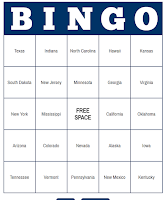
Flippity provides teachers with easy-to-use Google Sheets templates. A bingo board generator is the latest template added to Flippity’s catalog of offerings. The bingo board generator lets you quickly create sets of unique bingo boards that you can print or have your students use online during a game of bingo in your classroom. You can […]
5 Great Google Sheets Add-ons for Teachers

Google Sheets Add-ons make it possible for those of us who would otherwise struggle with spreadsheet scripting to get a lot of utility out of Google Sheets. From things like sending personalized emails to a list of students to creating rubrics to tracking attendance, the following five Google Sheets Add-ons can streamline processes for almost […]
How to Quickly Access Ten Google Sheets Templates for Teachers
Flippity is a great resource for G Suite users that I have been sharing with readers for a couple of years now. Flippity provides teachers with handy Google Sheets templates for creating things like quiz games, audio flashcards, and progress trackers. Recently, Flippity released a Google Sheets Add-on that makes all of their templates available […]
Ten Things Flubaroo Can Do for You
In this afternoon’s webinar about Google Forms and Sheets for Beginners I shared a few of the features of Flubaroo for grading quizzes created in Google Forms. But there is more to Flubaroo than meets the eye. You might already know that Flubaroo can grade multiple choice and fill-in-the-blank questions, but did you know that […]
Flubaroo Adds a New Feedback Option – Stickers & Badges

Back in June when Google added a scoring option to Google Forms many people wondered if Flubaroo was still a necessary Add-on. The answer to that is yes for anyone who wants to grade quizzes that have multiple correct responses, fill-in-the-blank questions, and for those who who want do more advanced grading tricks like case-sensitive […]
3 Features of Flubaroo That Are Often Overlooked
The Flubaroo Add-on for Google Sheets is a powerful tool for quickly grading multiple choice and short answer quizzes created with Google Forms. Flubaroo has been around for years and almost every week people ask me questions about how to use it. During this past week I shared three video tutorials on Flubaroo features that […]
Flubaroo Compared to the New Google Forms Auto-grading Feature

On Monday Google Forms received an update that allows you to create automatically graded multiple choice and true/false quizzes. To do this just go into your Form’s settings menu and select “quizzes.” You can then specify point values for each multiple choice question in your Form. In that same menu you can enter answer explanations. […]
When a Spreadsheet is Better Than a Form
Earlier this week a participant in one of my online courses asked a good question about using Google Forms as an assessment tool. Here’s the paraphrased question: I have created a great rubric for some year end projects. Rather than going straight to the spreadsheet, I complete the form as students present. However, i cannot for the life of me figure […]
How to Distribute Add-ons to an Entire Google Apps Domain
Add-ons for Google Sheets, Docs, and Forms can dramatically increase the features and utility of those tools. A domain administrator has the power to push Add-ons out to all users within a Google Apps for Education domain. Doing that ensures that every teacher and or student in a domain has the same set of Add-ons. […]