
G Suite for Education Shortcuts

We all have that colleague who always searches for Google Docs or thinks that the only way to find Google Classroom is to first open his email and then open the apps menu. That’s why I created a PDF and PNG of shortcuts to the core elements of G Suite for Education. You can find […]
The New Gmail is Coming Soon to More Domains and Users

Back in April Google revealed a redesigned Gmail user interface with a fantastic set of features including reply suggestions, message snoozing, and follow-up reminders. When it was announced the new Gmail interface was only available to those domains in the Early Adopter Program. Today, Google announced that the new Gmail interface will soon be available […]
Changes Coming to the Google Sign-in Screen
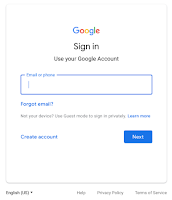
This morning Google announced that the sign-in screen you see when signing into your account is going to get a small change next week. Beginning on June 14th you’ll see a sign-in screen that reflects Google’s material design philosophy. This means that the sign-in screen will now have a blue box around the space where […]
A Convenient G Suite Update

On Thursday Google announced a small update to G Suite that could prove to be convenient and reduce confusion for folks who have more than one Google account. In the next few weeks G Suite administrators will be able to add custom images or logos to appear next to users’ profile pictures. This will mean […]
G Suite Training for Individuals and Groups – On Sale Now!

As you start to plan for your summer professional development needs, think about the benefits of self-paced, online courses. You can start and finish the course on your schedule from wherever you have Internet access. If you’re like me, in the summer that schedule and setting includes sipping coffee while sitting on your deck or […]
How to Use Grid View In Google Slides
Last week Google introduced a handful of new features for Google Slides. One of those new features is a grid view. There are two ways to access grid view in Google Slides. I demonstrate both methods in the short video that is embedded below.
Three Google Classroom Updates That You Will Appreciate
Six updates to Google Classroom were released yesterday. Three of those updates could immediately improve your use of Google Classroom this fall. Those three features are demonstrated in my video embedded below. In the video you will see how to view all of a single student’s work in one stream, how to display class codes […]
Warning! The Default Order of Icons in G Suite Launcher is Changing
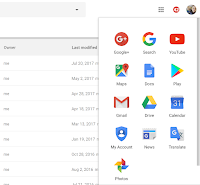
Today, Google announced an upcoming change to the default display of apps in the Google app launcher. That’s the little menu that appears in the upper, right corner of your screen when you’re logged into your G Suite account and using a G Suite product. Google stated that the change was made to improve the […]
How to Print Google Forms
Google Forms can be provide you with a good way to create a quiz for your students to complete online. It’s also a great tool for conducting surveys and or registrations for school club activities. Unfortunately, if not all of your students have access to the web then you will need to print copies of […]
Quickly Generate an Outline in Google Documents
Google Documents contains lots of handy features that often go overlooked. One of those features is the outline tool. The outline tool will quickly create an outline of your document. The outline is based on headers that you write in your document. The outline appears in the right-hand sidebar of Google Docs and lets you […]
5 Google Docs Formatting Tips
Some of the first questions that new Google Docs users ask are usually centered around formatting options in Google Docs. The stress of the transition from Word or Pages to Google Docs is eased once some of the basics are addressed. In the following videos I provide demonstrations of five Google Docs formatting options. How […]
Grade Items in G Suite Side-by-Side With Otus Rubrics
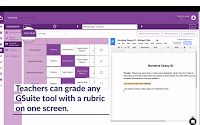
Otus is a fantastic learning management system that is steadily growing in popularity in large part because of its easy of use and flexibility. Proof of that flexibility can be found in a forthcoming update that will let you view, comment, and grade any G Suite item (Docs, Slides, Sheets) on the same screen that […]
How to Create Appointment Slots in Google Calendar

Whether you’re looking for a way to let students schedule office hours with you or you’re trying to streamline scheduling meetings with parents, Google Calendar provides a convenient solution in the form of appointment slots. In the following video I demonstrate how to create appointment slots in Google Calendar. This coming Tuesday I will be […]
7 Google Product Updates You Might Have Missed in March
It can be hard to keep up with all of the changes and updates that Google makes to the products that have become an integral part of many teachers’ lives. Some of the changes are minor and insignificant to the average end-user while others are significant to a larger portion of end-users. Here are some […]
Google’s Guides to G Suite Accessibility Options
Google offers two G Suite accessibility guides. There is a guide for administrators and there is a guide for users. The G Suite user guide to accessibility is designed for end users. The user guide is divided into sixteen sections. In the first section you will find recommendations for the best screen readers to use while using […]
Two New Google Calendar Features Help You Schedule Meetings

Google Calendar’s web interface got a helpful update this week. It now includes the same “smart scheduling” features for rooms and times that the Google Calendar Android and iOS apps provide. This means that Google Calendar in your web browser will now suggest a meeting room for you based on the rooms that you have […]
Two Ways to Grade Short Answer Questions in Google Forms
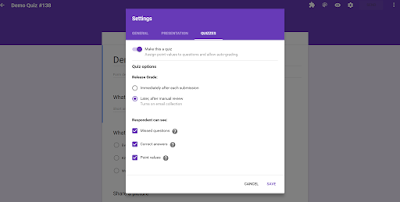
Last night I received an email from a reader who wanted me to clarify that is possible to grade short answer questions in the default “quizzes” mode. When you are selecting quiz settings in Google Forms you will need to choose the option for releasing grades “later, after manual review.” Then you will need to […]
Four G Suite Updates You Might Have Missed Recently

Google is constantly developing new features and sometimes eliminating old features from the tools that many of us use every day. It can be hard to keep up with all of the changes. In the last ten days there have been four changes to G Suite products that you should know about. This week Google […]
New Online Course – Getting Going With G Suite
I wasn’t planning to offer a new section of my course on G Suite for Education until January, but I’ve had a lot of requests from folks who want to take it before the end of 2016. Therefore, I got in touch with the Midwest Teachers Institute (my partner for graduate credit offerings) and we […]
Upload Files As Responses To Google Forms – Coming Soon
Earlier today Google announced a handful of new features that are coming soon to G Suite for Education (formerly called Google Apps for Education). The most exciting of those new features is found in Google Forms. The latest update to Google Forms includes two new features. First, now when you begin to write quiz questions […]
How to Create Google Alerts
In one of yesterday’s posts I mentioned using Google Alerts to track a topic on the web. A few hours after I published that post I was asked for clarification about how to create a Google Alert. In the following video I demonstrate how to create a Google Alert.
Improved Management of Google Drive File Uploads
One of the things that I like about Google Drive is that I can upload and store just about any file in my account. Additionally, I appreciate that I can have Word files automatically converted to Google Docs format. That feature is great when I’m working with someone who insists on using Word because they […]
11 Google Apps Updates You Might Have Missed This Summer – PDF
Over the summer Google released a bunch of updates to teachers’ and students’ favorite Google Apps. If you took a little break from your school Google Account over the summer and have just started to look at it again, you might notice that there are some new features available to you. I put together a […]
How to Impose Time Limits on Google Forms
Google Forms is a great tool for creating and delivering online quizzes and surveys. Like with any quiz or survey, you may find yourself needing to impose a time limit for responses. In the video embedded below I demonstrate how to impose a time limit on a Google Form. You can find fifteen more Google […]
15 Google Forms Tutorial Videos
On Friday I published a new video guide to using Google Forms for new users. As I noted when I published that video, there are many other features available in Google Forms. Over the last year I’ve created a bunch of videos on some of the advanced features available in Google Forms. Those videos are […]
5 Google Apps Updates You Might Have Missed This Week
This week Google released a bunch of updates to many of their tools that are popular with teachers. Here’s a short overview of those updates. 1. Google Classroom now supports sharing with parents. You can now invite parents and guardians to subscribe to a daily or weekly summary of activities in your Google Classroom classes. […]
How to Use the Lesson Plan Add-on In Google Docs
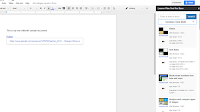
Update June 2020: OpenEd was acquired by ACT and is no longer online. This add-on no longer exists. Last month OpenEd released a new Google Docs Add-on that makes it easy to search for and organize lesson plan materials from their humongous library of resources. With the Lesson Plan Tool for Google Docs installed you […]
How to Create Your Own Custom Search Engine
This morning someone sent me an email asking how I had created the search on my alternatives to YouTube page. The answer is that I used Google’s custom search engine tool to specify pages that I wanted indexed in my search engine. In the video embedded below I demonstrate how to create a search engine. […]
Google Apps Terminology – A Short Explanation of Common Terms
Earlier this week I received an email from someone who was looking for clarification on the differences between Google Apps for Education, Google Drive, and Google Docs. That request for clarification isn’t uncommon. Here’s how I typically try to explain the differences between Google Apps for Education, Google Drive, and Google Docs. Google Apps for […]
My Favorite Search Strategies – Updated
This morning during the Practical Ed Tech Chromebook Camp I shared some of my favorite strategies and ideas for helping students improve their online research skills. The slides that I used today were an updated version of slides that I have previously shared here on Free Technology for Teachers. The latest version is of the […]
How to Enable Automatic Grading in Google Forms
The new automatic grading function in Google Forms seems to be a hit with many readers. I’ve received a bunch of questions about it in the last week. To answer many of those questions I created the short video that you can see embedded below and or on my YouTube channel.
Google Forms Can Now Automatically Grade Quizzes Without an Add-on
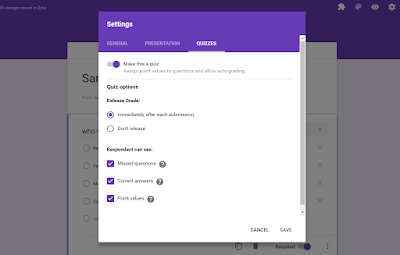
For a long time Flubaroo has been one of my go-to recommendations for easy scoring of quizzes created in Google Forms. Today, Google made it easier than ever to have quizzes scored for you and to show students their scores. Now when you create a Google Form you can go into the Form settings and […]
Google Cast for Education Gets Your Students on the Same Page
This morning at the ISTE 2016 conference Google announced some great new features for teachers. One feature that immediately jumped out at me is the new Google Cast for Education Chrome app. The Google Cast for Education Chrome app enables teachers and students share their screens over wireless networks. The app integrates with Google Classroom to […]
Homework Reminder Service What’s Due is Closing Down, Slowly
What’s Due is a free homework reminder service that I like a lot and have recommended a handful of times over the last couple of years. Unfortunately, What’s Due sent me an email earlier this week that announced their pending closure. The email didn’t say they were closing immediately rather it said that they wouldn’t […]
A New Version of Google Sites is Coming
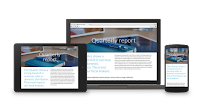
Google Sites is flexible tool for creating school websites, classroom blogs, wikis, and digital portfolios. For years it has remained unchanged except for the addition of page-level permissions a few years ago. Today, Google announced that a new version of Google Sites will be rolling out over the next year. The new version of Google […]
300+ Ed Tech Tools Tutorials
Over the last couple of years I’ve made an effort to publish at least one new tutorial video every week. Most of those videos end up being featured in the Practical Ed Tech Tip of the Week, but they all end up on my YouTube channel. I now have more than 300 ed tech tools […]
Helpful Gmail Settings for Students & Teachers – Best of 2015-16 School Year

All of this week I am on the road working with teachers in Texas, Kansas, and Arizona. Rather than scrambling to write blog posts at the end of each day, I’m taking this time to feature some of the most popular posts and new tools of the 2015-2016 school year. The Google for Work YouTube […]
A Guide to Google Books for Students & Teachers – Best of 2015-16 School Year
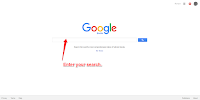
All of this week I am on the road working with teachers in Texas, Kansas, and Arizona. Rather than scrambling to write blog posts at the end of each day, I’m taking this time to feature some of the most popular posts and new tools of the 2015-2016 school year. Google Books is one of […]
How to Create a Progress Chart in Google Sheets – Best of 2015-16 School Year
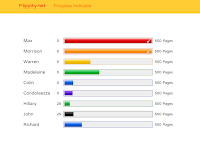
All of this week I am on the road working with teachers in Texas, Kansas, and Arizona. Rather than scrambling to write blog posts at the end of each day, I’m taking this time to feature some of the most popular posts and new tools of the 2015-2016 school year. Flippity provides a handful of […]
How to Create a Jeopardy Game in Google Sheets – Best of 2015-16 School Year
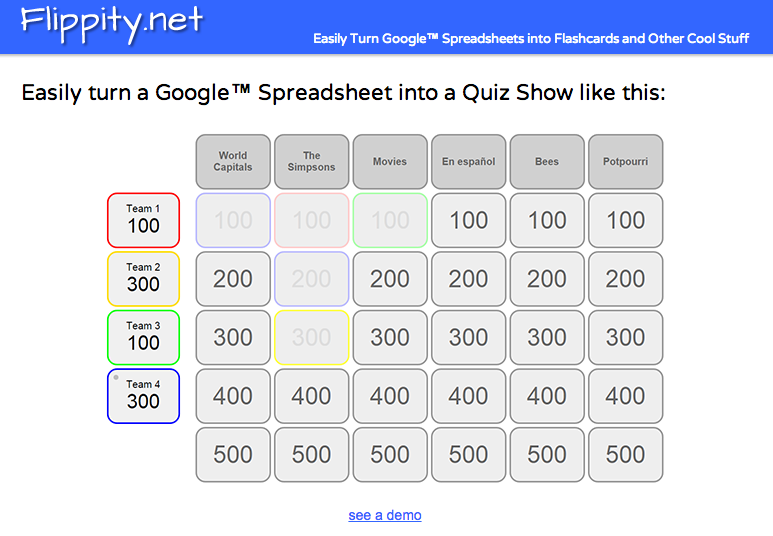
All of this week I am on the road working with teachers in Texas, Kansas, and Arizona. Rather than scrambling to write blog posts at the end of each day, I’m taking this time to feature some of the most popular posts and new tools of the 2015-2016 school year. Around this time last year […]
When a Spreadsheet is Better Than a Form
Earlier this week a participant in one of my online courses asked a good question about using Google Forms as an assessment tool. Here’s the paraphrased question: I have created a great rubric for some year end projects. Rather than going straight to the spreadsheet, I complete the form as students present. However, i cannot for the life of me figure […]
The Month in Review – The Most Popular Posts

It’s the end of the month and as I do every month I have compiled a list of the most frequently read posts of the last 31 days. May seemed to zip along quickly. This list offers an easy way to quickly see interesting and useful posts that you might have missed. Here are the […]
4 Google Apps Updates You Might Have Missed Last Week
Last week Google released a new product and updated some existing products that are of interest to teachers and students. Last Monday at the Google I/O conference Google introduced a new product called Spaces. Spaces is a service that lets you create small communities to share links, notes, and pictures. Take a look at my […]
How to Insert & Modify Charts in Google Slides
On Wednesday afternoon Google announced the release of a new feature in Google Slides. The new feature is the option to insert charts and graphs from Google Sheets. You can insert pre-existing charts from your Google Sheets or you can create a new chart or graph from scratch in your Google Slides. In the video […]
How to Create a Google Spaces Community

On Monday morning Google introduced their latest attempt at building a social network. The new product is called Spaces. Google Spaces is a platform on which you can create small communities of friends and colleagues in which you share links, notes, and pictures. A Google Spaces Chrome extension makes it easy to share links with […]
How to Use JoeZoo Express – A Google Docs Add-on for Grading Writing
JoeZoo Express is a powerful Google Docs Add-on that can help you more efficiently comment on your students’ writing in Google Documents. JoeZoo enables you to give feedback on students’ Google Documents by simply highlighting text then selecting feedback statements from a huge menu of feedback statements. You can use standard feedback statements provided by JoeZoo […]
How to Create a Biking or Walking Route Map in Google Maps
On Saturday morning I rode in a charity bike ride in my community. That ride was well mapped and planned thanks in part to Google Maps. If you want to create a biking route map or walking route map, follow the steps that I outline in the video embedded below. Applications for Education Warm weather […]
How to Use the New Q&A and Laser Pointer Features of Google Slides @googledocs
This afternoon Google added two fantastic new features to Google Slides. First, Google Slides now has a Q&A feature that lets your audience submit questions to you. Second, Google Slides now has a built-in laser pointer that you can use to call attention to parts of your slides. I’ve already received some questions about how […]
The Week in Review – The Most Popular Posts

Good morning from the temporary Byrne Instructional Media, LLC headquarters at O’Hare International Airport. I’m currently waiting for my flight home after a great afternoon yesterday with people who came to the networking event hosted by Otus. Thank you to everyone that came out to hear me speak. Getting to meet passionate educators all over […]
11 Google Apps Updates You Might Have Missed This Month
It’s the end of the month and it feels like I was writing about Google Apps daily in April. I checked, I wasn’t, but there were a lot of useful updates to Google Apps products this month. Here are the updates that are of interest to teachers and students. 1. Google Play podcasts. You can […]
New Options for Filtering YouTube in Schools

As I Tweeted earlier today, Google has introduced some new options for filtering YouTube in schools. If your school uses Google Apps for Education you can now whitelist (approve for viewing) an entire YouTube channel instead of just individual videos. This means that if I want all of my history students to be able to […]
Google Calendar Now Helps You Find Mutual Meeting Times

Parts of this post originally appeared on my other blog, Android4Schools. A couple of weeks ago Google added a goal setting feature to Google Calendar that helps you identify times to work on personal goals like exercising or reading for pleasure. Today, Google put some of that same technology into a new Google Calendar for […]
How to Enable Google Drive Desktop Notifications

Earlier this week Google launched a new notifications feature for Google Drive users. You can now get an alert on your desktop whenever someone shares an item with you or when someone requests that you share an item with him or her. There have been third-party apps that did this in the past. This is […]
How to Add Word Art to Google Slides
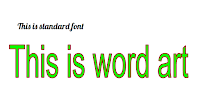
Google’s gallery of fonts provides a lot of style flexibility in Google Slides. Even more flexibility is available if you use the word art options in Google Slides. In the video embedded below I demonstrate the differences between using fonts and word art in Google Slides as well has how to customize your word art. […]
How to Create Bookmarks & Reminders With the New Google Keep Extension
Google Keep is a handy tool to taking notes in your web browser, on your Android phone, or on your iPhone. I’ve previously featured ten ways that students can use Google Keep. This week Google announced some updates to Keep. The latest version of the Google Keep Chrome extension and the Google Keep Android app […]
CaptureCast – Record Screencasts on Your Chromebook

CaptureCast is a free Chrome extension that enables you to create screencast videos on your Chromebook. With CaptureCast installed you can record everything that you display on your Chromebook’s screen. The CaptureCast extension gives you the option to record your sound. An option to record yourself through your webcam is also offered in CaptureCast. In […]
Now You Can Choose Which Google Drive Files Are Synced for Offline Access
For years now we have been able to sync Google Docs, Slides, and Sheets for offline access on our laptops and Chromebooks (learn how). That was great, but it didn’t typically sync your all of your older files. Soon that will change as Google has announced an update to Google Drive that will allow you […]
100 Google Apps Tutorial Videos
Often when I’m stuck on a technical problem all I need to get myself over the hurdle is just a quick tip. That’s why when I started making ed tech tutorial videos I made a conscious effort to keep them short and sweet. My YouTube channel now has more than 400 tutorial videos including 100 […]
How to Make Your Google Sites Mobile Friendly

Google Sites can be a good platform on which to develop your school, library, or classroom website. It’s a flexible platform that you can use for a variety of purposes including creating blogs, portfolios, and wikis. All that said, if you’re accessing a Google Site on a mobile device you may have trouble navigating it […]
How to Distribute Add-ons to an Entire Google Apps Domain
Add-ons for Google Sheets, Docs, and Forms can dramatically increase the features and utility of those tools. A domain administrator has the power to push Add-ons out to all users within a Google Apps for Education domain. Doing that ensures that every teacher and or student in a domain has the same set of Add-ons. […]
Three Google Apps Updates You Might Have Missed Last Week
Last week Google added a convenient polling option to Google Classroom. That update proved to be a huge hit as comments that I saw about it on Facebook and Twitter included, “finally,” “sweet,” and “woo hoo!” The update to Google Classroom wasn’t the only update to Google Apps that should be of interest to teachers. […]
JoeZoo Express Makes It Easy to Grade in Google Docs
JoeZoo Express is a free Google Docs Add-on that could change the way that you grade students’ work in Google Documents. JoeZoo enables you to give feedback on students’ Google Documents by simply highlighting text then selecting feedback statements from a huge menu of options. For example, in my sample document I highlighted text then […]
Three Google Drive Features That Impress New Users
I’m currently working with a school that is making the transition to Google Apps (click here for information on bringing me to your school). Last week we started to explore the many features of Google Drive. Within the group there were many first-time users of Google Drive. Like other groups they were amazed by some of […]
Coming Soon! Expiration Dates for Shared Google Drive Files
One of the challenges of sharing Google Drive files is keeping track of who has access to your files. In some cases you might only want someone to have access to the file for a limited time. In those cases you’ll have to remember to go back and change your sharing settings. This week the […]
Three Google Slides Features New Users Often Ask About
Last week I published a post answering three questions that new Google Docs users frequently ask. That post turned out to be quite popular so I’m following up this week with the answers to three questions that new Google Slides users frequently ask. Here are three questions that I frequently hear from new Google Slides […]
Three Helpful Google Docs Updates Released This Week
This week the Google Docs team released three updates. All three updates have potential to be useful in school settings. First, Google Docs in your web browser and in the Android app now has a document outlining tool. The outline tool will recognize headers within your documents and create an outline based upon those headers […]
3 Google Docs Options First Time Users Often Ask About
Earlier this week I led a short workshop for first-time Google Docs users in a school district near my home. I have facilitated these kinds of workshops on a regular basis for the last seven years. Over those years I’ve compiled a list of the questions most frequently asked by new users. Here are three […]
Check Out the New Google Docs & Slides Templates
This week Google added some new templates to the Google Docs, Slides, and Sheets template galleries. The most notable of these templates for students and teachers are the new book report template and the new science project template. The templates can be found and modified in your web browser or in the Google Docs, Slides, […]
How to Use Google’s My Maps in Your Classroom
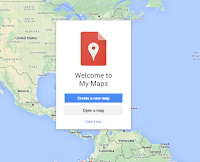
This morning at the NCTIES 2016 conference I facilitated a short workshop on using Google Maps and Google Earth in the classroom. Both tools are so robust that it is hard to cover everything you can or could do with them in just 90 minutes. To support the workshop I have a bunch of additional […]
Improved Voice Commands and More New Google Apps Features Released This Week
A few months ago Google adding voice typing as a native feature in Google Docs. This week they improved the voice typing feature by adding a slew of new commands. You can now use voice commands to do things like add and edit tables, select and highlight text, and format text. A complete list of […]
13 Google Forms Tutorial Videos
Last week the new version of Google Forms became the default version in many Google Accounts. But, as many people have pointed out to me, not all Google Accounts have made the transition. This is particularly true in Google Apps for Education accounts. Therefore, I put together a new playlist of Google Forms tutorials that […]
How to Use Find & Replace in Google Docs
The latest addition to my playlist of more than 90 Google Apps tutorials videos addresses a question that I received in my email this morning and probably receive every few weeks. That question is, “does Google Docs have a ‘find and replace’ function?” The answer is yes. You can locate “find and replace” in Google […]
A Convenient New Way to See Who Has Access to Your Google Drive Folders
Creating shared Google Drive folders provides teachers and students with a great way to contribute to a pool of B-roll media, to share study guides, or to collaborate on research projects. Keeping track of who has access to those folders can be a bit cumbersome. That will soon change as Google announced yesterday that a […]
How to Resize Videos in Google Forms
Shortly after I published a post about the recent changes to Google Forms I received an email from someone who wanted to know if there is an easy way to change the size of video embedded into a Google Form. There is an easy way to resize videos embedded into your Google Forms. In the […]
How to Create Historical Facebook Profiles With Google Drawings
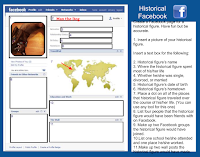
Creating a fake Facebook profile for a character in a book or of a famous person in history could be a good way to get students interested in writing about that person. Doing that on Facebook.com is a violation of Facebook’s terms of service, but there are ways to create fake Facebook profiles without using Facebook.com. One […]
How to Mix Privacy Settings on Google Calendar – And a Handful of Other Google Calendar Tutorials

This afternoon I facilitated a short workshop on using Google Calendar in school settings. One of the things that I shared in that workshop was the idea of putting lesson outlines in calendar events then making the calendar public so that parents could see what was happening in your classroom. Someone in that workshop raised […]
5 Good Google Tools for Social Studies Students

This evening I gave a short webinar presentation on my five favorite Google tools for social studies teachers and students. The webinar was hosted by the New England ISTE group. The content of key elements of the webinar are outlined below. Besides what you see featured below we also looked at Google’s Ngram Viewer. 1. […]
How to Create a Multiple Part Test in Google Forms
Yesterday, I posted a video in which I demonstrated how to impose a time limit on a Google Form. In response to that post someone on Facebook asked me if there was a way for students to save their progress on a Google Form and come back to finish it later. Unfortunately, there is not […]
How to Set a Time Limit on Google Forms

This morning I received a question from a teacher who was looking for a way to impose a time limit on a quiz or test administered through Google Forms. My suggestion was to try using the Google Forms Add-on called Form Limiter. In the video embedded below I demonstrate how to install and use Form […]
Google Books for Teachers and Students – A Guide
Google Books is one of my favorite research tools that students and teachers often overlook. In a post earlier today I embedded a book that I found through a Google Books search. Google Books allows you to do that with books that are in the public domain. I have done that a lot over the […]
An Easy Way to Download Your Google Data

One of the most common concerns or questions that I hear from educators (often school administrators) about using Google services revolves around the question of “can I get my information out of Google?” The answer is yes. At the Google Takeout site you can create an offline archive of your data. To do so just […]
82 Google Tools Tutorial Videos
I offer online and in-person workshops on Google Apps for Education, but I’m aware that sometimes all a person needs is just a two or three minute demonstration on a particular tool in order to get understand it. That’s why a few years ago I started to create short tutorials on a variety of tools […]