

Two Ways to Create Short Audio Recordings to Share via QR Code
A couple of weeks ago a loyal reader reached to me for my thoughts about sharing audio recordings via QR codes. His idea was to place QR codes on objects within his classroom and school so that students could scan them to hear his audio recordings. There were two tools that I recommended to him. […]
How to Make Custom QR Codes With Adobe Express

Yesterday afternoon I published a video and blog post about using Canva to create custom QR codes that include your own images and graphic designs. The Adobe Express suite of tools also offers a QR code creation tool. QR code creation tool in Adobe Express doesn’t let you use pictures in your codes like Canva […]
How to Create Custom QR Codes in Canva

Over the last fifteen years I’ve seen QR codes rise in popularity, fall in popularity, and rise again. They never lost their appeal to me because they can be used in schools a bunch of helpful ways. There are more QR code creation tools than ever before including one that is built into Canva. In […]
Five Ways QR Codes Can Be Helpful in Your School

Last week I was looking through my YouTube Studio analytics and noticed that once again my video about creating QR codes for Google Forms was trending upward. Searches on my blog for “QR code generator” were up last week as well. If you were one of those people searching for information about QR codes, here […]
A Quick and Easy Way to Distribute Contact Info During an Open House

I have an open house night coming up later this week. Thinking about that reminded me of the following that I wrote six years ago about using QR codes at open house night. The concept is the same now as it was then. The tools that I recommend for making QR codes have changed a […]
Ten Popular Back-to-School Tutorials for Teachers

YouTube’s channel analytics provides a lot of useful insights for people like me who publish a lot of videos and write a lot of blog posts. Not only does my YouTube channel’s analytics page tell me how many people watch and like my videos, it also tells me things like when those videos were watched […]
Best of 2022 So Far – QRToon

With the exception of the webinar I’m hosting tomorrow, I’m taking the rest of the week off. While I’m gone I’ll be republishing some of the most popular posts of the year so far. QR codes are handy for making long URLs easy to access on mobile devices. Last year I used QR codes to […]
My Three Favorite Tools for Creating QR Codes

There are lots of practical and clever uses for QR codes in schools. Over the years I’ve used them to make sign-in/sign-out sheets easily accessible, to distribute contact information to parents, and to create digital scavenger hunts. And on a fairly regular basis I get questions from teachers who want to know how to make […]
How to Create QR Codes for Audio Files in Google Drive

Earlier this week a reader reached out to me for advice about creating QR codes for audio recordings made by her students. Her students had made recordings using Vocaroo and then used Vocaroo’s built-in QR code generator to share the recordings. The problem they ran into is that Vocaroo deletes the recordings after a few […]
Five Uses for QR Codes in School Settings
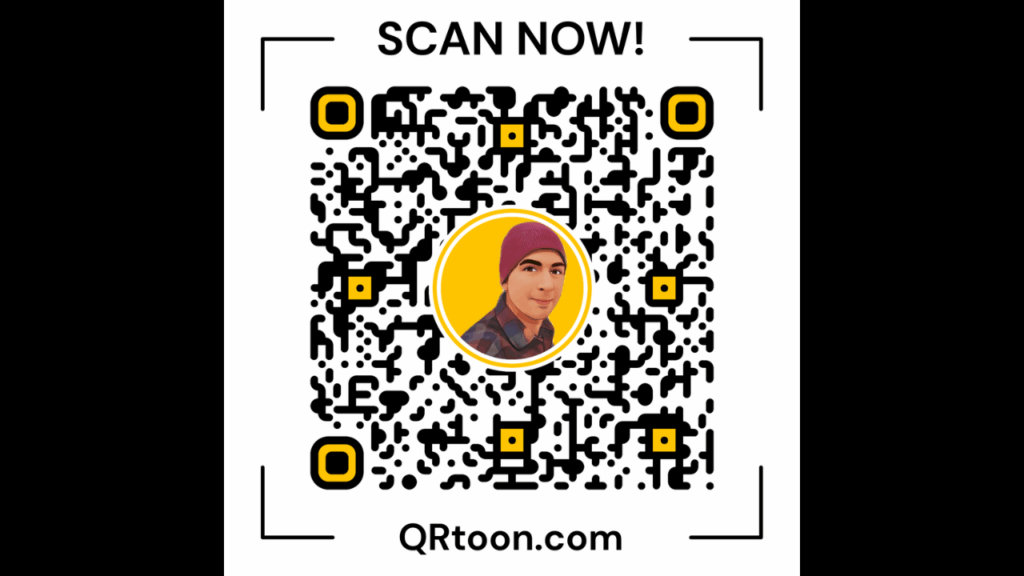
Over the weekend I shared a neat QR code generator called QRToon that lets you create a QR code that includes a cartoon version of yourself in it. Writing that post got me thinking about how far QR codes have come since I first saw them while working for Roadway Package Systems (now called FedEx […]
Scan Documents and QR Codes With Your Chromebook

Chromebook users will be happy to learn that Google has released an update that provides more utility for the camera that is built into Chromebooks. The update gives Chromebook webcams the ability to scan documents and QR codes. To scan a document with your Chromebook you now need to just open the camera app on […]
Share Voice Notes via Mote QR Codes
Earlier this year Mote emerged as one of my favorite new tools of the year. Mote is a Chrome extension that works with all of the core products in Google Workspace. With it you can add voice comments to Google Classroom, Google Docs, and Slides. You can also use it to add voice notes to Google […]
The Easiest Way to Create QR Codes for Google Forms

Last fall I published a video and blog post about using QRCode Monkey to make QR codes for Google Forms. Doing that makes it easy for students to quickly access your Google Forms from their phones. In my school a lot of teachers are using QR codes to give students quick access to things like […]
How to Share Google Slides via QR Code

Earlier this week I published a video and blog post about how to share Google Forms through QR codes. In response to that video a follower of my Facebook page asked for some help sharing Google Slides presentations via QR code. Students were having trouble viewing the slides she had shared via QR code so […]
How to Create QR Codes for Google Forms

Now that Google has shutdown Goo.gl many people have been looking for a new way to create QR codes for Google Forms. Goo.gl was convenient because you could shorten a URL and get a QR code in one place. My recommendation now for making a QR code for sharing Google Forms is to use QR […]
How to Create a QR Code for a Voice Recording

Just a few minutes ago I answered an email from a reader named Chris who wanted a recommendation on how to have students create voice recordings that play back when a QR code is scanned. My recommendation was to try Vocaroo. Vocaroo lets you record for free (no registration required) then have a QR code […]
How to Use QR Codes to Share Animated Videos

Earlier this week I answered an email from a reader who had heard someone talk about using QR codes so that people could watch animations made by students. Not having heard that person speak or seen the actual presentation my guess was that the process went like this; students wrote stories, students then made videos […]
How to Quickly Create a QR Code for Almost Anything

Over the weekend I shared the news that Google is shuttering the Goo.gl service. In that post I shared a handful of alternatives to Goo.gl. This morning someone emailed me to ask about an alternative to Goo.gl for creating QR codes. My suggestion is to use QR Droid Zapper. With that tool you can create […]
How to Create a QR Code for a Google Form
This afternoon I received an email from a reader who wanted to know how to make a QR code for quiz that she had made in Google Forms. The process is rather straight-forward as it requires just one simple tool outside of Google Forms. To create a QR code for a Google Form simply click […]
How to Add a QR Code to a Google Document
Earlier this morning someone sent me a direct message on Twitter to ask me how to add a QR code to a Google Document. This is a process that is easier to understand if you see it in action. In the video embedded below I demonstrate how to insert a QR code into a Google […]
Goo.gl – Save Time, Shorten URLs, and Track Interactions

Goo.gl is Google’s free URL shortening service. As I explain in the video embedded below, Goo.gl can be a good tool to help you get all of your students on the same webpage at the same time. By shortening a long URL to something manageable, you should be able to get all of your students […]
An Easy Way to Distribute Contact Info During an Open House

At back-to-school night parents usually end up with collection of papers that they may or may not be saved for reference throughout the school year. Use QR codes to put the odds in your favor of the information in those papers being saved. I figure that if parents and or students scan and save information […]
Develop Mobile Language Lessons With QR Voice
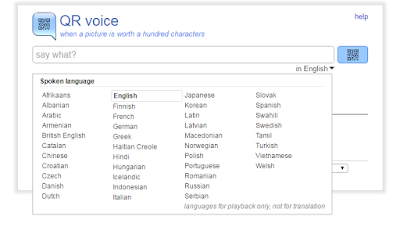
QR Voice is a free tool that allows you to create QR codes that when scanned will play a short audio message. To create your message and QR code you can record a voice message by clicking the microphone icon on QR Voice or you can type in your message. Either way you’re limited to 100 […]
5 Ways to Quickly Get Your Students On the Same Webpage

Getting all of your students on the same webpage at once is one of the small and annoying challenges of using websites and web tools in your classroom. Fortunately, there are some simple solutions to this challenge. The solution that you pick will be partially based upon the type of devices that your students use […]
Two Easy Ways to Create QR Codes to Use In Your Classroom
QR codes make it easy to quickly share important information with students. Through a QR code you can share links to websites and Google Documents (provided you have set sharing permissions to “anyone with the link”) for your students to open on their tablets or phones. You can share links to Google Calendars or to […]