
How to Use Microsoft Flip – Teacher and Student Views
It’s that time of year again when many of us are thinking about ways for our students to get to know each other and us. One popular way of doing that is through short video introductions. Microsoft Flip (formerly known as Flipgrid) provides a great platform on which to do that. As a teacher you […]
Student-led Conversations in Flip

Flip by Microsoft recently unveiled a slew of new features. Some of the new features are purely decorative things like new stickers and editing effects. Then there are some new features that are actually meaningful. One of the meaningful new features in Flip is the option for students to start discussions by posting their own […]
5 Things You Can Make With Microsoft Flip Besides Selfie Videos

Microsoft Flip (formerly known as Flipgrid) is a great tool for getting to know your students through the use of short selfie-style videos. I’ve also used it for asynchronous classroom discussions. You might have done the same with your students then gotten to the point of wondering, “okay, what’s next?” If that’s where you are […]
Updated – Screencasting on Chromebooks – Built-in Tool vs. Third-party Tools

Back in June Google introduced a new screencasting tool for Chromebooks. Back then I wrote a comparison of the Chrome OS screencast tool and some others that are available to use on Chromebooks. Since then Screencastify has changed their free plan and Flipgrid has been renamed as Microsoft Flip. So I think it’s time that I […]
How to Make Whiteboard Videos in Microsoft Flip

Last week’s most popular post was Getting Started With Microsoft Flip. To start this week let’s look at doing a little more than just a basic selfie video in Microsoft Flip. An additional way to use Microsoft Flip is to create whiteboard style videos. When you open the recording tool in Microsoft Flip press record […]
Getting Started With Microsoft Flip

Back in June Microsoft threw a big party to announce that they were rebranding Flipgrid. What was once called Flipgrid is now Microsoft Flip. Fortunately, not much else changed and all of my favorite Flipgrid features still work. That said, some people have already been asking me for tutorials about Microsoft Flip. That’s why I […]
Flipgrid is Dead!

If you’re attending the ISTE conference in person this week or you’re following updates from it on social media, you probably heard a thing or two about Flipgrid hosting a big event they called Flipfest. I didn’t go because I wasn’t at ISTE and even if I was there corporate “fests” are generally not my […]
Tools for Asynchronously Collecting Stories
Nearly fifteen years ago I used VoiceThread to have my students collect stories from their parents about changes in the community since their time in high school. VoiceThread is still available today although it costs a lot more than it did when I used it (it was free back then). There are other free tools […]
Screencasting on Chromebooks – Built-in Tool vs. Third-party Tools

Last week Google introduced a new screencasting tool for Chromebooks. Besides being a built-in part of Chrome OS the screencasting tool has some nice features for teachers and students. Those features include automatic transcription creation and ease of sharing with students and colleagues. So that might make you wonder why you would want to use […]
My Five Favorite Flipgrid Video Features

Over the last few years Flipgrid has added so many great features that it has evolved beyond being just a platform for teachers to ask questions and have students record selfie videos in response. Now you can use it to create video lessons, to create audio-only conversations, and much more. In this new video I […]
Three Ways to Share Videos Without Using YouTube

The days of heated arguments about whether or not YouTube should be accessible in school seem to be behind us. That doesn’t mean that YouTube is always the best option for hosting and sharing videos in your school. In fact, just yesterday someone emailed me to ask for suggestions on how her students can share […]
An Often Overlooked Flipgrid Option for Starting Conversations
In this week’s Practical Ed Tech Newsletter I shared some tools and ideas to use to try to make sure that students actually watch the instructional videos that you create for them. One of my suggestions was to try an option in Flipgrid that is hiding in plain sight. When you post a new topic […]
How to Blur Backgrounds in Flipgrid Videos
One of my favorite new things in 2021 was Flipgrid’s addition of a background blurring tool. With this feature enabled everything behind you is heavily blurred when you’re recording a video in Flipgrid. A related feature is the option to use virtual backgrounds in Flipgrid. The virtual background can be an image that you choose […]
A New Way to Add Students to Flipgrid
This week Flipgrid released a bunch of helpful updates. My favorite of those updates is a new way to invite students to join your Flipgrid groups. Now you can invite them by simply sharing a link to your group. You can share that link in your LMS of choice, post it on your blog, or […]
My Big List of Tools for a Variety of Classroom Video Projects

Other than questions about Google Workspace tools, I get asked more questions about making videos than any other three topics combined. Over the years I’ve used dozens and dozens of video creation tools. This is my current list of recommended video creation tools for classroom projects. Video Reflections/ One-take Videos These are videos that require […]
How to Record an Instructional Video in Wakelet

Wakelet is an excellent tool for creating collections of bookmarks, notes, and files to share with your students. It has has a built-in video creation tool in the form of a Flipgrid integration. That integration allows you to create videos with your webcam, by recording your screen, by recording on a virtual whiteboard, or a […]
Resources for Connecting Classrooms

Yesterday, during Two Ed Tech Guys Take Questions Rushton and I answered a question about how teachers can find other classroom to connect with for collaborative learning. We came up with three suggestions. Those suggestions are explained below. GridPals Flipgrid’s GridPals is available to any teacher who has a Flipgrid account. Through Gridpals you can […]
Three Good Tools for Recording and Publishing Audio Conversations

This is an excerpt from the latest version of The Practical Ed Tech Handbook. You can get your own copy for free when you sign-up for my Practical Ed Tech Newsletter. Synth is a free service that was designed for classroom use. It has had some significant updates in 2021. Originally, Synth limited recordings to […]
Flipgrid Virtual Backgrounds – How and Why

Last week Flipgrid unveiled a list of features for the 2021-22 school year. One of those new features is an updated menu virtual background options called backdrops. In the latest version of Flipgrid you can choose from a large selection of virtual background images or upload your own. Additionally, you can reposition yourself in front […]
How to Change Camera and Microphone Access Settings in Chrome

On a fairly regular basis I get questions from readers that go something like this, “I’m trying to use Flipgrid but my camera won’t work. What can I do?” A variation on that question asks for help with a microphone. When you’re trying to use a website like Flipgrid, Vocaroo, GoSynth, or any other site […]
5 Ideas for Using Threadit in School

This is an excerpt of my full article that I published on my other site, Practical Ed Tech. Threadit is Google’s new tool for recording webcam and screencast videos. The best way to think of it is as “Google Docs meets Flipgrid.” Here’s my preliminary list of five ways to use it in school. Group […]
Some of my Favorites – Flipgrid Whiteboard

This week is school vacation week here in Maine. I usually take this week off to go ice fishing on Moosehead Lake. Unfortunately, that’s not happening this year. Instead I’ll be “staycationing” and working on some projects around home. While on my staycation I’ll be sharing some of my personal favorite tools. Flipgrid’s new whiteboard […]
How to Use Flipgrid to Make Screencast Videos

As I do every year, I’m taking this week off from writing new blog posts. This week I’ll be re-running a few of the most popular posts in 2020. On Wednesday afternoon Flipgrid announced the launch of a new recording feature for teachers and students. You can now create screencast videos within Flipgrid. The feature […]
Flipgrid Text Comments – In Case You Missed It Like I Did

About a month ago Flipgrid added a new option for writing comments in response to videos within a discussion topic. This is in addition to the written feedback option that teachers have had for quite a while in Flipgrid. Now students and teachers can write comments in response to students’ video submissions within a Flipgrid […]
Five Screencasting Tools Compared and Ranked – Fall 2020

The launch of Vimeo Record earlier this week made me think that perhaps it was time to write a comparison of popular screencasting / screen recording tools. For this comparison I selected the five options that pop into my head whenever I’m asked about screencasting (which has been almost daily since March). With the exception […]
How to Use Flipgrid With Students Who Don’t Have Email Addresses
Last week I shared a tutorial on how to get started using Flipgrid. That tutorial included the perspective of a teacher and a student. The student perspective that I showed featured a student who has an active email address. It’s important to note that you can use Flipgrid with students who don’t have active email […]
Getting Started With Flipgrid – Teacher & Student Views

In the last month I’ve shared videos about how to make split screen videos in Flipgrid and how to make whiteboard videos in Flipgrid. It was pointed out to me, in the form of a reader request, that those are great features once you know how to use the basics of Flipgrid. To help people […]
How to Create Split Screen Videos in Flipgrid

A couple of weeks ago Flipgrid introduced some new features and product changes for the 2020-21 school year. One of those changes was a slight relocation of the whiteboard recording tool. At the same time a new whiteboard option was added. That option is to have a split screen while recording your whiteboard videos in Flipgrid. […]
How to Make a Whiteboard Video in Flipgrid

Last week Flipgrid introduced a bunch of updates and changes. If you haven’t logged into your Flipgrid account since the end of the last school year, you might find some things have changed since you last used Flipgrid. The updates and changes made last week didn’t eliminate any features. The updates and changes did move […]
What You Need to Know About the Latest Version of Flipgrid

Earlier this week Flipgrid published a slew of updates and had a big online event to hype it up showcase those new features. A lot of the updates were largely cosmetic. From what I’ve seen so far, nothing fundamentally changed with the way that Flipgrid works. What did change and is worth noting is some […]
How to Record a Screencast With Flipgrid

We’re halfway through 2020. This week I’m taking some time off from the blog to work on some other projects. The rest of this week I’m going to re-run some of the most popular posts and videos of the year so far. Flipgrid continues to evolve with new features seemingly appearing every quarter. Screencast recording […]
Seven Ideas for Flipgrid Activities

One of the reasons that Flipgrid became popular and continues to grow in popularity is that it can be used across grade levels. Another reason for its popularity is that it new features are added to it on a regular basis. With every new feature comes a new way to think about how Flipgrid can […]
Three Tools for Collecting Stories from Students and Parents
Earlier this week I hosted a webinar about using online tools to build communities. One of the topics within that webinar was collecting and publishing stories from students and their parents. To that end, there were three tools that I recommended. Those were Flipgrid, GoSynth, and Wakelet. Flipgrid Flipgrid was originally designed for classroom use […]
Now You Can Use Flipgrid to Make Screencast Videos

On Wednesday afternoon Flipgrid announced the launch of a new recording feature for teachers and students. You can now create screencast videos within Flipgrid. The feature is kind of hidden so I made a screencast video to show you where Flipgrid’s screen recording tool is found and how it works. As I demonstrate in the […]
How to Create Whiteboard Videos in Wakelet Collections
A couple of months ago Flipgrid introduced a new feature that enables you to create whiteboard-style instructional videos to share with your students. That feature is called Flipgrid Shorts. Wakelet has integrated the Flipgrid camera into their service so that now you can create whiteboard-style instructional videos directly within your Wakelet collections. Watch my video below […]
How to Use Flipgrid to Create Whiteboard Videos

A couple of days ago Flipgrid released some new features that all teachers can use in the new school year. Those new features include tools for creating whiteboard-style instructional videos. You can use this feature to create whiteboard videos for your students to watch in Flipgrid. You can also have your students use the whiteboard […]
Great New Features Added to Flipgrid

Just in time for the start of the new school year Flipgrid has rolled-out new features for teachers and students. I tried them out this afternoon and plan to make a video overview of them soon. In the meantime, here’s a run-down of what’s new and why you might care about the new features. Whiteboard […]
13 Flipgrid Tutorial Videos – #FlipgridFever

Flipgrid is a free video response service that has become massively popular in the last couple of years. Everywhere that I go, including today’s visit to Bonner Springs, Kansas, teachers are using Flipgrid to collect students’ video responses to all kinds of prompts. If you haven’t tried Flipgrid, I have thirteen tutorial videos that will […]
A Flipgrid Feature That is Often Overlooked

Earlier this week I was leading a workshop about making videos with students. The first part of the workshop included using Flipgrid. One of the features of Flipgrid that I always show is the sticky notes feature for students. Even though this feature is in plain view many people say to me, “I never tried […]
2,000+ New Stickers and Emojis Are Being Added to Flipgrid

Today at the BETT Show I had the pleasure of meeting Dr. Charlie Miller. You might not know his name, but you probably know the company he founded, Flipgrid. In our conversation I mentioned the Ed Tech Fitness Flipgrid that I created and how I would love it if they added some fitness or exercise […]
The Ten Most Watched Ed Tech Tutorial Videos of 2018

More than 13,000 of you are now subscribed to my YouTube channel. These were the ten most watched videos on my YouTube channel in 2018. Interestingly, despite publishing more than 100 new videos in 2018, nine of the ten most-watched videos of the year were made in 2017 or earlier. How to Add Your Voice […]
How to Use Flipgrid’s Android App

Based on the number of videos that I have made about it in the last month, it is not a secret that I think Flipgrid is a fantastic tool for gathering feedback from students. One of the reasons that I like it so much is that it works equally well and is equally easy for […]
How to Create a Custom Flipgrid Code

If you’re a Flipgrid user you already know that each of your grids is given a default code and URL. But did you know that you can customize that code and URL? You don’t have to use the default code and URL. You can customize it by making one small change in the grid set-up […]
How to Use Flipgrid on an iPad

Last week I published a detailed tutorial on how to get started using Flipgrid in your classroom. In that tutorial I focused on using Flipgrid in the web browser on Mac, Windows, and Chrome OS computers. Students can also use Flipgrid on iPads. The Flipgrid iPad app is intended for student use not for teacher […]
How to Use Flipgrid – From Sign-up to Video Responses

Flipgrid is one of the most popular ed tech tools to emerge in the last couple of years. It can be used as tool for video-based formative assessment, it can be used as an alternative to a classroom YouTube channel, and it can be used to connect classrooms around the world. Those are just a […]
A Couple of Thoughts About Flipgrid Stickers

A couple of weeks ago I was at a conference to present on the topic of formative assessment. Flipgrid was one of the tools that I mentioned in my presentation. After my presentation a nice woman asked me for my thoughts about the stickers and drawings that kids can add to their Flipgrid videos. She […]
Try Flipgrid as an Alternative to a Classroom YouTube Channel

Whenever I lead a workshop or webinar about classroom video projects I always talk about the importance of respectfully sharing students’ videos online. That often leads into discussions about YouTube privacy settings and alternatives to using YouTube to publish students’ videos. Recently, I’ve started share the idea of using Flipgrid to have students share videos […]
How to Use a Spreadsheet to Create Flipgrid IDs

Flipgrid is a great video response tool that can be used by students of almost any age including those under age 13 who often don’t have email addresses. If your students don’t have email addresses you can create student IDs for them to use on Flipgrid. You can manually create IDs for them within the […]
How to Upload Videos to Reply to Flipgrid Topics

I love Flipgrid for the ease with which students can record videos with their webcams to reply to prompts that you give them. But not every student likes to appear on camera. And not every Flipgrid topic has to be a free-form response. It is in those instances that your students can use the option […]
How to Use Guest Mode in Flipgrid
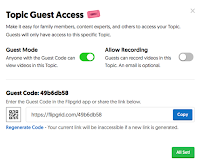
A few weeks ago Flipgrid added a new feature called Guest Mode. Guest Mode allows you to give parents access to view a specific topic within a Flipgrid grid. Guest Mode also provides the option for parents to record a video to be added to a specific topic within a Flipgrid grid. Watch my following […]
Two Good Places to Find Classrooms to Connect With

Last week I ran a guest post written by Sarah Fromhold containing great tips for hosting Mystery Skype or Mystery Hangout activities. Since then I’ve fielded a few emails from readers who were looking for other ways that they can connect their classrooms with other classrooms. There are two things that I’ve recommended to those folks. […]
Three Thanksgiving-Themed Activities To Do This Month

Now that it is November it’s time to start sharing some resources and ideas for Thanksgiving-themed lessons (apologies to readers outside of the U.S. who don’t celebrate Thanksgiving when Americans do, if at all). Here are a few activities that you could start now and have your students continue working on throughout the month. 1. […]
New Accessibility Options in Flipgrid and Other Microsoft Products

This week Microsoft unveiled a slew of new accessibility options for the services that teachers and students use most. One of those features is the inclusion of Immersive Reader in Flipgrid. Immersive Reader is a free service that students can use to have text read aloud to them. Immersive Reader not only reads aloud it […]
Recap is Shutting Down
Swivl has announced that they are shutting down their Recap service and replacing it with a new podcasting service called Synth. Once a competitor to Flipgrid, Recap just didn’t experience the popularity that Flipgrid does. Recap will be shut down in January of 2019. That gives you about ten weeks to find an alternative. You […]
Create Flipgrid Mixtapes to Showcase Grid Highlights

Flipgrid continues to add new features for teachers. The latest feature is the option to combine videos from multiple grids. Flipgrid calls this new feature Mixtapes. Mixtapes was created so that you can pull videos from multiple grids to create things like digital portfolios, summaries of a semester’s discussions, and presentation highlights. Watch my video […]
Find Some Flipgrid Pals for Your Classroom #GridPals

In addition to the new features in the mobile app, the Flipgrid website has a new feature for teachers. That feature is the #GridPals tab in your teacher dashboard. Under the #GridPals tab you will find an option to make your teacher profile public for other teachers to find so that you can connect your […]
Flipgrid’s Mobile App Now Has Basic Editing Options

Buried in amongst the other Microsoft EDU announcements that were made this week was the news that Flipgrid’s mobile app was updated. The latest version of the Flipgrid mobile app has a basic editing function that will let students trim the beginning and or end of a video before submitting it to a grid. Additionally, the […]
Rubric Grading and Ten Other New Microsoft for EDU Features

Google wasn’t the only tech giant to release new tools for teachers and students this week. Microsoft has also announced eleven new features for teachers and students who use Microsoft Teams for EDU. Rubric Grading in Microsoft Teams is at the top of the list of new Microsoft Teams for EDU features. This is a […]
Use Flipgrid to Publish Instructional Videos

The new school year will be here soon and I haven’t taken a break all summer. I’m taking a short break from the Internet to go fishing at one of my favorite places in the world, Kennebago Lake. I’ll be back with new posts on Saturday. While I’m gone I’ll be republishing some of the […]
Share Flipgrid Topics Through Otus

Last month Flipgrid made the huge announcement that all features were going to be made available to all users for free. That opened up a bunch of new possibilities for using Flipgrid in your classroom. Now that Flipgrid is free for everyone to use, I think we’ll see more people sharing creative ways to use […]
How to Use Flipgrid to Publish Instructional Videos
In Sunday’s Practical Ed Tech Tip of the Week I mentioned three ways to use Flipgrid now that all features are free for all users. One of those ways is to have students record and publish instructional videos. They can do this is a few ways. They can record themselves in front of a whiteboard, […]
Huge Flipgrid News! – All Features Now Free

Flipgrid has been acquired by Microsoft. That’s good news for the founders of Flipgrid and great news for all of us who enjoy using Flipgrid. As of this morning all Flipgrid features are now free for all users! If you are a person who paid for a Flipgrid Pro account, you’ll be getting a prorated […]
Flipgrid Password-protected All Grids This Morning

This morning all teachers using Flipgrid were sent an email about privacy updates that they made to all accounts. Those updates included automatically password-protecting all Flipgrid grids that did not already have password-protection in place. That means that students will need to enter a password in order to view and or add to a Flipgrid […]
How to Include a Discussion Element in Your Google Site

The transition from the old version of Google Sites to the new version of Google Sites has left a lot of people longing for features of the old version. Commenting was one of the features of the old version that does not exist in the new version. That prompted one reader to email me with […]
Three Ways to Collect Video Reflections from Students

As the 2017-18 school year winds down for many of us, it’s a good time to have students reflect on what they learned throughout the year. You could have students write these reflections and post them on a classroom blog. Another option is to have them record one-take videos to share their reflections with you […]
How to Embed Flipgrid Topics Into Google Sites
One of the good things about the new version of Google Sites is that Google has made it much easier to embed content from third party services. Flipgrid is one of the popular ed tech tools that you might want to add to your Google Site. By embedding a fully functional Flipgrid topic into your […]
5 Ed Tech Tools to Try in 2018

Earlier today I went on live on my YouTube channel to share five ed tech tools that I recommend trying in 2018 if you didn’t try them in 2017. Watch the video for my explanations of my recommendations then jump to the list to find tutorial videos for my recommended tools. 1. Flippity.net 2. Toontastic […]
How to Use Flipgrid – A 2017 Favorite

For the last five days I have featured the most popular posts of 2017. On this last day of the year, I’m going to highlight my favorite posts of the year regardless of their popularity. This post features my guide to using Flipgrid. Flipgrid is a fantastic service for collecting video responses to prompts that […]
How to Embed Flipgrid Videos Into Your Blog
On Sunday I featured Flipgrid in my tip of the week. My video tutorial on getting started with Flipgrid included how to share your video prompts with students and how they can reply to your prompts. One method of sharing that I didn’t include in Sunday’s video was embedding Flipgrid videos into blog posts. You […]
A Powerful Blogging Activity for Almost Any Classroom

A question that often comes up in my workshops about blogging is, “what should I have my students write about?” There are dozens, perhaps hundreds, of possible answers to this question. The suggestion that I often make is to start with a simple reflection activity. Set aside time in your Friday schedule to have your students sit […]
How to Use Flipgrid – A Guide for Getting Started

Flipgrid is a fantastic service for collecting video responses to prompts that you pose to your students. It has been a hit whenever I have demonstrated it in a workshop or conference presentation during the last year. The basic idea behind Flipgrid is that it enables you to post a video prompt and then have […]
4 Ways to Use Flipgrid in 4th Grade
This is a guest post from Caroline Schaab. As a 4th grade teacher, I’m always looking for creative ways spark curiosity, promote student voice, and keeps students engaged and to want to continue learning outside of school. Last year, with a few weeks left in the school year, I was introduced to Flipgrid. Fligrid is […]