
Two New Google Bard Features to Try
This week Google added a handful of new features to Google Bard including support for many more languages. Two of the new features that jumped out to me were the option to use images as prompts and the option to hear Bard responses read aloud. Both of those features are demonstrated in this short video. […]
Search Options When Your District Blocks Google Search
Late last week I got the following email from a reader: Recently our district blocked Google Search. My teachers are frantic as to what to use for kid research etc….What are some of your go to search/research websites that do not link to Google? My first sarcastic thought was to Google some suggestions 🙂 […]
Scholar, Books, Datasets, and More – Google Search Tools Students Overlook
In last week’s episode of Two EdTech Guys Take Questions Rushton and I answered a question about alternatives to using Google search. What we failed to emphasize is that Google offers a lot of search tools that students often overlook or don’t even know about. Some of my favorites of those are highlighted and demonstrated […]
A Few New Search Tools from Google

Those of you who use Chrome as your primary web browser on your computer or phone, that’s 75% of all readers of FreeTech4Teachers.com according to my Google Analytics account, may notice a few new search tools the next time you update your browser. Yesterday afternoon Google announced new search shortcuts for the Chrome address bar. These […]
Plate Tectonics and a Search Lesson

This is a post from my archives that fits with the theme of Geography Awareness Week. This morning I responded to a Tweet from someone who was looking for “plate tectonics virtual experiences for students.” My mind immediately went to using Google Earth. A quick search in my archives and I found this lesson plan […]
A Helpful Sheet of Google Search Modifiers

A few days ago I highlighted five Google search products that students often overlook. While it is important for students to know about those tools, they first need to know some basics like how to modify their search terms to get different results. Years ago Vicki Davis tipped me off to a search modifiers poster published by […]
Two Ways to Add an Image Search Tool to Your Website

In yesterday’s blog post about finding free images for school projects I mentioned that Photos for Class offers a free tool for adding their image search tool to your website. You can do a similar thing if you use Google’s Programmable Search tool to create your own image search engine. Both options enable you to […]
Google Search Tools Students Often Overlook

The default action for students to take when given a research task is to turn to Google. Unfortunately, many students won’t venture much beyond the first couple of pages of Google.com results pages before declaring, “I can’t find anything about this.” But as Dan Russell reminds us in The Joy of Search, good search often […]
Search Tip – How to Find Published Google Workspaces Files

Refining Google searches according to domain is one of my favorite ways to get students to look beyond the first couple of pages of their typical Google search queries. Students can specify site or domain in Google’s advanced search menu to limit results to those that are only from top-level domains like .edu. They can […]
Try the Fact Check Explorer

Fact Check Explorer is a free tool from Google that anyone can use to explore the veracity of claims made on the Internet. As you can see in my brief video embedded below, on Fact Check Explorer you can enter a topic or name then see a list of articles accompanied by notations about the […]
What is Sub-image Search? – And Why Would Your Students Would Use It?
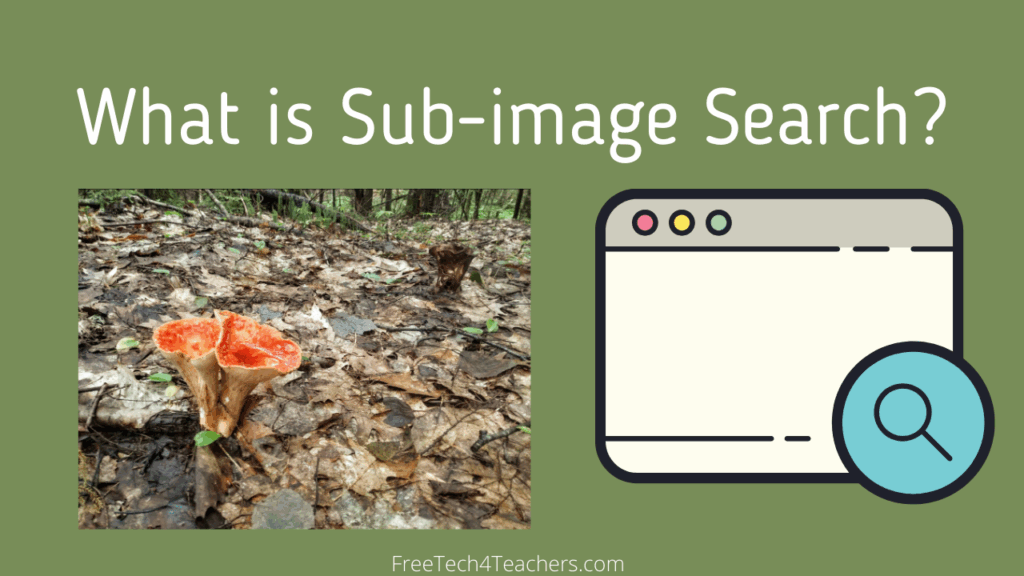
Sub-image search is one of the search strategies that I use a lot when trying to find out what an unfamiliar object is. I’ve used it to identify some old farm equipment, to find the origins of some flea market pottery, and to identify types of plants whose names I don’t know. It’s that last […]
How to Use Google Books

Google Books is one of my favorite search tools. Unfortunately, students often overlook it as a research tool unless they’ve been shown how it works. In this short video I provide a demonstrate of the key features of the current version of Google Books. In the video you’ll see how to: Search for a book. […]
Search Strategies Students Need to Know – A New Practical Ed Tech Course

A couple of weeks ago I hosted a live Practical Ed Tech webinar titled Search Strategies Students Need to Know! I’ve now taken the content and concepts of that webinar and broken into a self-paced mini course. Search Strategies Students Need to Know contains ten self-paced modules, templates for helping students conduct better online research, […]
11 Search Tips and Tools for Teachers and Students

As some of you have noticed, I wrote quite a bit about search tools and search strategies in July and early August. What you saw in those posts were excerpts from two projects that I’ve been working on. The first was The Practical Ed Tech Handbook (available to subscribers to my newsletter). The second is […]
How to Set Google Scholar Alerts – Two Options

I’ve published a few posts about Google Scholar lately because I think it’s a valuable research tool that students often overlook or haven’t been introduced to. It can be used to conduct research on court cases, inventions and inventors, and all kinds of academic topics. There’s one more feature of Google Scholar that students should […]
Why You Should Try Refining Search Results According to Domain

Refining Google search results according to site or domain can be a fantastic way for teachers and students to locate websites that they might not otherwise find but still contain useful information. This is because, as we know, a website can have excellent information about a topic but not rank well in Google search results. […]
Changing Search Predictions
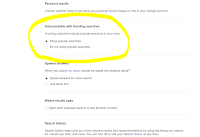
Google has a lot of help search tools if you know how to access them and use them. Just opening the advanced search menu often shows students a new world of search refinement possibilities. However, Google also has a couple of search options that sometimes do more to distract than to help. Those options are […]
Get a Free Chapter of My Favorite Book About Search Strategies

The Joy of Search is a book that I’ve been recommending for a couple of years now. It’s all about search strategies and is a must-read for anyone who wants to develop better search strategies or teach search strategies. The book was written by Dan Russell whose title at Google is Senior Research Scientist for Search Quality […]
5 Features of Google Advanced Search That Students Should Know How to Use

One of last week’s most popular post was this one in which I explained how excluding words from search results helped my students get past a little roadblock in their quest to find plans for an Arduino car. Excluding words from search results is one of many features in Google’s Advanced Search menu that students […]
How to Find Google Earth Files Without Endless Browsing

This morning I responded to a Tweet from someone who was looking for “plate tectonics virtual experiences for students.” My mind immediately went to using Google Earth. A quick search in my archives and I found this lesson plan calling for using Google Earth to teach plate tectonics and I found this Google Map filled […]
How to Improve Reverse Image Search Results

Reverse image search can be a good way to find more information about an object, animal, or person in a photograph. I use reverse image quite often when my daughters ask me about plants or animals that we see on our walks in the woods. To do that I take a picture and then upload […]
Five Search Tools Students Often Overlook

In our new remote teaching and learning environments students may find themselves having to look things up online more than ever before. Even if you’re hosting online class meetings in Zoom, Google Meet, or Microsoft Teams there will still be lots of time when students need to do some research on their own. This is […]
5 Features of Google’s Advanced Search Menu

My last two blog posts (here and here) have been about creating search practice activities for students. One of the Google search tools that students often overlook or have never been taught to use is the advanced search menu found on the search results page. Using the tools within the advanced search menu can help […]
Diving Into Google – Learn Search Techniques from Dan Russell

Longtime followers of this blog may have picked up on my appreciation for Dan Russell’s excellent Search ReSearch blog where he posts interesting search challenges designed to help readers become better web researchers. His forthcoming book, The Joy of Search, is sure to be excellent too. If you’re not familiar with Dan’s work or you […]
A Helpful Search Refinement Option for Students Studying Trending Topics

Earlier this month I published Ten Search Strategies Students Should Try. An eleventh strategy that students can try when they are researching current events, trending topics, or any rapidly changing topic is to refine results according to publication date. In the following video I demonstrate how students can refine search results according to publication date.
Tracing the Evolution of Phones – A Google Scholar Practice Activity

Google Scholar can be an excellent place to find articles from academic journals. Articles from academic journals aren’t the only things that students can search for on Google Scholar. Google Scholar provides search tools for locating court decisions and tools for locating patent filings. A good way for students to practice using the patent search […]
In Case You Forgot That Someone Is Always Watching…

From the pages of “Google knows when you are sleeping” comes Google’s latest search feature. Google has launched new activity cards for mobile search users. These new activity cards will appear at the top of your search page. The cards will suggest pages to you based on the last searches that you conducted. Google says […]
Create Your Own Search Engine

Last week I saw some folks on Twitter sharing a link to a site called Kidy that advertised itself as an “intellegent, safe search engine for kids.” I checked out the site and found that it was just an implementation of a Google Custom Search Engine that anyone can create. The implementation on Kidy was […]
Lessons to Help You and Your Students Become Better Researchers

If you’re looking to improve your search skills this summer or you want to find new ideas for teaching search skills, check out Power Searching With Google. Power Searching With Google was hosted by Google back in 2012. With the exception of the live Hangouts on Air that were held during the course, all of […]
Advanced Google Search to Gain Different Perspectives

One of the activities that students are frequently asked to do is search for information on current and historical events from around the world. The issue is that when students perform a search, they typically are not searching in a manner that will provide results that offer different perspectives. For example, if a student is […]
How Search Works – An Illustrated Explanation

Google search is a part of our students’ daily lives (most of them have never lived in world without Google), but often they don’t know how the search results displayed before them got there. How Search Works is an animated graphic that reveals the basics of how websites are sorted, ranked, and presented to you in your […]
Change the Dialect to Change Your Search Results

One of the points that I always make in my Search Strategies webinar is the importance of thinking about how other people describe the topic you’re researching. Here are two examples of how that has had an effect on my travel planning. Going to Australia A couple of years ago I gave the opening keynote […]
How to Create Google Alerts
In one of yesterday’s posts I mentioned using Google Alerts to track a topic on the web. A few hours after I published that post I was asked for clarification about how to create a Google Alert. In the following video I demonstrate how to create a Google Alert.
How to Refine Google Searches According to Date
Google’s search function has a lot of handy features that students often overlook while conducting research. One of those features is the option to refine search results according to a range of dates. As I explain in the video embedded below, refining a search according to date can be a good way to discover what […]
My Favorite Search Strategies – Updated
This morning during the Practical Ed Tech Chromebook Camp I shared some of my favorite strategies and ideas for helping students improve their online research skills. The slides that I used today were an updated version of slides that I have previously shared here on Free Technology for Teachers. The latest version is of the […]
The Hardest Type of Web Search for Students

There are three basic types of searches that students conduct on the Internet. Those types of searches are navigational, transactional, and informational. Navigational searches are conducted to find something specific like a website or physical location. Transactional searches are conducted for the purpose of trying to purchase something. Informational searches are conducted to discover information […]
Try the Google Newspaper Archive to Locate Old Articles and Images
Earlier this week I shared the U.S. News Map which is a database of newspapers that displays search results on a map of the United States. The U.S. News Map is limited to the years of 1836 to 1925 and is limited to U.S. newspapers. The Google News Newspaper archive offers a larger selection of newspapers […]
My Favorite Internet Search Tips for Teachers & Students

Whether you teach students who are ten years old or forty years old there will be times when they turn to you and say, “I can’t find anything about this” while they are researching. In most cases the problem isn’t that the Internet doesn’t hold any information for them. Rather, the problem is that students […]
How to Find Google Earth Files That Aren’t in the Google Earth Gallery

Yesterday, during my workshop on Google Earth and Google Maps someone asked me if I knew of any files about Rome. I did know about a couple, but I couldn’t find them in the Google Earth gallery. So I turned to Google and did a search by file type. My search was refined to .KMZ […]