
AI Use in K12: Strong Critical Thinking Skills Are More Important Than Ever
AI use in K12. Strong critical thinking skills are more important than ever in K12 due to AI. Hermeneutics offers a clearer, teachable definition of critical thinking.
Audio, Assessments, and Summer Cold – The Week in Review

Good morning from Maine where the sun is rising on what should be a great summer day. Fortunately, I’m feeling much better than I did throughout the week as a struggled with a miserable cold that had me sleeping a lot more than normal and exercising a lot less than normal. I did get out […]
Five Tools for Creating Automatically Scored Formative Assessments
This morning I answered an email from a reader who was asked to teach additional classes this fall. She reached out to me for suggestions on tools to create self-grading formative assessments to save her time this fall. I’d bet that there are many other teachers in the same situation and wondering the same thing. […]
Ten Tools for Gathering Real-time Feedback From Students

I’m taking the week off to do a bunch of fun things with my kids. While I’m away the most popular posts of the year so far will reappear. Chat tools and polling services provide good ways to hear from all of the students in a classroom. These kinds of tools, often referred to as […]
How to Use AI to Create Formative Assessments
A day ago I published a big list of AI tools and resources for teachers. This morning I tried another AI tool that is worth noting. That tool is the new AI-powered assessment generator that is now built into Formative. Formative’s new AI-powered assessment generator is currently a beta product that anyone with an active […]
Two Ways to Use Pictures in Formative Assessment

When I taught a computer repair class for high school students there were two ways that I consistently used pictures and diagrams in formative assessment. Formative Assessment With Images on FormativeEvery week I would have students answer questions based on a diagram that I upload to Formative.com. I like using Formative.com for this purpose because I […]
Grading Google Forms Short Answers Without Google Classroom

Last week I got an email from a reader who was looking for advice about grading short-answer questions in Google Forms. Specifically, the person wanted to know if there was a more efficient way to grade short-answer questions than tabbing through the “responses” pages. While you can have short-answers automatically graded for you in Google […]
Book Widgets Now Offers Digital Rubrics

BookWidgets is a service that I wrote about back in October. When I wrote about it then, it offered dozens of templates for creating interactive lesson activities that you can see your students complete online. Recently, BookWidgets added a new rubrics function that you can use to score your students online and offline work. The […]
Classwork – One of My New Favorites in 2021
I’m taking this week to recharge and get ready for the next session of the Practical Ed Tech Virtual Summer Camp. For the next few days I’m going to highlight some of my favorite new and new-to-me tools so far this year. Canva offers nearly two thousand worksheet templates for teachers to copy and modify. All […]
Two Great Ways to Quickly Create Animations

A couple of weeks ago in my weekly newsletter I explained why I value having students create simple animations. The short version of the explanation is that I agree with the premise of Dan Roam’s Back of the Napkin. The premise is that if you really understand a complex topic you can explain it in […]
Spaces Digital Portfolios Emphasize Feedback and Growth

Disclosure: Spaces is an advertiser on this blog. A couple of months ago I published a detailed overview of a digital portfolio platform called Spaces. In that blog post I emphasized the capability of Spaces to be used for Asynchronous breakout sessions. Those asynchronous breakout sessions are great for students to give each other feedback. […]
A New Microsoft Teams Feature That I Wish Google Classroom Had

If you work in a school that use Microsoft Teams or any of the other great Office 365 tools available to teachers and students, you need to subscribe to Mike Tholfsen’s YouTube channel. It was through his channel that I recently learned about a fantastic new feature in Microsoft Teams that I wish Google would […]
By Request – How to Create a Timed Quiz in Google Classroom

I’m taking a digital portfolio approach to assessment in our remote learning environment and using EDpuzzle for little comprehension checks. But my approach to assessment isn’t the only one you might take. In fact, a more than a handful of people have asked me via email, Twitter, and even a phone call (a colleague of […]
Three Good Ways to Create Rubrics – Tutorials Included

In my previous post I highlighted the University of Wisconsin Stout’s collection of rubrics for multimedia projects. At the end of that post I mentioned that while the rubrics might not match exactly what you need, they can be a great starting point for developing your own rubrics. If you’re looking for a good way […]
Rubrics for Videos, Podcasts, Blogs, and More

Over the years I’ve referenced the University of Wisconsin Stout’s collection of rubrics for multimedia projects. It has been a few years since I last featured it so I think it’s time to highlight it again. UW Stout’s collection of rubrics is organized by task or project type. There are sections in the collection for […]
How to Use Branching Logic in Microsoft Forms
For teachers working in schools that use Office 365, Microsoft Forms is a great tool for creating online assessments. Branching logic is one of the features of Microsoft Forms that is sometimes overlooked. It’s a great feature that can be used to direct students to a specific section of a form based on their answers […]
Loop – A Nice System for Gathering Feedback from Students

There is no shortage of online tools for gathering feedback from students. I featured a selection of them in the latest version of The Practical Ed Tech Handbook. Loop is the latest one to come across my desk. Loop lets you create an online classroom to post questions for your students to respond to with […]
Create Rubrics in Google Classroom – Coming Soon!

Last year Google added a comment bank option to Google Classroom. That feature, demonstrated here, can save you a lot of time when giving your students feedback on their assignments. Today, Google announced another grading feature that teachers have wanted for years. That feature is the option to create and attached rubrics to assignments within […]
Quick Key – Quickly Score Paper-based Quizzes With Your Phone or Tablet

This morning I answered an email from a reader named Eric who was looking for an alternative to GradeCam. His school district is possibly not renewing their subscription to GradeCam, but based on his message (copied below), it sounds like he likes the technology of GradeCam. Here’s the message I received: I teach an AP […]
How to Add Formative to Your G Suite Domain

Formative is one of my favorite online assessment tools. I’e been using and and featuring it in my workshops about formative assessment for many years. It’s a flexible tool that can be used to create and deliver assessments that include handwritten responses, diagram-based questions, interactive image-based questions, and many other question styles. Formative can be […]
How to Create Show Your Work Questions on GoFormative.com
Last week at the EdTech Teacher Summit in Boston I gave a presentation about formative assessment (you can see the slides here). GoFormative.com was one of the tools that I featured in my presentation. One of the key features of GoFormative is the “show your work” question type that allows students to draw responses to […]
How to Create a Comment Bank in Google Classroom

Google Classroom got a bunch of new features this summer. One of those is a new option to create a comment bank to use when commenting on your students’ work. The comment bank option will let you create and save lists of comments that you can easily view and insert into documents while you are […]
Otus Adds New Features Including a Lockdown Browser

Otus is a fantastic learning management system (LMS) that I’ve watched mature from its early iterations as an iPad-specific tool to a full-fledged LMS. This week, the folks at Otus announced a new round of updates to their LMS. Included in those update is a new lockdown browser mode that can be activated when students […]
My Top 5 Choices for Making Multimedia Quizzes

Over the years I have tried and written reviews of dozens of tools that teachers can use to create multimedia quizzes. But at the end of the day there is just a handful of tools that I consistently think of when it is time to make a quiz myself. Those tools are included in the […]
Ranked Responses – New Microsoft Forms Question Types

Microsoft recently added a couple of new response formats to Microsoft Forms. The new response formats are “ranking” and “Likert.” These new response types can be used when making a quiz or a survey in Microsoft Forms. The new ranking response format is exactly what you would guess that it is. You can build a […]
Mega Feedback – A Good Way to Organize Feedback

Mega Feedback is a new tool from the same person that developed Mega Seating Plan and Mega Name Picker. Both of those tools have been popular with readers of this blog and I think that Mega Feedback will become popular too. Mega Feedback is designed to help you quickly record, save, and distribute short bits […]
Join Me for Fun With Formative Assessments
Conducting formative assessments is one the ways that we can gauge our students’ understanding of the topics that we teach. Formative assessment doesn’t have to be boring for your students and it doesn’t have to be tedious for you. To help you make formative assessment fun for your students and informative for you, I am […]
Padlet Now Has Voting and Grading Tools

Padlet has added a couple of new features that bring it even closer to being an all-in-one formative assessment tool. Padlet now lets you vote on the notes added to a wall and grade the notes added to a wall. This is all done through the new “reactions” setting in Padlet. Voting on Padlet notes […]
Fun With Formative Assessments
Gauging your students’ understanding of the topics you teach is a process that involves discussion, a bit of intuition, and some formative assessment activities. Next Monday afternoon I’m hosting a webinar to introduce you to some fun ways and fun tools to use to conduct formative assessment activities. In this webinar you will learn how […]
ClassFlow: Creating Interactive Digital Lessons
ClassFlow is a free lesson delivery application that is used by over 125,000 institutions around the world. It helps teachers design interactive and engaging lessons. Teachers can create lessons from scratch or find free and low cost lessons that are already made in the marketplace. To get started, you will need to set up a […]
How to Launch Kahoot Challenges
Challenge mode is one of the key features of the new Kahoot mobile app. Challenge mode lets students play your Kahoot quiz games even when they aren’t in your classroom. When Challenge mode is used students see your quiz questions and the answer choices on the same screen on their mobile phones. In the video […]
A New Google Forms Feedback Feature You and Your Students Will Like

Earlier this week Google released a bunch of updates to Google Classroom and Google Forms. One of the updates to Google Forms is the option to give individualized feedback on each question that a student answers on a quiz given through Google Forms. In the video embedded below I provide a demonstration of how to […]
Create Formative Labeling Activities

Back in June Formative released an overhauled user interface for creating digital formative assessments. One of the things that you can do in the updated interface is change the background on a “show your work” question. Changing the background lets you create a labeling activity for your students to complete. Watch my video embedded below […]
A Clever Use of Google Keep for Grading in Google Docs
Earlier this year Google Keep became a core service of G Suite for Education. That update brought with it an improved integration of Google Keep into Google Docs. Eric Curts who writes the blog Control Alt Achieve has a great idea for using Google Keep to give students feedback in Google Documents. Watch his video, […]
Students Evaluating Student Work
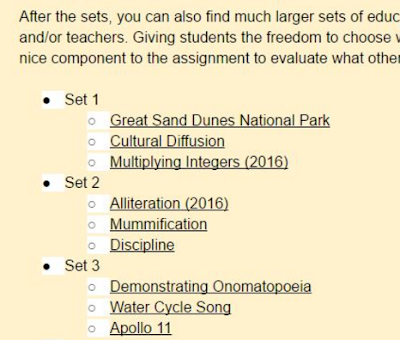
This is a guest post from my friend Rushton Hurley. Rushton is the founder of Next Vista for Learning and the author of Making Your School Something Special. At the recent #CUE17 conference, I ran a workshop on getting a digital video project going. While a good chunk of the session was devoted to exploring […]
Kahoot Adds a Team Mode – Best of 2016

As I usually do during this week, I’m taking some time off to relax, ski, and work on some long-term projects for the next year. This week I will be re-publishing the most popular posts of 2016. This week Kahoot, the wildly popular quiz game platform, released a new team mode. The new team mode […]
Quizalize – Best of 2016

As I usually do during this week, I’m taking some time off to relax, ski, and work on some long-term projects for the next year. This week I will be re-publishing the most popular posts of 2016. There is certainly not a shortage of interactive quiz platforms available to teachers today. Platforms like Socrative and […]
Five Good Digital Exit Ticket Tools

One of the strategies that I use when creating lesson plans is to reflect on the previous lesson. Part of that reflection includes feedback from students. This can be done by simply asking students to raise their hands in response to a “did you get it?” type of question, but I like to have better […]
3 Features of Flubaroo That Are Often Overlooked
The Flubaroo Add-on for Google Sheets is a powerful tool for quickly grading multiple choice and short answer quizzes created with Google Forms. Flubaroo has been around for years and almost every week people ask me questions about how to use it. During this past week I shared three video tutorials on Flubaroo features that […]
How to Place an Image-based Quiz in Your Blog

A couple of weeks ago I published a tutorial on how to create an image-based quiz on Formative. The image-based quizzes that you create in Formative can be embedded into your classroom blog where your students can then answer the questions in the quiz. In my video embedded below I demonstrate how to create the […]
5 Features to Look for on Formative in the Fall

Earlier this week at the ISTE 2016 conference I had a nice meeting with the founders of the popular assessment tool, Formative. Formative is hard at work to add new features in time for the new school year in the northern hemisphere. The list of features that they showed me is fifteen deep. Many of […]
Triventy – Collaboratively Create Online Games and Save the Results
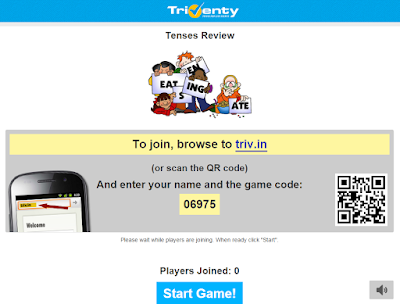
Triventy is a free online quiz game platform that is similar in concept to platforms like Kahoot and Socrative. Triventy differentiates itself from the crowd by allowing you to accept question suggestions from students. You can see an overview of Triventy in this video that I published in January. This week Triventy add a frequently […]
A Quick Way to Create Rubrics Online – Best of 2015-16 School Year

All of this week I am on the road working with teachers in Texas, Kansas, and Arizona. Rather than scrambling to write blog posts at the end of each day, I’m taking this time to feature some of the most popular posts and new tools of the 2015-2016 school year. From the same people that […]
Rubrics for Assessing Wikis, Blogs, Podcasts, and Digital Portfolios

The University of Wisconsin, Stout has organized a nice collection of rubrics for assessing digital projects. In the collection you will find rubrics for assessing student blogging, student wikis, podcasts, and video projects. Beyond the rubrics for digital projects there are rubrics for activities that aren’t necessarily digital in nature. For example, you can find […]
Now You Can Sync Your Google Classroom Roster With Quick Key

Quick Key is a free app that turns your iPhone or Android phone into a bubble sheet scanner. It has two parts to it that when combined make it very easy for you to quickly grade multiple choice and true/false quizzes. This week Quick Key introduced the option to sync your Google Classroom rosters to […]