
Trick O’ Treat Safety Review Games

Halloween is just eight days away. If you’re an elementary school teacher, you might be planning to do some trick o’ treating safety reviews with your students. Playing Kahoot games is a fun way to review almost anything including Halloween safety. That’s why a few years ago I made the following video to demonstrate how to find and modify […]
A Good Source of Last-minute Halloween Games

I mentioned this in the list of Halloween-themed resources that I shared a few weeks ago, but I thought it would be worth reminding you that Kahoot has a huge gallery of Halloween-themed games. You can find those games by clicking the “Discover” tab in your Kahoot dashboard and then entering the search term “Halloween” […]
Ziplet – A Great Way to Gather Feedback from Students

This morning I saw an interesting Tweet from a company called Ziplet. The Tweet is what prompted me to write this blog post. Ziplet’s Tweet this morning was an interesting exit ticket prompt. Here’s the prompt: “Imagine a classmate is absent from class today. How would you explain the lesson to him/her in 25 words […]
How to Display Kahoot Questions and Answer Choices on the Same Screen
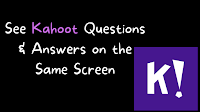
Last week Kahoot added a feature that teachers and students have been waiting years to see. That feature is the option to have game questions and answer choices displayed on the same screen. This means that students no longer have to look up at a screen in your room or a screen in Zoom then […]
Kahoot Now Displays Questions and Answers on the Same Screen – Finally!

For years teachers and students have wanted to be able to see Kahoot questions and answer choices on the same screen. This week Kahoot finally made that possible! Now when you launch a live Kahoot game for in-person or online play you can choose to enable an option to show questions and answer choices on […]
Kahoot Acquired Whiteboard.fi – What Could That Mean for You?

Last spring I got quite excited about a new online whiteboard tool called Whiteboard.fi. A lot of other people did, too. This blog post that I wrote about Whiteboard.fi had more than 100,000 hits! The success of Whiteboard.fi didn’t go unnoticed by other educational technology companies as evidenced by the announcement that Kahoot has acquired […]
How to Play Kahoot Games in Google Classroom

As I do every year, I’m taking this week off from writing new blog posts. This week I’ll be re-running a few of the most popular posts in 2020. This is the time of year when many of us are looking for fun ways to conduct end-of-year review sessions with our students. Playing Kahoot quiz […]
How to Create and Host Your First Kahoot Game

In this week’s Practical Ed Tech newsletter I share some ideas for adding some fun educational activities into online and hybrid classrooms. In the newsletter I mentioned that I’m using Kahoot at the end of my of my class meetings as a fun way to recap that day’s lesson. This morning I actually used Kahoot […]
The Month in Review – The Most Popular Posts in July

It’s hard for me to believe that it’s the last day of July. It feels like just last week I was hosting end-of-year Google Meet sessions with my students. Now I’m starting to think about the first day of school that is less than a month away. That’s why I’m going to have a few […]
How to Use Kahoot With Google Classroom

We’re halfway through 2020. This week I’m taking some time off from the blog to work on some other projects. The rest of this week I’m going to re-run some of the most popular posts and videos of the year so far. May is a time when many of us are looking for fun ways […]
How to Use Kahoot in Google Classroom

This is the time of year when many of us are looking for fun ways to conduct end-of-year review sessions with our students. Playing Kahoot quiz games is one of the most popular means of doing that. Kahoot games are fun to play in a classroom and you can also use them for remote learning […]
How to Find and Edit Thousands of Halloween Games for Your Classroom

As I write this there are two mini pumpkins on my desk courtesy of my daughters. If you’re an elementary school teacher, I bet that there are plenty of visual reminders of fall and or anticipation of Halloween around your school. As Halloween gets closer and you think about reviewing trick o’ treating safety or […]
When the Shine is Gone

Yesterday, Quizizz made an announcement about some new features that they have added to their quiz game service. As I was writing about those features I started thinking about a comment that I am starting to hear on a fairly regular basis about services like Quizizz and Kahoot. That comment is, “our kids are bored […]
How to Use Kahoot’s New Question Bank to Create a Game
Earlier this summer Kahoot gave a preview of some new features including a question bank for making quiz games. Today, Kahoot made that question bank available to all users. Along with making the new question bank available to all users Kahoot unveiled a slightly new user interface for making quiz games. I tried it out […]
Now You Can Share Kahoot Games in Microsoft Teams

Last week Kahoot released some game creation updates in advance of the ISTE conference. This week Kahoot made an announcement during the conference. That announcement was that you can now share Kahoot games in Microsoft Teams. With this update you will be able to share games for live play in your classroom and share games for […]
Kahoot Adds New Game Creation Options

In advance of next week’s ISTE conference, Kahoot has unveiled some new features that teachers have been asking for. Now when you create a Kahoot game you will have 25% more space to write your questions. You’ll now be able to drag-and-drop your game questions into a new order. And, finally, Kahoot has added autosaving […]
AP Government Review Resources – Kahoots and Quizlets from C-SPAN Classroom

AP exam season will be here soon. As they have done for the last five years, C-SPAN Classroom will be hosting a live Cram for the Exam session on May 4th. It’s free and open to any student who is taking the AP Government exam. That’s not the only AP Government review resource that C-SPAN […]
Kahoot Adds a Smart Practice Mode

Kahoot has added a new way for students to use the free Kahoot iOS and Android apps. The new way to use the apps is to play games in what Kahoot is calling Smart Practice mode. Kahoot’s new Smart Practice mode gives students an opportunity to focus on the questions that they answered incorrectly during […]
How to Find and Modify Halloween Games in Kahoot

Halloween is only seven days away. If you’re an elementary school teacher, you might be planning to do some trick o’ treating safety reviews with your students. Playing Kahoot games is a fun way to review almost anything including Halloween safety. That’s why I made the following video to demonstrate how you find and modify […]
Kahoot Adds New Features for Teachers

Kahoot has just announced a feature that teachers have requested for a long time. You can now upload a spreadsheet of questions to create a game in Kahoot. To do this you have to use Kahoot’s spreadsheet template. I think that after you’ve used the template a time or two writing quiz questions and answers […]
7 Places to Create Your Own Educational Games for Students to Play at Home

The Internet is not lacking for websites that offer games that students can play online. Despite that fact, there are still occasions when you can’t find exactly what you or your students need. In those cases you might want to just create your own game instead of conducting more fruitless searches. Here are seven places […]
A New Look for Kahoot – Coming Soon

Two weeks ago Kahoot added a new game creation capability to their free mobile apps. This week at ISTE they’re previewing a new user interface for teachers. The new user interface is based on the one that is now available for Kahoot business users. The new interface features improved collaboration options and improved results reporting. […]
Now You and Your Students Can Create Quizzes in Kahoot’s Mobile App

Kahoot has released a major update to their free mobile apps. As of this morning you can now create a Kahoot game within the free app. The app also lets you distribute games to be played in your classroom or as “challenges” for students to play at home. More importantly, now students can create games […]
Quizalize Introduces New Differentiation Tools

Quizalize is an excellent platform through which you can create and distribute online quiz games. Your students can play the games as a group in your classroom much like Socrative or Kahoot. You can also have your students play the games at home. In fact, Quizalize offered the “play at home” option long before Kahoot […]
How to Share Kahoot Challenges Through Remind
This week Kahoot announced an integration with the Remind messaging service. This integration lets you send your Kahoot Challenges (games for students to play at home) to your students and their parents through the Remind messaging service. In the following video I demonstrate how to send your Kahoot Challenges through the Remind messaging service.
Kahoot Now Lets You Share Games Through Remind
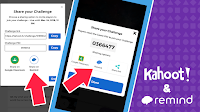
Last fall Kahoot released a new feature called “Challenges” that are review games your students can play at home or anytime they are outside of your classroom. That feature has proven to be popular. Today, Kahoot announced a new integration with Remind that will make it easier than ever to send Kahoot Challenges to your […]
21 Tools for Conducting Digital Formative Assessments – Best of 2017
As I do during this week every year, I am taking some time off to relax and prepare for the new year. Every day this week I will be featuring the most popular blog posts of the year. This was one of the most popular posts in February. Conducting simple formative assessments is one way […]
Kahoot Launched a Paid Plan – What That Means for You

Kahoot launched a paid service yesterday. You might have seen some Tweets or Facebook posts about it and gotten concerned as did the folks who emailed me about it yesterday. The paid plan isn’t going to have a direct impact on your teacher account. The new Kahoot Plus plan is designed for corporate users who […]
How to Launch Kahoot Challenges
Challenge mode is one of the key features of the new Kahoot mobile app. Challenge mode lets students play your Kahoot quiz games even when they aren’t in your classroom. When Challenge mode is used students see your quiz questions and the answer choices on the same screen on their mobile phones. In the video […]
Kahoot, Fractions, Copyright – The Week in Review

Good afternoon from Maine where it is a gorgeous late summer day. I started the day with a fun hike with my daughter and dogs. These days my hikes are little slower than they used to be, a 30lb child on your back will do that, but they are sweeter because I enjoy them with […]
Kahoot Launches a New Mobile App – Play Games in Classroom or at Home

Kahoot released a new mobile app this morning. The new app, available for Android and iOS, contains all of the features that were promised back in June at the ISTE Conference. The new mobile app will let students participate in Kahoot games both in the classroom and at home. The Kahoot mobile app offers a […]
Where to Find and How to Use the New Kahoot Math Games
Earlier this week Kahoot launched a new featured called Kahoot Studio. Studio is a curated collection of math games made by Kahoot and aligned to Common Core standards. In the future Kahoot will be adding games for other subjects. I received a couple of emails from readers looking for more information about Kahoot Studio. In […]
Kahoot Launches a New Collection of Math Games
Kahoot, the immensely popular review game platform, has launched a new component for teachers. The new component is called Kahoot Studio. Kahoot Studio offers curated collections of pre-made Kahoot quizzes. The collections will contain quiz games created by Kahoot staff and Kahoot’s “expert” educators. As of right now the only curated collection in the new […]
Kahoot Unveils a New Mobile App and Game Play Options

Kahoot announced the release of new mobile app this week at ISTE 17. The app, still in beta, addresses a lot of the complaints about Kahoot that I’ve heard from teachers over the last few years. The first item to note in the mobile app is that your students will now see the questions and […]
4 Good Formative Assessment Tools for Classrooms That Aren’t 1:1

Earlier today Kahoot announced that they now have 50 million users. That prompted one person to email me asking if there was something similar that she can use in her classroom that isn’t 1:1. My immediate reply was to try Kahoot’s team mode. Kahoot’s team mode is designed to be used with students who are sharing […]
Kahoot Announces New Windows 10 Apps
In an earlier post I shared some of the news about Microsoft’s new Windows 10 S operating system. In that post I mentioned that all apps used in Windows 10 S have to be approved by Microsoft for inclusion in the Windows Store. Kahoot is one of the first to get approval. Kahoot has two […]
How to Create Short Answer Activities in Socrative
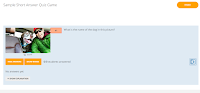
Socrative is one of the original and best platforms for creating quiz games to be played in your classroom on Chromebooks, laptops, and mobile devices. One of the best aspects of Socrative is that unlike Kahoot, Socrative lets you create games in which students have to type answers instead of just picking a multiple choice […]
Use Socrative to Create Quiz Games That Accept Short Answers

This morning I received an email from a reader who was looking for an alternative to Kahoot. He wrote, “I would love to have the same set up / timer / point distribution as Kahoot, but I’m now looking for something more challenging than clicking on an answer…” Socrative was the first option that came […]
Hone Geography Skills With These Fun Games
Yesterday, I received an email from Kahoot that featured six games they are promoting along with National Geographic. The games are intended to help students brush-up on their knowledge of U.S. and world geography. You can find those games here in the public gallery in Kahoot. I played a couple of the games and found […]
Kahoot Adds a Team Mode – Best of 2016

As I usually do during this week, I’m taking some time off to relax, ski, and work on some long-term projects for the next year. This week I will be re-publishing the most popular posts of 2016. This week Kahoot, the wildly popular quiz game platform, released a new team mode. The new team mode […]
How to Create Kahoot Games
For the last eleven months “create Kahoot games” and “Kahoot” have been the most frequently searched terms on this blog. While I have published videos about specific parts of Kahoot, until today I didn’t have a video on the complete Kahoot creation experience. In the video embedded below I demonstrate how to create a Kahoot […]
Jumble Mode Is a New Way to Play Kahoot Games
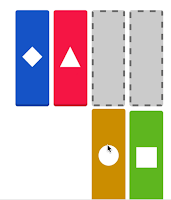
Earlier today while creating a chart to compare features of popular quiz game tools I noticed that Kahoot has a new formatting option called Jumble Mode. The jumble mode lets you create quiz games in which students sort answer choices instead of just picking one correct answer from a multiple choice or true/false question. The […]
Try Quizalize to Run a “Quiz Night” for Students & Parents
Last week in Atlanta a teacher asked me about the possibility of running a “Kahoot night” in which her students and their parents would play Kahoot games at home together. There were two problems she was running into in organizing that idea. The first problem was timing the event so that everyone would sign-in at […]
7 Halloween Lesson Activities for Elementary School Students

Halloween is less than one week away. Some communities, like mine, are having Halloween festivities this weekend. If you’re in need of some educational activities with a Halloween-theme, take a look at the resources summarized below. All of these resources have appeared in individual posts in the past. On Storyboard That you can now turn your storyboards […]
Mentimeter Adds Options for Image-based Polling

Mentimeter is a convenient service that lets you create and distribute poll questions for an audience to answer during a presentation. Your audience can respond to your questions on their phones, tablets, or laptops. Earlier this year Mentimeter added a quiz option to their services. That option works much like Kahoot or Socrative. This week […]
GameOn World – A Fun Geography Game

GameOn World is a free geography game system developed by a teacher and his student here in Maine. GameOn World is played in a manner similar to Kahoot. The teacher projects the game questions on a screen and students reply from their phones, tablets, or laptops. One of the convenient features of GameOn World is […]
Sushi, Gmail, and Kahoot

At the end of every month I like to take a look at the search terms visitors frequently use on Free Technology for Teachers. It gives me a sense of what people are interested in learning about. That information helps me brainstorm new blog posts for the next month. The three most commonly searched terms in […]
GameOn World – A Great, Multiplayer Geography Game

GameOn World is a new, multiplayer geography game developed by a high school teacher and his student in Portland, Maine. The game is similar in structure to that of Kahoot. In GameOn World the teacher selects a game category (cities, places, and timeline are three of the nine categories) and starts the game. The students […]
Great Review Games for the Classroom That Isn’t 1:1

A comment that I frequently hear during or after my workshop on backchannels and informal assessment goes something like this, “I would love to do these things, but not all of my students have computers to use.” Fortunately, there are some great review games that can be played in classrooms that only have a handful […]
The Week in Review – The Most Popular Posts

Good afternoon from Connecticut where I’m getting ready for my youngest brother’s wedding. That’s him in the picture to the left. He’s a high school Language Arts teacher. Our paternal grandparents, our father, and one of our uncles were also teachers. I guess you can say that we went into the family business. A lot […]
Timers, Word Clouds, and Kahoot

At the end of every month I like to take a look at the search terms visitors frequently use on Free Technology for Teachers. It gives me a sense of what people are interested in learning about. That information helps me brainstorm new blog posts for the next month (by the way, I have a […]
PingPong – Collect Sketches & Written Feedback from Students

PingPong is a student response system that I recently learned about from Danny Nicholson. Like many similar systems PingPong provides you with a free and easy way to collect feedback from students in the forms of multiple choice, true/false, and short answer questions. PingPong also lets you collect sketches from students which is a great […]
The Three Most Common Searches on Free Technology for Teachers

Every month I take a look at the most popular posts of the month. At the same time I look at the search terms that visitors enter most often on Free Technology for Teachers. This month the three most frequently searched terms were “random name selector,” “kahoot,” and “photos for class.” Below I have assembled […]
Kahoot Adds a Team Mode

This week Kahoot, the wildly popular quiz game platform, released a new team mode. The new team mode is designed to be used with students who are sharing computers, tablets, or phones. In team mode students arrange themselves in teams around a shared computer or tablet. When you start a Kahoot game you’ll now choose […]
11 Backchannel & Informal Assessment Tools Compared in One Chart
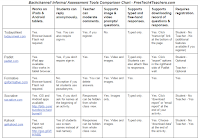
Last winter I made a series of charts in which I compared popular ed tech tools. I’m now going through those charts and removing some tools and adding some new ones. The chart embedded below is the updated version of my chart comparing 11 backchannel and informal assessment tools. At the bottom of the chart […]
Have You Tried Kahoot’s Ghost Mode?

The buzz coming out of the Tech Share Live session at FETC today was all about the “ghost mode” in Kahoot. Kahoot’s ghost mode essentially gives students the opportunity to play a Kahoot review game against themselves. In ghost mode students measure their progress against themselves. How ghost mode works: First, run a Kahoot game […]